

Teams Guest Access: Admin Preflight for Pro Services to Avoid Exposure
Teams guest access lets you add external people (clients, contractors, auditors) directly into a team so they can chat, join meetings and work on shared files as if they were almost one of your own. Before you switch it on, confirm your Entra external collaboration policy first, then enable the guest toggle in the Teams admin centre. There is no separate Teams licence for guests; billing instead follows the Entra External ID model.
Key takeaways
- Guest access billing follows the Entra External ID model, with no additional Teams license needed, but monthly active user costs can add up as invitations scale.
- Proper setup requires checking Entra external collaboration policies, SharePoint sharing rules, and Teams guest toggles, with changes taking up to 24 hours to propagate.
- Guests can chat, join meetings, and access shared files, but cannot search directories, add apps, or browse OneDrive outside shared links by default.
- Troubleshooting failed invites involves verifying toggle settings, domain restrictions, and inviter permissions, using tools like the Microsoft 365 guest access diagnostic tool.
- Regular reviews, audit logs, and moving long-term partners to shared channels help prevent unmanaged guest accounts and maintain security over time.
Table of Contents
- Guest access versus external access and shared channels: picking the right model
- How to enable and configure guest access in the Teams admin centre
- Guest invitation process and prerequisites
- Guest permissions and limitations: what to expect by default
- Troubleshooting: why Teams won't let you add a guest
- Lifecycle and governance: reviews, audits and shared channels over time
- A practical checklist for professional services engagements
- When guest access becomes an identity governance project
- How PC Scientist helps with Teams and Microsoft 365 guest access
- Sources
- FAQ
Guest access versus external access and shared channels: picking the right model
Not every external relationship needs the same level of access, and choosing the wrong one is where most governance headaches start. Guest access creates a full Entra B2B account inside your directory, giving someone ongoing membership in a specific team, its channels, files and chats. External access (sometimes called federation) is lighter: it lets people find, chat with and call your staff without ever joining a team or seeing its content. Shared channels sit in between, offering channel level collaboration through B2B Direct Connect, without creating a guest account at all, a distinction confirmed in Microsoft's guidance on shared channels.
- Guest access suits ongoing, deep collaboration where someone needs to work inside a team long term.
- External access suits quick, occasional contact such as calls or chats with people outside your organisation.
- Shared channels suit partner relationships where you want to collaborate on one channel without handing over a seat in your directory.
How to enable and configure guest access in the Teams admin centre
Before you touch anything in Teams, check three places: Entra external collaboration settings, your Microsoft 365 Groups sharing rules and your SharePoint external sharing policy. These three layers control what guest access actually does once it is switched on, and skipping this step is the single most common cause of accidental directory exposure.
- Open Entra ID and confirm external collaboration settings allow guest invitations from the domains you expect.
- Check SharePoint and Microsoft 365 Groups sharing policies, since Teams files live on SharePoint behind the scenes.
- Go to the Teams admin centre, select Users, then Guest access, and switch the main toggle on.
- Configure the secondary toggles for guest messaging, meeting participation and calling to match your organisation's risk appetite.
- Allow time for the change to propagate, then test with a real invite.
Pro Tip: Changes to guest settings can take up to 24 hours to apply across your tenant, so test with a single invite before rolling guest access out to every team.
Guest access itself carries no extra Teams licence fee. Instead, Entra External ID billing applies for guest usage, calculated on monthly active users, a point worth confirming with your Microsoft 365 licensing documentation before you scale up invitations, as summarised in this overview of Teams pricing.
Guest invitation process and prerequisites
Once the toggles are set correctly, inviting a guest is straightforward from the team owner's side, but a few technical steps happen behind the scenes that are worth understanding before your first real invitation.
- A team owner adds the guest by email, which triggers creation of an Entra B2B account in your directory.
- The guest receives a welcome email and must accept it to activate access.
- People using personal or consumer email addresses are authenticated through one time pass codes rather than a work account.
- Admins can delegate invitation rights through the Guest Inviter role rather than leaving it open to every team owner.
- Run a test invite to a non critical team before relying on the process for a client engagement.
Guest permissions and limitations: what to expect by default
Guests get enough access to genuinely collaborate, but not enough to see everything your own staff can. By default, guests can post in channels, join chats, take part in meetings and calls, and open files shared within the channels they belong to. What they cannot do by default is search your organisation's directory, add new apps to a team, access OneDrive outside what is explicitly shared with them, or view your organisation chart. These behaviours are controlled through the same messaging, meeting and calling toggles you set in the Teams admin centre, so a change there flows straight through to what guests experience.
- Can do: chat, post in channels, join meetings and calls, open shared files.
- Cannot do by default: search the directory, add apps, browse OneDrive, see the org chart.
- Worth checking: whether a file is shared as a direct link or added to a channel, since the two behave differently for guests.
One guest account cannot be added directly to a shared channel: B2B Direct Connect handles that scenario instead, a limitation confirmed in Microsoft's guidance on guest and shared channel constraints. It is a small detail that trips up a lot of admins who assume the two models are interchangeable.
Troubleshooting: why Teams won't let you add a guest
When an invite fails, the cause is almost always one of three things rather than a genuine fault in Teams itself.
- Check whether the Guest Access toggle is actually switched on in the Teams admin centre.
- Check Entra ID for domain restrictions that might be silently blocking the guest's email domain.
- Confirm the person attempting the invite actually holds inviter permissions, since this is role gated.
- Run the Microsoft 365 guest access diagnostic tool, which walks through these exact checks and flags the likely cause.
- If the problem persists, check audit logs and group membership rules, and confirm one time pass codes are actually being delivered.
These three causes, the toggle, domain restrictions and missing inviter rights, account for the vast majority of failed invitations according to Microsoft's own troubleshooting guidance. If none of that resolves it, collect the relevant logs before raising a support ticket, since Microsoft support will ask for them regardless.
Lifecycle and governance: reviews, audits and shared channels over time
Guest access is easy to turn on and easy to forget about, which is exactly how directories end up cluttered with stale accounts nobody remembers inviting. Every guest addition is logged as a group administration activity, and Microsoft recommends using Entra access reviews to periodically remove guests who no longer need access.
- Set up recurring access reviews, quarterly is a sensible starting cadence for most organisations.
- Monitor audit logs for unexpected guest additions outside your usual onboarding process.
- Apply sensitivity labels and tighten external collaboration settings to limit directory exposure.
- Move long term partner relationships to shared channels via B2B Direct Connect rather than accumulating guest accounts.
Pro Tip: Assign one named owner for guest access governance, even in a small organisation, so reviews actually happen instead of drifting indefinitely.
A practical checklist for professional services engagements
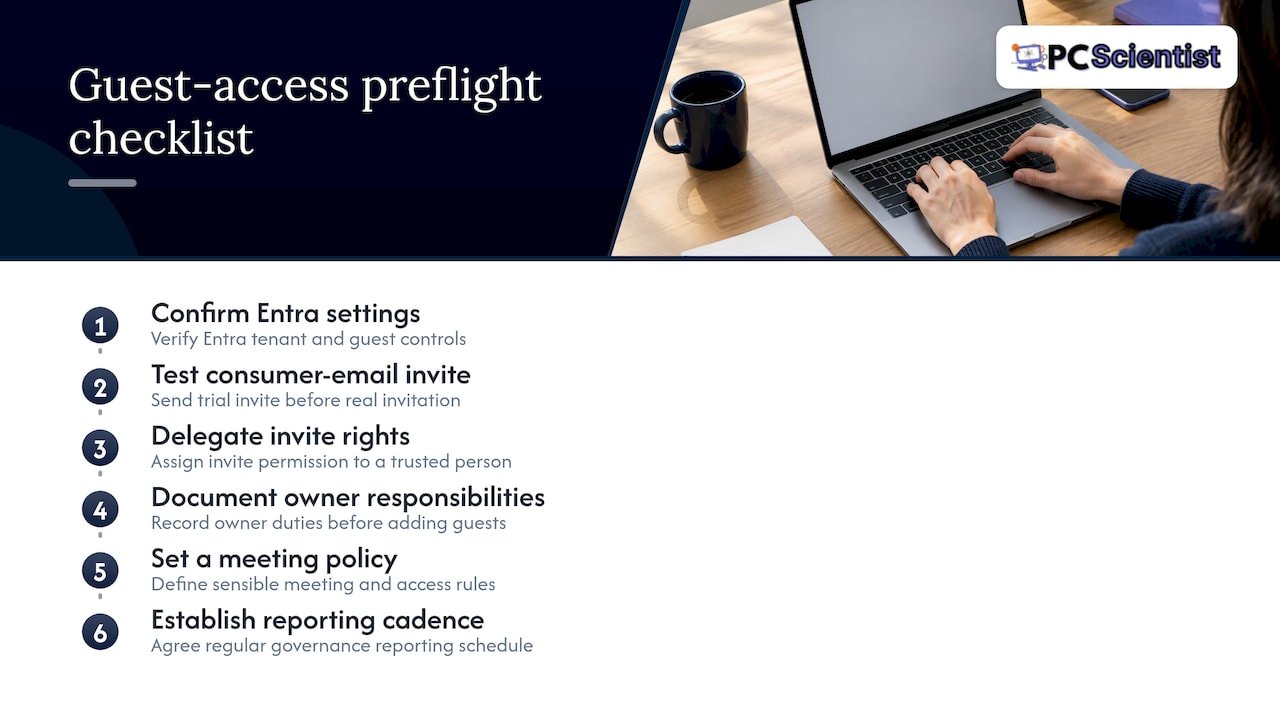
In professional services and hospitality settings, guest access often gets requested urgently: an auditor needs files by Friday, a contractor needs a channel for one project, venue staff need shared access for an event. A workable preflight checklist covers confirming Entra settings, testing a consumer email invite before the real one goes out, and delegating invite rights to a trusted person rather than every team owner. Document owner responsibilities, a sensible meeting policy and a reporting cadence before the first guest is ever added, since retrofitting governance after the fact is far harder than building it in from day one.
When guest access becomes an identity governance project
Once you are managing guests across multiple teams, handling sensitive files, or seeing repeated audit flags, a single toggle is no longer enough. That is the point to name a governance owner and formalise reviews, rather than letting individual team owners manage it ad hoc.
- PC Scientist
How PC Scientist helps with Teams and Microsoft 365 guest access
Getting the Entra settings, SharePoint policies and Teams toggles to line up correctly takes a bit of trial and error if you are doing it for the first time, and a wrong setting can sit unnoticed for months. Professional IT support providers offer clear upfront pricing, practical step-by-step guidance, and repairs without upfront fees, helping you get a proper Microsoft 365 and Teams configuration without guessing your way through admin menus.

- We review your Entra external collaboration policy and Teams admin settings together, so nothing is left half configured.
- We set up guest permissions, meeting and calling policies tailored to how your team actually works with external partners.
- We help establish an access review cadence so guest accounts do not pile up unmanaged.
If you would like a proper Microsoft 365 and Teams setup done once and done right, book a visit through Computer Support Scientist and we will get your guest access configured and governed properly.
Sources
For ongoing reference, keep Microsoft's own documentation close at hand: the guest access overview, the guest experience guide, and the shared channels documentation cover invitation flows, B2B Direct Connect and access reviews in detail. For broader context on managing external collaborator risk, this guide to third party risk management is a useful companion read.
- Microsoft Teams pricing - Chanty
Recommended
Frequently Asked Questions
Straight answers about Teams Guest Access: Admin Preflight for Pro Services to Avoid Exposure - without jargon or pressure. Call 0493 563 381 for advice, or get help below.
Want the quickest answer? 0493 563 381 for free advice.
You accept the invitation email sent by the team owner, which activates an Entra B2B guest account under your own email address. If you are using a personal email address, you will likely be asked to verify with a one time pass code rather than signing in with a work account.
By default, guests cannot search your organisation's directory, add new apps, browse OneDrive beyond what is shared, or see your org chart. They can chat, post in channels, join meetings and calls, and open files shared within the channels they belong to.
External access lets people chat, call and find your staff without joining a team or seeing its content, while guest access creates a full account inside your directory with ongoing access to a specific team's channels and files. Shared channels offer a third option, giving channel level access through B2B Direct Connect without creating a guest account at all.
The most common causes are the Guest Access toggle being switched off in the Teams admin centre, domain restrictions in Entra ID blocking the guest's email, or the inviter lacking the right permissions, as outlined in Microsoft's troubleshooting guidance. Running the Microsoft 365 guest access diagnostic tool is the quickest way to identify which of these applies to your situation.
Email help across NSW
Still stuck setting up Teams guest access?
If you have tried the steps and mail still is not coming through, that is okay. Get email help in your area and we will take it from here.
Start here
Get email help
Optional Need a Sydney city or region?
Choose a side of Sydney
These are Sydney cities and regions, such as the Northern Beaches or Inner West. First tap a side of Sydney. Then open the city or region that covers you.
C Sydney City / Inner 3 areas
N Northern Sydney 6 areas
NW North-West / Central Sydney 3 areas
W Western Sydney 1 area
SW South-West Sydney 3 areas
S Southern Sydney 2 areas
Optional Find your suburb
Type a suburb from our listed coverage. This opens the matching city or region page for this topic. Listed suburb pages are general technology services, not this specialist page.
If your suburb is not listed, use the city or region list above, or call 0493 563 381.
Disclaimer
The information in this article is provided for general educational and informational purposes only. While PC Scientist strives to keep all content accurate and up to date, technology issues can vary depending on your device, software, network configuration, and individual circumstances. Always back up important data before attempting repairs or system changes. If you are unsure or the issue cannot be resolved safely, contact PC Scientist today for professional onsite or remote IT support. PC Scientist is not liable for any loss of data, damage, or other issues resulting from the use of the information provided in this article.

