

How to Prewire Your House for Ethernet in Australia
Prewiring a house for Ethernet means running data cable from one central point to a wall outlet in every room that needs a reliable connection, before the walls are closed up or while you have a good reason to open them. In Australia the work has to be done by a registered cabler, the cable should be at least Cat 6, and the best time to do it is during a build or renovation. Get the plan right on paper first and everything else gets easier.
This guide walks you through the planning side: what to run, where it goes, what the law says and how to avoid the mistakes we see in NSW homes.
TL;DR
- Run at least Cat 6 cable from a central point to every room that needs it. Cat 6A is increasingly preferred if you want 10 Gigabit headroom.
- Cabling inside walls, ceilings or floor cavities must be done by a registered cabler, who must give you a TCA1 form afterwards.
- Cable is the long-lived part of your network. Routers change every few years; the cable in the wall stays.
- Plan outlets for Wi-Fi access points, cameras, TVs and the home office, not just for desks.
- Doing it before the plasterboard goes up is far cheaper than retrofitting.
Table of Contents
Why prewire at all when Wi-Fi exists?
Wi-Fi is convenient, but it is shared, it drops with distance and it struggles through brick, concrete and multiple storeys. Ethernet gives each device its own steady connection. CHOICE notes that Wi-Fi suits portability and a tidy look, while cable is the better pick where reliability matters.
Most people think about the speed of their internet plan and ignore the cabling behind it. A fast NBN plan feeding old Cat 5, a kinked cable or a single overloaded Wi-Fi unit still feels slow. The cable is the plumbing. Get it right once and every router, mesh system or access point you buy later performs better.
The places it matters most:
- Home offices. Video calls and large file transfers that do not stutter.
- Smart TVs and gaming consoles. Streaming and downloads without buffering.
- Security cameras. Wired cameras with Power over Ethernet (PoE) need no separate power point at the camera.
- Wi-Fi access points. A cable to a ceiling-mounted access point is the cleanest way to cover a large or multi-storey home.
Which cable should you choose?
The short answer for an Australian home is Cat 6 as the floor and Cat 6A if you can stretch to it.
| Cable | Where it fits | Things to know |
|---|---|---|
| Cat 5e | Older homes, existing runs | Fine for basic use, but if your house has legacy Cat 5 it is worth testing before you rely on it |
| Cat 6 | Most new homes and renovations | Recommended minimum for new homes, per nbn co guidance |
| Cat 6A | Larger homes, home offices, future-proofing | Supports 10 Gigabit Ethernet; the NSW Department of Education, for example, specifies Cat 6A for its school cabling |
Cat 6A cable is thicker and stiffer, so it costs more and is a little harder to bend around tight corners. For a typical family home, Cat 6 is a sensible choice. If you are building something you expect to keep for 15 years, or you work with big video files, Cat 6A is cheap insurance when the walls are already open.
Two practical points a good installer will follow:
- Star layout. Every run goes in a straight, unbroken line from the central point to the outlet. No joins, no splices, no daisy chains between rooms.
- Sensible run length. 100 metres is the usual ceiling for a single Ethernet run. Most houses sit far inside that, but a long run out to a granny flat or shed needs thought, particularly if it will power a PoE device.
Keep data cable apart from mains power cable. Running them side by side can introduce interference, so your installer should keep separation between the two.
Where the cables should go
This is the part people rush, and it is where a prewire succeeds or fails.
Choose your central point first
Every cable needs somewhere to end. That spot, often called the home distributor or comms cabinet, is where your NBN equipment, router, switch and patch panel will live.
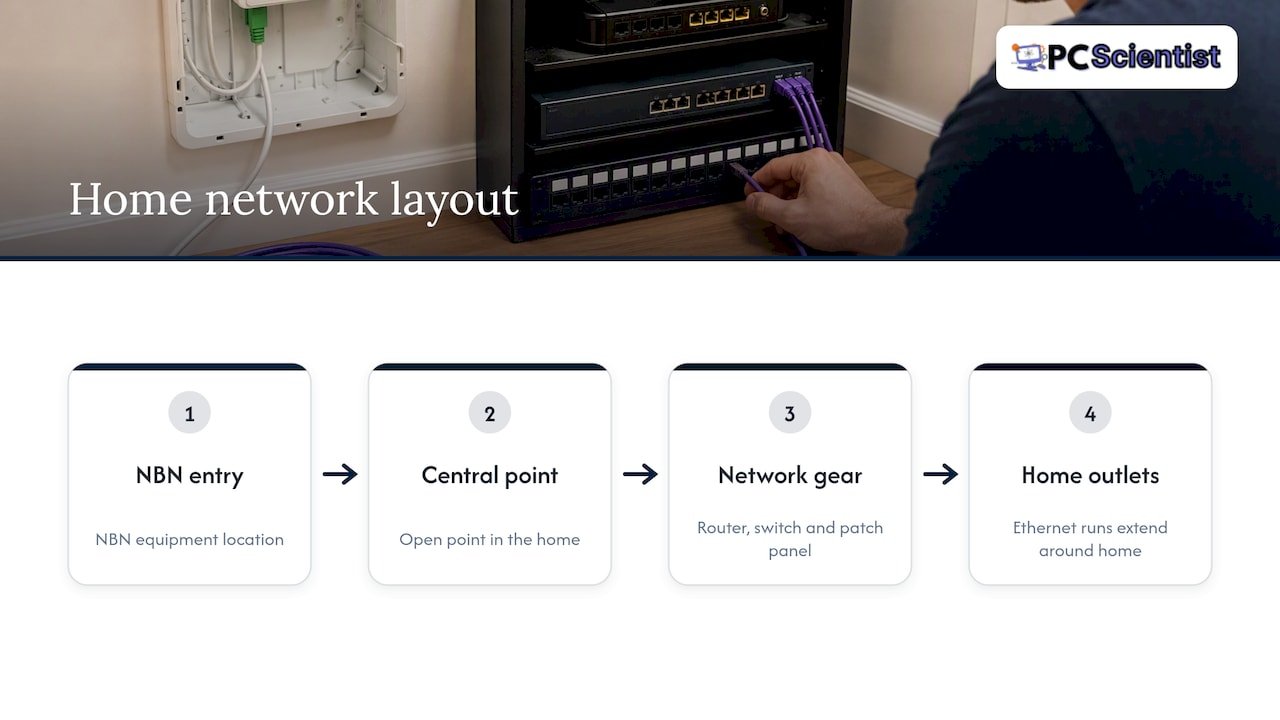
nbn co advises running cabling from the NBN equipment location to a central, open point in the home for the Wi-Fi router, rather than burying it in a cupboard. Heat builds up in small enclosed spaces, and modern routers and switches need airflow to stay stable. A router that overheats is one of the quieter causes of random dropouts.
The frustration we hear most from new owners is finding that the NBN connection box ended up in a garage or at the far end of the block, nowhere near the living areas. The Department of Infrastructure explains that infrastructure in new developments should be arranged before you sign a contract, so ask early where the entry point will be and whether you can influence it. If the entry point is fixed, plan a cable run from there to your central point.
If you are not sure which box does what once it is all connected, our guide on which NBN device most homes actually need is worth a read before you buy anything.
Work out the outlets room by room
Walk through the house and list every place something could plug in. A useful starting point:
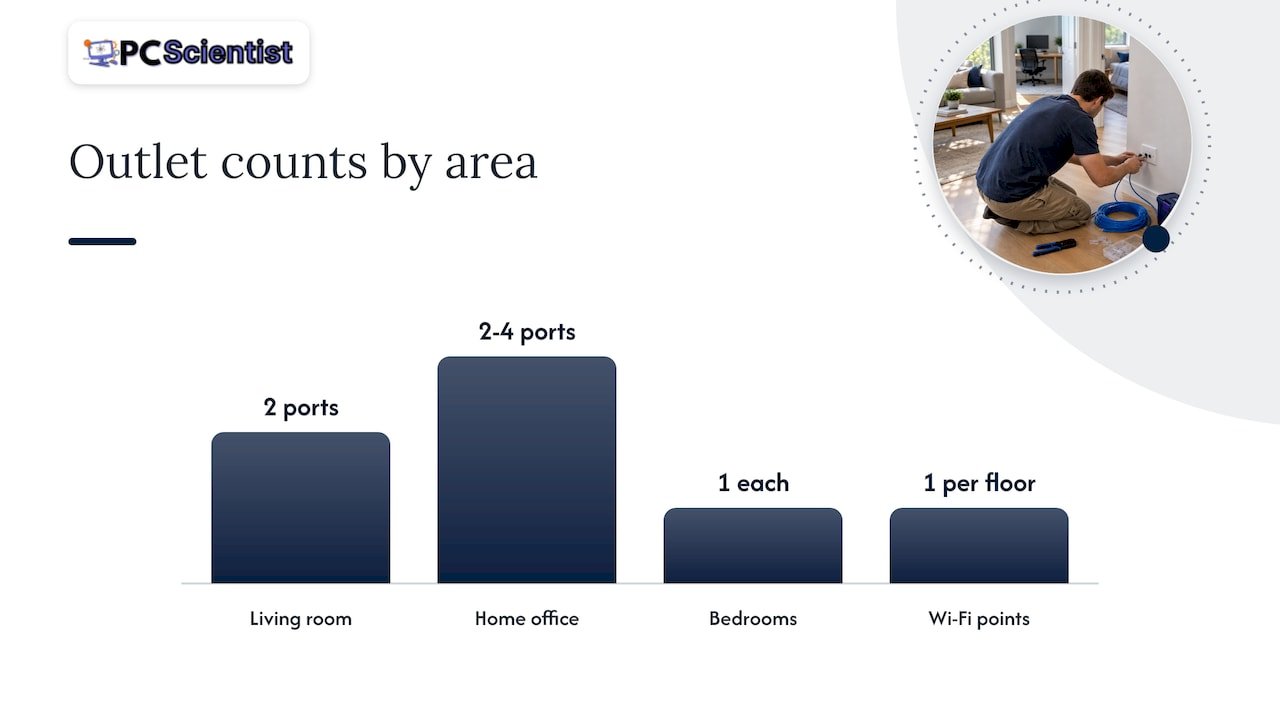
- Living room. Two ports behind the TV, one for the TV and one for a console or streaming box.
- Home office or study. Two to four ports. This is the room you will regret under-wiring.
- Main bedroom and kids' rooms. One each, more if a child plays online or studies with a desktop.
- Ceiling points for Wi-Fi access points. Typically one per floor or one per zone in a larger home, positioned centrally rather than in a corner.
- Outdoor and perimeter points. Cameras at the front door, driveway and back entry.
- Kitchen or family area. A port for a smart display, printer or a spare.
- Garage or granny flat. A cable here is useful for cameras, a workshop PC or a rental unit.
Then add one or two spares. Extra cable in the wall costs little at the time and a lot later.
Furniture matters too. A port placed where the sofa or bed ends up is a port you cannot reach. Looking at open-concept living room layouts with real measurements before the electrician marks the walls helps you place TV and media outlets where they will actually be used.
Plan for cameras and access points
Ceiling-mounted access points on a wired backhaul beat wireless extenders in large and multi-storey homes. nbn co's fact sheet describes the wired approach to mesh and access points as the way to get consistent coverage in every room. If you are deciding between the two styles, our mesh Wi-Fi versus access points guide gives you four questions to settle it.
For cameras, wired PoE models carry both data and power over the one cable. If you are weighing up camera types, this comparison of analog and IP cameras explains why network-based cameras need Ethernet runs in the first place. We also have a separate guide on prewiring a house for CCTV, including conduit and the rules around it.
The legal bit: you cannot DIY inside the walls
This surprises people. Under the Telecommunications Act 1997, cabling in concealed locations, meaning through walls, ceilings and floor cavities, must be done by a registered cabler. Your electrician's licence does not cover it on its own, and neither does being handy with a drill.
What to check before you hire:
- Registration type. The ACMA explains the three types of cabling registration: Open, Restricted and Lift. For home data cabling you want someone with the right registration category and a structured cabling competency.
- Written compliance. When the job is done, the cabler must give you a Telecommunications Cabling Advice Form, known as the TCA1. It certifies the work meets the Australian standard AS/CA S009. Keep it with your house documents.
- Scope. Ask for a written scope listing the number of outlets, cable category, where each run ends and whether the patch panel and labelling are included.
The ACMA's page on cabling in your home or office confirms that registered cablers can install, repair and maintain data cabling in new and existing buildings.
What you can still do yourself is plug in. Once a registered cabler has installed the outlets and patch panel, connecting patch leads, a router and a switch is normal household work.
New build, renovation or finished house?
New build
This is the easy case. nbn co recommends planning telecommunications infrastructure and internal cabling before finalising your home design, and notes that skipping prewiring during the build often costs significantly more later. Ask your builder to include data cabling at frame stage, and provide the outlet list above so it is not left to guesswork. Check who is doing the cabling and ask for the TCA1 at handover.
Renovation
If walls are open for a bathroom, kitchen or extension, that is your window. A cabler can pull cable through exposed frames in a fraction of the time. Tell your builder early so the cabler is booked before plasterboard goes on.
Finished house
You can still prewire a finished home. Cablers use ceiling spaces, roof voids, subfloors and sometimes existing conduit. Double brick, concrete slab floors and single-storey homes with no roof access are harder. If cabling every room is not realistic, prioritise: a cable to the home office, one to the TV, and one to a central access point does most of the work.
If you are comparing the options, our guide on network cabling versus powerline covers three site checks that help you decide quickly.
What the cables connect to
The prewire is only half the system. At the central point you will typically have:
- A patch panel. Each wall outlet's cable ends here, labelled by room.
- A network switch. It links the patch panel ports to your router. Choose one with PoE if you are adding cameras or access points.
- Your router. Handles the NBN connection and Wi-Fi settings. Whether to use a modem-router combo or separate units is covered in our guide to combos versus separate devices.
- Access points. Connected to ceiling or wall ports, giving Wi-Fi where you actually use it.
Label everything. A patch panel with ports marked "Study 1" and "Lounge TV" saves hours of guesswork years from now, whether you or a technician is the one standing at the cabinet.
If you move into a house that is already wired, do not assume the outlets work. Previous owners often leave cabling of unknown quality, sometimes with nothing at the other end. Have the runs tested before you build your network around them.
Common mistakes to avoid
- Hiding the router in a cupboard. Heat and signal loss, both avoidable.
- Too few outlets. Most people end up wanting twice what they first planned.
- Skipping the ceiling access point cable. Adding it later means opening a finished ceiling.
- No spare capacity. Ask for a spare run or two to useful places.
- Accepting the work without paperwork. No TCA1, no proof the job meets the standard.
- Buying a faster plan to fix an internal problem. If one room is slow, the cause is often wiring or placement, not the plan. If you are chasing evening dropouts, try these eight checks first.
Our perspective
We get called out to a lot of NSW homes where the Wi-Fi is the complaint, and often the real issue is that nobody planned the network when the house was built. Someone bought a better router, then a mesh kit, then an extender, and the underlying problem stayed put: there was no cable to where the signal was needed.
Our advice is simple. Decide where the central point lives, run cable to every room you might use, and put a ceiling port on each level for an access point. Spend a little more on cable and spare ports now. Equipment can be swapped in an afternoon, but cable behind finished walls is a project.
We also think the planning conversation matters as much as the cable. You should not need to know what a patch panel is to get a good outcome. Tell us how you live: who works from home, where the TV goes, whether you want cameras. We turn that into a clear plan and explain each step in plain English, so you can talk to a cabler or builder with confidence.
- PC Scientist
How we can help
Our Network Scientist service covers Wi-Fi and network installation for homes and businesses across NSW. We can walk through your home, help you plan the outlet list and central point, and set up the router, switch and access points once the cabling is in. We will tell you plainly where a registered cabler is needed for the in-wall work. If you are on the Northern Beaches, our Wi-Fi and network help page has local details. Cameras are part of the plan too, and our Security Camera Scientist team can size the cabling to suit.
Not sure where to start? Get in touch and describe the problem. You do not need to know the technical terms.
Sources
- Fact sheet: Optimising your internet set-up when building or renovating, nbn
- Residential Preparation and Installation, SDUs and MDUs, nbn
- How to install home ethernet cabling for the NBN, CHOICE
- The 3 types of cabling registration, ACMA
- Cabling in your home or office, ACMA
- Telecommunications in new developments, Department of Infrastructure
- Structured Cabling System Specification, NSW Department of Education
Recommended
- Decide Fast: Network Cabling vs Powerline in Australia, 3 Site Checks
- Australia CCTV Prewire: Conduit, ACMA Rules, $120 Survey
- Fix slow home internet in Australia: 5 minute wired test first
- Stop Buying the Wrong NBN Device in Australia: Most Homes Need a Router
Frequently Asked Questions
Straight answers about How to Prewire Your House for Ethernet in Australia - without jargon or pressure. Call 0493 563 381 for advice, or get help below.
Want the quickest answer? 0493 563 381 for free advice.
No. In Australia, cabling through walls, ceilings or floor cavities must be done by a registered cabler. You can plug in patch leads and equipment yourself once the outlets are installed. Cabling in plain view, such as a lead along a skirting board, is a different matter, but it is rarely tidy or lasting.
Only if they hold the right cabling registration as well as their electrical licence. An electrician handles mains power, while data cabling falls under the cabling rules the ACMA sets out. Ask to see the registration and expect a TCA1 form at the end.
Cat 6 is the sensible minimum for a new home, and Cat 6A is a good choice if you want 10 Gigabit capability. Both are covered in nbn co's building and renovating fact sheet. Avoid using old Cat 5 for new runs.
Not in a way that gives you full speed to two devices from one wall port. A switch at the end of the run is the correct way to connect several devices. In a prewire, each outlet should have its own unbroken cable back to the central point.
Usually yes. Even a Wi-Fi-first home benefits from cable to the access points, the office and the TV. Those few runs give the wireless side a solid backbone.
Network help across NSW
Still stuck planning ethernet prewire?
If the steps above did not get the network behaving, that is okay. Get help in your area and we will take it from here.
Start here
Get network help
Optional Need a Sydney city or region?
Choose a side of Sydney
These are Sydney cities and regions, such as the Northern Beaches or Inner West. First tap a side of Sydney. Then open the city or region that covers you.
C Sydney City / Inner 3 areas
N Northern Sydney 4 areas
NW North-West / Central Sydney 3 areas
W Western Sydney 1 area
SW South-West Sydney 3 areas
S Southern Sydney 2 areas
Optional Find your suburb
Type a suburb from our listed coverage. This opens the matching city or region page for this topic. Listed suburb pages are general technology services, not this specialist page.
If your suburb is not listed, use the city or region list above, or call 0493 563 381.
Disclaimer
The information in this article is provided for general educational and informational purposes only. While PC Scientist strives to keep all content accurate and up to date, technology issues can vary depending on your device, software, network configuration, and individual circumstances. Always back up important data before attempting repairs or system changes. If you are unsure or the issue cannot be resolved safely, contact PC Scientist today for professional onsite or remote IT support. PC Scientist is not liable for any loss of data, damage, or other issues resulting from the use of the information provided in this article.
