SYDNEY ยท NETWORK & WI-FI

Sydney Wi-Fi help for the room that never gets a signal

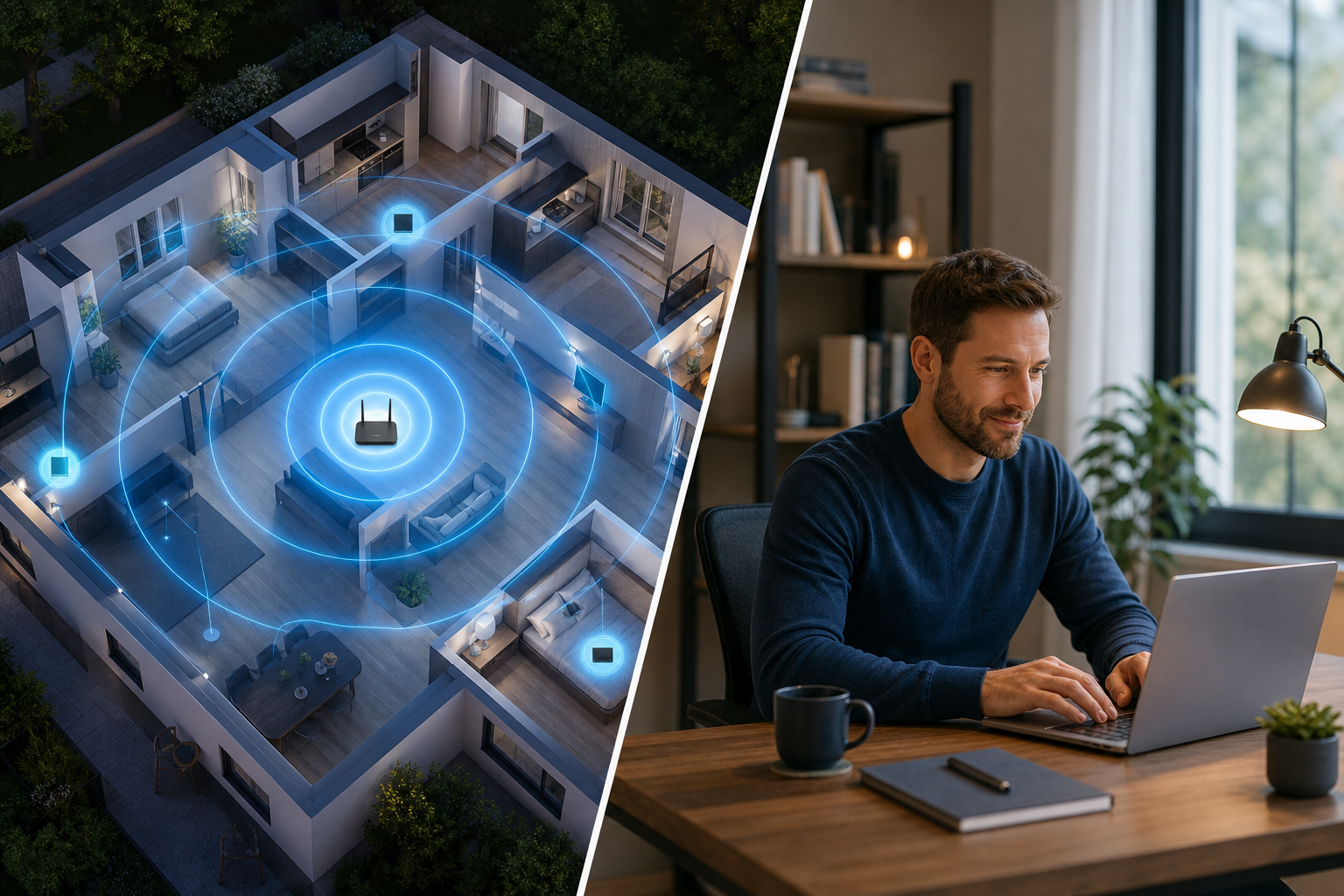
The back bedroom is a dead zone. The mesh node you bought keeps flashing orange. The NBN box restarts right as the morning video call begins. Across Sydney, most Wi-Fi trouble comes down to where the gear sits and how it is set up, not how much it cost.

Network Scientist visits for coverage and cabling, and fixes settings remotely when that is all it needs. PC Scientist prices the work before anything changes. Call 0493 563 381, request a call back, or book an eligible visit online.

Book online for eligible visits and get 10% off.

PC Scientist Wi-Fi and network help for dropouts and weak signal across Sydney
Sydney Wi-Fi and network help for dead zones, mesh dropouts, and modem restarts - clear pricing first.

Why Sydney households call about rooms the signal never reaches

No Fix, No Fee

  • If a Wi-Fi fault cannot be fixed, there is no repair fee for the attempt.
  • Straight advice when the router or the internet plan is the real limit.

Clear Upfront Pricing

  • The cost of new gear and install time explained up front across Sydney.
  • Bigger coverage jobs quoted in writing first.

Speak to a Real Person

  • No jargon about bands and channels unless you want it.
  • A local person who has fixed the same layout before.

Fixed Properly First Time

  • We find why a dead zone in the back bedroom happens, not just restart the router.
  • Coverage tested room by room before we leave, not just near the modem.

Several Issues, One Visit

  • Old gear cleared out and labelled in the same trip.
  • Guest access set up while we are already across Sydney.

Your Data Treated Carefully

  • Old settings noted before anything is changed.
  • Guest devices kept away from your personal ones.

In Sydney, is the pain a dead back room, a mesh node that reconnects every hour, or an NBN box that restarts at night?

Wi-Fi across Sydney apartments and houses fails in different ways. Name the weak room and what drops first - PC Scientist will say whether a visit or remote tweak fits.

Sydney Wi-Fi mix: dead bedroom, mesh flap, modem that restarts after dark

  • A bedroom that never holds a signal is a common Sydney Wi-Fi call.
  • Mesh nodes that reconnect every hour often show up in the same visit.
  • An NBN box that restarts during evening calls is worth flagging early.
  • Homes and small workplaces across Sydney use this page as the network door.
  • You approve the work before it starts. The price is clear first.

How to contact PC Scientist

  1. Call for Free Advice - One call to 0493 563 381 is often enough to know the next step for apartments stacked with neighbouring networks
  2. Request a Call Back - Fill in a few lines about a mesh system that never worked properly and we phone you back
  3. Request a Free Quote - Best when someone else needs to sign off on the Wi-Fi spend first

You only need one of the three for Sydney Wi-Fi and network help, and if the issue feels urgent or confusing start with the phone

What happens after you get in touch

  • Support for Sydney can be onsite, remote over the internet, or a mix, depending on access, urgency, and what the issue actually needs across Sydney.
  • In Sydney you hear practical options next, with clear pricing before work starts, and nothing goes ahead until you are comfortable.
  • For Sydney, we listen to what you were doing when the problem showed up, in everyday words - not a checklist of buzzwords.

Where we visit across Sydney

Wi-Fi jobs are a map across Sydney. Dead rooms in Penrith, mesh that never quite landed in Liverpool, shop networks in Chatswood, and NBN boxes hiding in laundries in Bondi Junction. We start with what you can see, then the gear.

Looking for a specific service?

Need a different type of help than the examples above for Sydney? Browse specialist technology categories for Sydney - each card is a starting point on this page. Or call 0493 563 381 for free advice across Sydney.

Need a calm look at the laptop that dies on battery in Sydney? Bring the house Wi-Fi that collapsed, the laptop that dies on battery, or the printer off the Wi-Fi from Sydney. We translate it into a clear next step. A familiar pattern for people in Sydney.
Call For Free Advice

Get in touch

Leave your message and we'll get back to you shortly.

Attachments

Allowed file types: jpg, jpeg, png, gif, pdf, doc, docx, xls, xlsx, odt, ppt, pptx, pps, ppsx, html, and less than 100 MB.

No file chosen

This form uses spam checks and sends your request directly to PC Scientist.

Start here

Slow Wi-Fi, dropouts, dead rooms, and routers that never quite behave. If only one laptop fails and the phone Wi-Fi is fine, start with computer support.

What this covers

  1. 01
  2. 02
  3. 03
  4. 04
  5. 05
  1. 01Start

    Slow Wi-Fi, weak signal, and dead zones

    Dead rooms, upstairs dropouts, granny flats, and weak calls.

  2. 02

    Dropouts and video calls

    Zoom and Teams that freeze - we find the smallest change that holds.

  3. 03

    Routers, NBN, and mesh

    NBN boxes, mesh in a cupboard, and settings before another extender.

  4. 04

    Home, business, and larger properties

    Homes, shops, and separate staff and guest Wi-Fi when that is the job.

  5. 05

    Is it the internet provider?

    Sometimes the line is the problem. We help you call the provider with evidence.

Visit

How it works

  1. 1

    Which rooms fail

    Time of day, which devices, and whether the modem lights stay happy.

  2. 2

    Local vs provider

    We say which side of the socket the fault looks like.

  3. 3

    Sensible fix

    Placement, settings, mesh, or cabling - quoted before new gear.

Book network and Wi-Fi help on the Sydney Call 0493 563 381, request a call back, or ask for a quote.
Call 0493 563 381
shape
image
Frequently asked questions about Sydney technology services
FAQ

If you are wondering about help in Sydney

Often, yes. We confirm the symptoms by phone first, then book a visit across Sydney when that makes more sense than a remote session.

If a TV that falls off the Wi-Fi is the main worry, say so on the call so we bring the right gear.

Some router settings can be checked remotely, but coverage problems need someone walking the rooms with a meter.

We usually suggest a visit when rooms drop out, and remote help for settings.

We take changing the network name and password as seriously as a bigger repair - it is still something stopping your day across Sydney.

We can show you the steps for changing the network name and password if you want to handle it yourself next time.

Both. Two-storey homes, apartments, and small offices across Sydney all need coverage planned a little differently.

When the home office and the family share one connection, we plan for both.

shape
shape
Need help now? Not sure what to click or what to do next?

Call PC Scientist for free advice, calm and practical IT help