

Decide Fast: Network Cabling vs Powerline in Australia, 3 Site Checks
For the most reliable, high-speed connections, use wired network cabling. Use powerline adapters only when running cable is impractical and you can accept variable performance. Wired Ethernet suits stationary, demanding devices like gaming PCs, 4K streaming boxes and business workstations. Powerline fills a gap when cabling isn't realistic, while mesh Wi-Fi and extenders solve coverage, not latency.
Key takeaways
- Powerline adapters' real-world performance heavily depends on your home's wiring layout, age, and electrical noise, which can vary drastically between households.
- Using a dedicated Ethernet cable, particularly Cat6, offers consistent gigabit speeds and near-zero latency, making it ideal for demanding and stationary devices.
- Powerline speeds are often overestimated, with actual throughput limited by circuit separation, wiring quality, and interference, especially in older homes.
- Proper cabling installed by a registered professional ensures compliance with standards, long-term stability, and safety, unlike DIY or non-compliant powerline setups.
- For stable, high-performance connections in busy or permanent setups, investing in wired cabling outperforms powerline or wireless solutions, especially for latency-sensitive applications.
Table of Contents
- How network cabling, powerline and mesh systems actually work
- Speed and latency: what you'll actually get, not what's on the box
- Why powerline performance swings so much from house to house
- Installation, cost and compliance: what you're really weighing up
- When powerline makes sense: practical scenarios worth knowing
- Why cabling is the smarter long-term investment for busier homes
- What an onsite network check actually looks for
- Quick decision rules for common situations
- How PC Scientist can help with your home or business network
- FAQ
- Sources
How network cabling, powerline and mesh systems actually work
A Cat5e or Cat6 Ethernet cable gives your device a dedicated, physical data path straight to your router or switch. Nothing else shares that connection, so the speed and consistency you get are largely fixed by the cable's rating and length, not by what else is happening in the house. Cat6 comfortably supports gigabit speeds and is the easier choice to future-proof a home or small office.
Powerline adapters take a different route. One unit plugs into a power socket near your router and sends a network signal through your home's existing electrical wiring; a second unit plugs in near the device you want connected and turns that signal back into Ethernet. It's a clever use of infrastructure that's already in the walls, but it means your internet connection is now riding alongside everything else drawing power in your home, from the kettle to the dishwasher.
Mesh systems and Wi-Fi extenders both aim to stretch wireless coverage, but they work differently. A mesh system uses multiple units that talk to each other, forming one unified network with a single name, so devices roam between nodes without dropping out. An extender, on the other hand, typically creates a second, separate Wi-Fi network that your devices have to manually switch to, which can mean a few dropped frames right when you walk between rooms. Neither mesh nor extenders match the predictability of a wired connection, because they're both still subject to wireless interference and signal loss through walls.
Speed and latency: what you'll actually get, not what's on the box
Gigabit Ethernet delivers close to its advertised speed consistently, because the signal travels through a shielded cable with minimal interference. Powerline kits are usually marketed with headline figures like "2000Mbps", but that's a theoretical ceiling, not what reaches your device. Real-world throughput depends heavily on your home's wiring, and professional cabling remains the more future-proof choice for sustained, high-speed connections precisely because it doesn't carry that uncertainty.
Latency is where the gap matters most. A wired connection typically adds almost nothing to your network's response time, which is why online gamers and anyone on frequent video calls notice the difference immediately on Ethernet. Powerline introduces more variability in latency because the signal is competing with electrical noise and has to be processed through the adapter's modulation, which can cause small but noticeable lag spikes.
A few practical points worth remembering:
- Advertised powerline speeds (like "AV2000") describe the connection between the two adapters, not what your device will actually receive.
- Distance from the switchboard, wiring age and the number of circuits between adapters all reduce real throughput.
- Wired Ethernet performance stays stable regardless of what else is plugged in elsewhere in the house.
Powerline effectiveness varies significantly by building wiring, which is why two homes with identical adapters can get very different results. One property might see near-advertised speeds; another, barely enough for smooth streaming.
Why powerline performance swings so much from house to house
The biggest factor in powerline reliability is something most people never think about: how their home's circuits are laid out. If your two adapters sit on different circuits or different electrical phases (common in larger homes or those with switchboard upgrades), performance can drop sharply or the connection can fail outright. Powerline adapters are unlikely to work well across separate circuits or different phases, which is one of the most common reasons people assume the technology is broken when it's actually a wiring mismatch.
Electrical noise is the other culprit. Appliances like kitchen mixers, dimmer switches, old fridges and solar inverters all generate interference on the electrical line, and that interference competes directly with your data signal. Older homes with ageing wiring are particularly prone to this, since insulation degrades and connections loosen over time.
Before you commit to a powerline setup, a few simple checks can save you a wasted purchase:
- Plug both adapters directly into wall sockets, never into a power board or extension lead.
- Confirm both adapters are on the same circuit by checking your switchboard labelling, if available.
- Run a basic speed test with a laptop connected to the remote adapter before relying on it for anything important.
Checking that adapters pair correctly and running a short speed test before you set up permanently is one of the easiest ways to avoid disappointment.
Pro Tip: If your home has solar panels, test your powerline adapters during daylight hours when the inverter is active, since that's when interference is usually at its worst.
Installation, cost and compliance: what you're really weighing up
Buying a powerline kit costs relatively little and takes minutes to set up, which is the main reason people reach for it first. Running proper network cabling costs more and takes longer, but it's a one-time job that pays off in consistency for years.
There's also a compliance side that's easy to overlook. In Australia, cabling work generally must be carried out by a registered cabler and must meet AS/CA S008 standards as adopted by ACMA. This isn't red tape for its own sake: incorrect cabling can affect your own network and, in some cases, the broader telecommunications network it connects to. It's one reason DIY concealed cabling inside walls is restricted for anyone without the right registration.
Safety matters just as much on the product side. Electrical and telecommunications equipment sold in Australia should carry the Regulatory Compliance Mark (RCM) and meet mandatory safety standards, and that applies to powerline adapters too. Cheap, non-compliant imports bought from overseas marketplaces sometimes skip these checks entirely, which raises real fire and shock risks rather than just performance concerns.
Worth keeping in mind:
- A registered cabler protects both your compliance and your network's long-term performance.
- Powerline adapters are a lower up-front cost but carry ongoing uncertainty about speed and stability.
- Always check for the RCM mark before buying powerline or networking hardware, especially from unfamiliar brands.
When powerline makes sense: practical scenarios worth knowing
Powerline isn't a bad technology, it's just a situational one. It earns its place in specific circumstances rather than as a default choice.
- You're renting and can't run cable through walls or under floors without landlord approval.
- You need a short-term setup, like a temporary home office or a holiday rental.
- You just need to get one device, say a smart TV in a back room, onto a stable connection without rewiring the whole house.
If you do go with powerline, choose an AV2 or AV3 kit with a passthrough socket, since this recovers the power point you've used and often improves performance over basic models. Passthrough kits can deliver respectable real-world throughput for streaming, though sustained gigabit speeds still need direct cabling. Test the kit on your own circuit before you're past the returns window, and keep your expectations realistic: powerline suits web browsing, HD streaming and single-device connections well, but it's not the right tool when low latency genuinely matters, like competitive gaming or video conferencing for work.
Why cabling is the smarter long-term investment for busier homes
Once you've got more than a couple of devices that genuinely need a stable connection, cabling starts to look like the obvious choice rather than the expensive one. A wired network delivers predictable gigabit throughput to every connected point, regardless of what else is happening on the network, and it supports Power over Ethernet (PoE), which lets you run devices like CCTV cameras or access points through the data cable itself, no separate power point needed.
Troubleshooting is simpler too. With cabling, a problem is almost always a specific cable, port or device, not an invisible variable like wiring age or circuit noise. That makes faults faster to diagnose and fix.
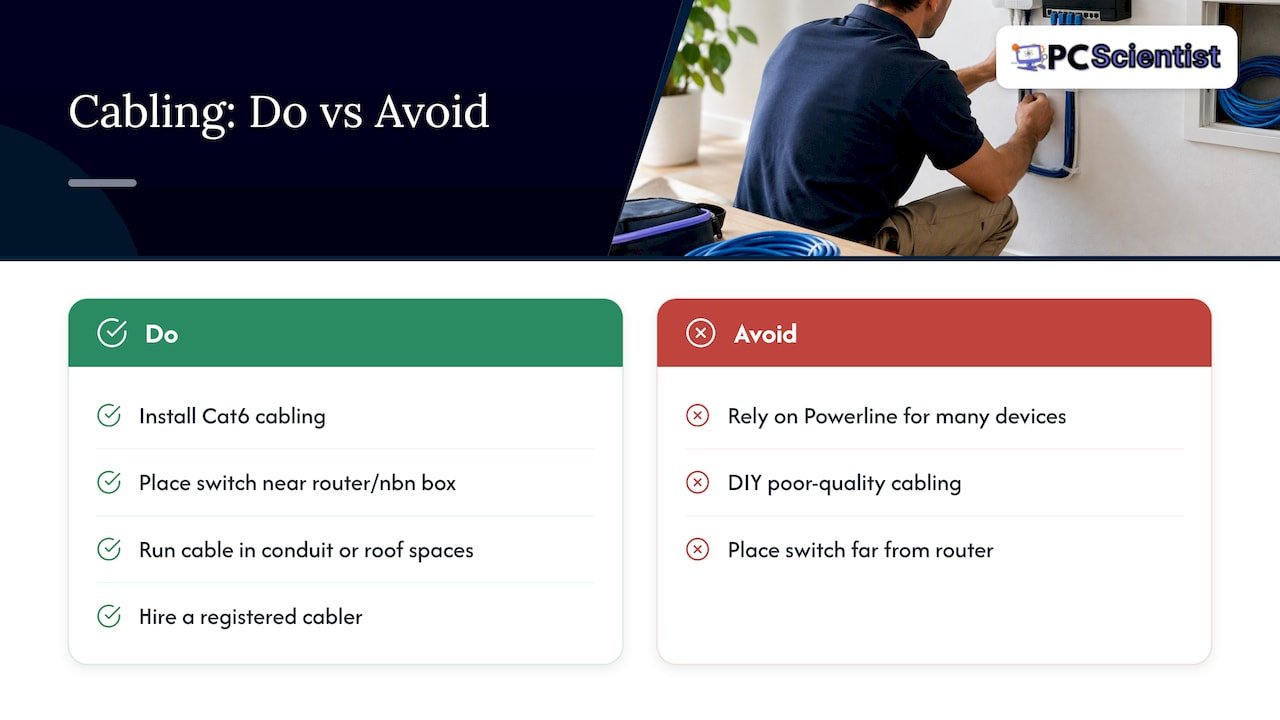
For a home or small office planning cabling, Cat6 is the sensible standard, it comfortably handles gigabit speeds with headroom for future upgrades. Running cable through conduit, along skirting boards or through roof spaces with a planned pathway keeps things tidy and makes later changes easier. Placement matters too: keeping your main switch or patch panel close to your router or nbn box simplifies the whole layout and reduces cable runs.
Experts generally recommend hardwired Ethernet first for stationary, performance-sensitive devices, treating cabling as the property's core infrastructure rather than an optional extra. Hiring a registered cabler for this work protects both the compliance side and the actual performance you end up with, since poor-quality DIY cabling can introduce the very inconsistencies you're trying to avoid, as detailed in our guide on how to wire access control system.
What an onsite network check actually looks for
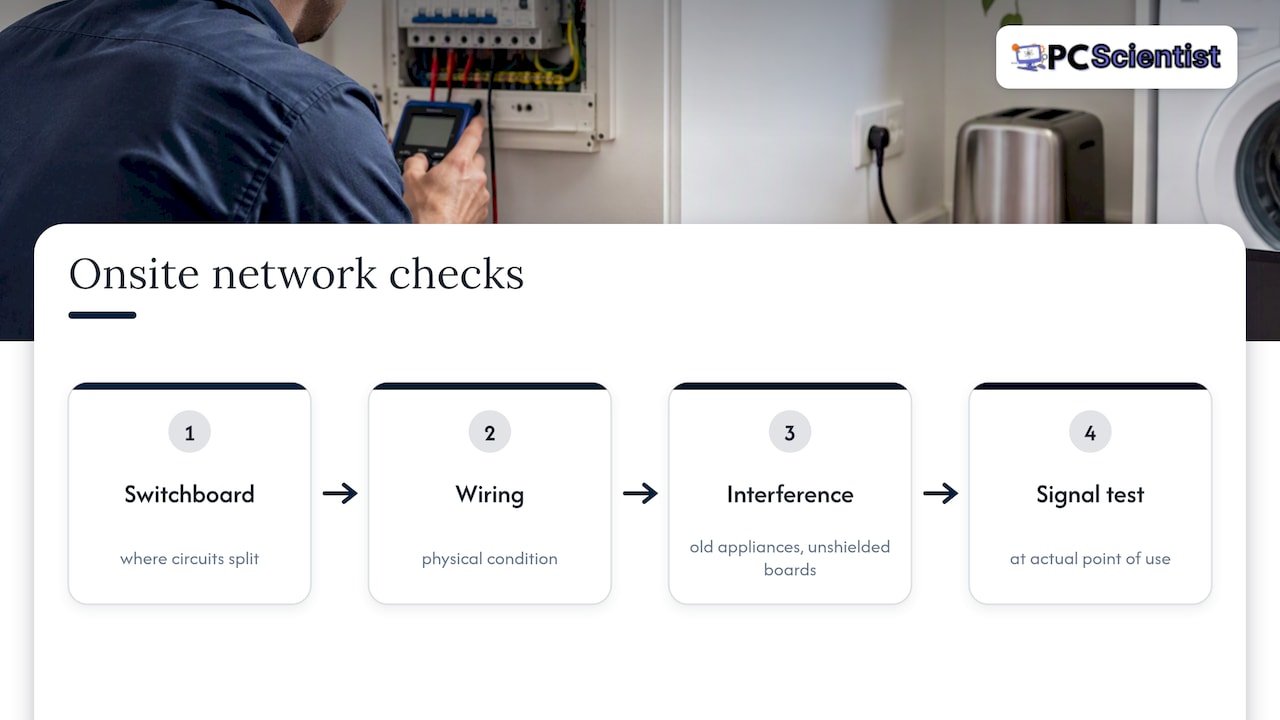
When we assess a property for cabling or network issues, we're not just checking Wi-Fi signal strength. We look at where the circuits in the switchboard split, the physical condition of the existing wiring, and whether there are obvious interference sources nearby, like old appliances or unshielded power boards. We also test signal consistency at the point of use, not just near the router, since that's often where problems actually show up for the household.
That inspection shapes the recommendation. Sometimes a temporary powerline or mesh solution genuinely makes sense, especially in a rental or while a bigger cabling job is being planned. Other times, the wiring and circuit layout make it clear that cabling is the only way to get a stable result, and we'll say so plainly rather than selling a quick fix that won't hold up.
If you're talking to any installer, it's worth asking a few direct questions: are they a registered cabler, what standard will the work meet, and what will you actually receive at the end, a test report, cable labelling, or just a verbal "it's working"? Clear answers to those questions tell you a lot about the job you're about to pay for.
Quick decision rules for common situations
If you're renting or testing the waters in a new place, powerline is a sensible stopgap, just don't expect it to behave the same in every room. Families streaming across several devices usually do better investing in cabling sooner rather than patching around Wi-Fi dead zones for years. Gamers and anyone on regular video calls should treat wired Ethernet as non-negotiable for the one device that matters most, even if everything else stays wireless. Small businesses handling eftpos, POS systems or shared files should budget for proper cabling from the outset, since network hiccups there cost more than just annoyance.
One red flag worth remembering: if your powerline adapters are on different circuits or you've got solar, older wiring or a switchboard that's been added to over the years, expect inconsistent results no matter which brand you buy.
- PC Scientist
How PC Scientist can help with your home or business network
If you've read this far and you're still not sure whether your place needs cabling, a powerline fix, or something in between, that's exactly what a proper network assessment is for. We check your switchboard layout, test signal at the points that matter to you, and give you a straight answer about what will actually work in your home or office, not just what's easiest to sell.

A typical visit includes testing your current setup, identifying where interference or wiring issues are limiting performance, and talking through options that fit your budget and how long you're planning to stay in the property. For businesses needing a more detailed look at network and Wi-Fi performance across an office, our Business Network & Wi-Fi Assessment covers exactly this. For home setups, our Network Scientist service handles everything from troubleshooting to full cabling installation, assessed and quoted before any work begins.
Sources
- Electrical safety at work (WorkSafe Queensland)
- Powerline ethernet adapter: everything you need to know (WhistleOut)
- Australian cabling standards (ACMA)
- Powerline adapter (Lenovo glossary)
Recommended
- Wired vs wireless CCTV: which one actually protects your property?
- Case Studies | Real IT Support, Website and Network Outcomes
- Business Network & Wi-Fi Assessment NSW
Frequently Asked Questions
Straight answers about Decide Fast: Network Cabling vs Powerline in Australia, 3 Site Checks - without jargon or pressure. Call 0493 563 381 for advice, or get help below.
Want the quickest answer? 0493 563 381 for free advice.
No, powerline doesn't match the consistency of a wired Ethernet connection, because its performance depends on your home's electrical wiring and circuit layout. Experts generally treat powerline as a situational alternative rather than a replacement for cabling, best used when running cable isn't practical.
A network cable (like Cat6 Ethernet) carries data only, through a dedicated line built specifically for that purpose. A powerline adapter sends data signals through your existing electrical wiring, which was designed to carry power, not network traffic, which is why its performance varies more.
Powerline adapters are sensitive to electrical noise from appliances and are unlikely to perform well across different circuits or electrical phases in your home. Plugging them into power boards instead of wall sockets also commonly causes drops in speed or connection failures.
It depends on what you need: powerline is generally better for a wired connection to one specific device, while a Wi-Fi extender is better for stretching general wireless coverage to a dead zone. Neither offers the latency or consistency of a direct Ethernet cable, so for performance-critical devices, cabling remains the stronger option.
Network help across NSW
Still stuck choosing network cabling or powerline?
If the steps above did not get the network behaving, that is okay. Get help in your area and we will take it from here.
Start here
Get network help
Optional Need a Sydney city or region?
Choose a side of Sydney
These are Sydney cities and regions, such as the Northern Beaches or Inner West. First tap a side of Sydney. Then open the city or region that covers you.
C Sydney City / Inner 3 areas
N Northern Sydney 6 areas
NW North-West / Central Sydney 3 areas
W Western Sydney 1 area
SW South-West Sydney 3 areas
S Southern Sydney 2 areas
Optional Find your suburb
Type a suburb from our listed coverage. This opens the matching city or region page for this topic. Listed suburb pages are general technology services, not this specialist page.
If your suburb is not listed, use the city or region list above, or call 0493 563 381.
Disclaimer
The information in this article is provided for general educational and informational purposes only. While PC Scientist strives to keep all content accurate and up to date, technology issues can vary depending on your device, software, network configuration, and individual circumstances. Always back up important data before attempting repairs or system changes. If you are unsure or the issue cannot be resolved safely, contact PC Scientist today for professional onsite or remote IT support. PC Scientist is not liable for any loss of data, damage, or other issues resulting from the use of the information provided in this article.

