

Audit Ready Network Assessment Checklist for IT Pros and SMBs
A useful network assessment checklist gives you four things: a complete asset inventory, a security baseline, a performance baseline, and a prioritised remediation plan you can actually action. Start today by checking your router's firmware version and confirming multi factor authentication is switched on for every admin account, or book a professional to run the full process for you. Either way, you'll want the results mapped against recognised benchmarks like the ASD Essential Eight and the NIST CSF, and the Small Business Cyber Resilience Service is there if you want expert eyes on it, for free.
Key takeaways
- Conduct a comprehensive asset inventory that documents every device, software, service, and connection point, including shadow IT and unsanctioned cloud tools.
- Verify firmware versions and update history on all hardware, especially overlooked peripherals like printers and NAS devices, to identify outdated or unsupported equipment.
- Map your entire software environment, noting operating systems, cloud services, and backup processes, and ensure backup restoration tests are recent and successful.
- Regularly measure key performance metrics such as throughput, latency, and Wi-Fi coverage, then compare against baseline data to detect degradation or issues early.
- Prioritize remediations based on impact and exploitability, enforce MFA on all admin and remote accounts, and review policies and logs for vulnerabilities and suspicious activity.
Table of Contents
- What is a network assessment checklist, and where do you start?
- Building a hardware inventory that exposes forgotten devices
- Mapping software, cloud services, and backup evidence
- Measuring performance and setting your baseline
- Testing security controls and mapping vulnerabilities
- Checking policies, access rights, and identity hygiene
- Reading logs to find bottlenecks and threats
- Turning findings into a remediation plan people will act on
- How PC Scientist runs a business network assessment
- Assessing wireless coverage and Wi-Fi security properly
- Why the physical inspection still matters
- Checking compliance against real standards
- Planning for scalability and future growth
- Setting objectives and scope before you start
- How often should you run this, and what method fits?
- Practitioner perspective: the blind spots that matter most
- Get your network properly assessed by PC Scientist
- Sources
- FAQ
What is a network assessment checklist, and where do you start?
An IT network assessment starts with mapping every network and segment your business actually runs, not just the ones you remember setting up. This is where shadow IT hides, and it's the single most common gap we see when a business thinks its network is simple and it turns out to be anything but.
Start by walking through every connection point: your main LAN, the guest Wi-Fi, any VLANs separating departments or devices, site-to-site VPNs, and cloud VPCs if you run infrastructure on AWS, Azure, or similar. Don't assume the network diagram from three years ago is still accurate. Networks grow sideways, usually without anyone updating the paperwork.
The harder part is finding what isn't documented anywhere. That means talking to staff directly, because shadow IT commonly bypasses official controls, and personal cloud folders or unapproved apps holding business data won't show up in any router log. Ask people how they actually share files, not how the policy says they should.
By the end of this stage you want:
- A simple network diagram showing every segment and how they connect
- A list of every SSID and VLAN ID in use, including guest and IoT networks
- A record of all public IP addresses and what services sit behind them
- Notes on any personal or unsanctioned cloud tools staff mentioned using
This inventory becomes the map everything else in your network health checklist gets plotted against. Skip it, and you'll end up securing a network that doesn't match the one you're actually running.
Building a hardware inventory that exposes forgotten devices
Every router, switch, access point, NAS unit, printer, and server needs its own line in your inventory, with enough detail that someone could walk in cold and understand the network. That means capturing the model and firmware version, IP and MAC address, physical location, and who has admin access to each device.
Patch currency is where this gets uncomfortable. Firmware update history should be evidenced, not assumed. If a switch hasn't been patched in eighteen months, or a device has reached end of life and the vendor no longer issues security updates, that's a flag for the remediation plan, not something to quietly work around.
Printers and NAS units deserve particular attention here. Office printers and other overlooked peripherals often retain default passwords and outdated firmware, and they're routinely forgotten because nobody thinks of a printer as a security risk. It is one, and it's frequently the easiest device on the network to compromise. NAS devices carry similar risk, often holding the business's most sensitive files behind whatever password was set at unboxing.
For each device, capture:
- Model, firmware version, and last patch date
- IP address, MAC address, and physical location
- List of admin users with access
- Whether the device is still vendor-supported or approaching end of life
Pro Tip: Photograph the physical location and cabling of every network cabinet you inspect. Six months later, when someone asks "why is this switch here?", the photo answers the question faster than any spreadsheet.
Mapping software, cloud services, and backup evidence
Hardware is only half the picture. Your network infrastructure analysis needs a matching inventory of the software and services running on top of it, because that's where a lot of exposure actually lives.
Document every operating system version across servers and workstations, and note where business data physically sits, whether that's on-premises, in a cloud platform, or with a third-party vendor. If you can't answer "where does our customer data live?" in one sentence, that's worth fixing before anything else.
Specific items to check off:
- Microsoft 365 configuration, including admin roles and conditional access settings
- Any remote administration tools and who can use them from outside the office
- Web-facing services (customer portals, VPN gateways, remote desktop) and whether they're necessary
- Backup schedules for every critical system, with dates of the last successful run
- Evidence of a completed restoration test, not just a backup log showing the job ran
That last point matters more than most businesses realise. A backup that has never been restored is not a reliable recovery plan. CPA Australia's checklist treats evidence like this, exports, patch reports, restore logs, as the currency of a real audit. Screenshots and statements of intent don't count.
Measuring performance and setting your baseline
You can't tell if your network is degrading unless you know what "normal" looks like. Baseline testing gives you the numbers to compare against next quarter, next year, or after the next big software rollout.
- Test LAN and WAN throughput separately. Internal file transfer speed tells you if your switching and cabling are the bottleneck; internet throughput tells you if your ISP connection matches what you're paying for.
- Measure latency between key points, especially if you run VoIP or video conferencing. High latency can cause noticeable call quality issues.
- Check packet loss. Anything above 1% on a wired connection usually points to a faulty cable, an overloaded switch, or interference on a shared segment.
- Run a basic Wi-Fi site survey. Walk the premises with a phone or laptop, note signal strength dead zones, and check for channel overlap between access points.
- Record everything in a baseline report, including the date, time, and conditions of each test, so future comparisons are fair.
Set a regular monitoring cadence appropriate for your business size and growth stage to detect performance changes promptly. A baseline taken once and never revisited is barely better than no baseline at all.
Testing security controls and mapping vulnerabilities
This is the section that carries the most weight in any network security evaluation, because it's where actual exposure gets identified rather than assumed.
Start with an authenticated vulnerability scan across your internal network and any internet-facing systems. Authenticated scans see far more than an external-only scan because they're logged in, checking configurations and patch levels rather than just probing from outside. Rank what you find using CVSS scores or the vendor's own severity rating, so you're not treating a low-risk finding with the same urgency as a critical one.
From there, review your firewall and NAT rules line by line. Old rules pile up over years and nobody removes them, which means ports and services can stay open long after the reason for opening them has disappeared. Check remote access paths specifically, and confirm MFA is enforced on every admin account and every remote login, not just the ones someone remembered to configure.
ACSC guidance treats router security, MFA enforcement, and tested backups as the core small business measures, and for good reason: they stop the highest volume of real-world incidents. Map whatever you find against the ASD Essential Eight or the NIST Cybersecurity Framework to show coverage gaps in a language that makes sense to a non-technical owner or a board.
- Run an authenticated vulnerability scan and rank findings by severity
- Review all firewall/NAT rules and remove anything no longer needed
- Confirm MFA on every admin and remote access account
- Map results against Essential Eight or NIST CSF categories
Pro Tip: If you find even one admin account without MFA, treat it as a critical finding regardless of what the vulnerability scanner rates it. A single unprotected admin login is often the one thing standing between "minor incident" and "full breach".
Checking policies, access rights, and identity hygiene
Technology controls only work if the human side is documented too. This part of an IT network assessment captures who has access to what, and whether that access still makes sense.
Pull an export of MFA status across every account, a current list of admin users, and a leavers list showing whether former staff still have active credentials anywhere. It's more common than you'd think for someone who left eight months ago to still have a working VPN login.
Check these specifically:
- BYOD policy: is there one, and does it cover what happens when a personal device is lost or stolen
- Guest Wi-Fi policy: is it genuinely isolated from the business network
- Supplier and contractor access: who has it, and when was it last reviewed
- Privilege review: does every admin account still need admin rights
Evidence should be dated. A policy document with no revision date is functionally the same as no policy, because nobody can tell if it reflects current practice.
Reading logs to find bottlenecks and threats
Logs are where the network tells you what actually happened, as opposed to what the diagrams say should happen.
- Gather logs from firewalls, switches, wireless access points, servers, NAS devices, and authentication systems. Set a retention period of at least 90 days where storage allows, since some patterns only emerge over weeks.
- Triage for noise first. Most log data is routine. Filter out expected traffic and focus on repeated failures, unusual login times, or persistent errors that show up night after night.
- Look for saturated links where throughput consistently maxes out at the same time each day, repeated authentication failures against the same account, and access attempts from locations that don't match your business footprint.
A switch reporting errors at 2am every night for a week is either a scheduled job nobody documented or something worth investigating properly. Logs make that distinction possible.
Turning findings into a remediation plan people will act on
A list of problems isn't useful until it's ranked. Score each finding by business impact and how likely it is to be exploited or fail, then assign an owner and a realistic deadline to each one.
A short remediation proposal should include an executive summary in plain language, the urgent actions that need attention this week, a timeline for the rest, and a way to verify each fix once it's done. Separate quick wins, enabling MFA, closing an old firewall rule, from capital upgrades like replacing an end-of-life switch, and grade each by rough effort and cost so decision makers can see what's cheap and what needs budget approval.
How PC Scientist runs a business network assessment
Onsite, PC Scientist physically inspects cabling, hardware, and access points; remotely, we run vulnerability scans, pull configuration exports, and test backup restorations. Every finding gets evidenced, diagrams, scan logs, patch reports, not just described.
Common quick wins we implement on the day include enabling MFA on exposed accounts, tightening firewall rules, and updating firmware on neglected devices. Staged upgrades get recommended when hardware is end-of-life or when Wi-Fi coverage genuinely can't meet current demand without new access points.
If your business handles sensitive client data, has grown past its original network design, or nobody can currently tell you where your backups actually sit, that's the point to book professional help rather than keep patching it yourself.
Assessing wireless coverage and Wi-Fi security properly
Wireless problems are usually reported as "the Wi-Fi is slow" when the real issue is coverage, security, or both, and they need separate testing.
For coverage, walk every area of the premises with a signal strength app and note dead zones, particularly in meeting rooms, warehouses, or anywhere metal shelving or thick walls sit between access points and users. Check for channel overlap too. Two access points broadcasting on the same channel in overlapping areas will fight each other and drag speeds down for everyone nearby.
Security checks matter just as much. Confirm every access point uses WPA3 encryption where hardware supports it, or WPA2 at an absolute minimum. Treating the router as the front door of the network is the right instinct, and that means verifying current firmware, strong encryption, and a properly isolated guest network with its own credentials, never sharing a password with the main business SSID. If your guest network can see printers, servers, or staff devices, it isn't actually isolated regardless of what the settings menu claims.
Our guest Wi-Fi network setup guide walks through configuring this separation correctly, which is one of the most commonly misconfigured settings we find on small business networks.
Test from multiple device types too, phones, laptops, IoT devices, since some hardware struggles with newer security standards and needs a fallback network configured deliberately rather than by accident.
Why the physical inspection still matters
It's easy to treat a network assessment as a purely digital exercise, but a huge share of real-world faults trace back to something physical: a cable, a cabinet, or a device sitting somewhere it shouldn't.
Walk every server room, comms cabinet, and patch panel in the building. Look for cabling that's been bent sharply around corners, run alongside power cables (which causes interference), or left loose and unlabelled in a tangle nobody wants to touch. Check that switches and routers have adequate airflow. Equipment crammed into a cupboard with no ventilation fails early, often intermittently, which makes the fault maddening to diagnose from software logs alone.
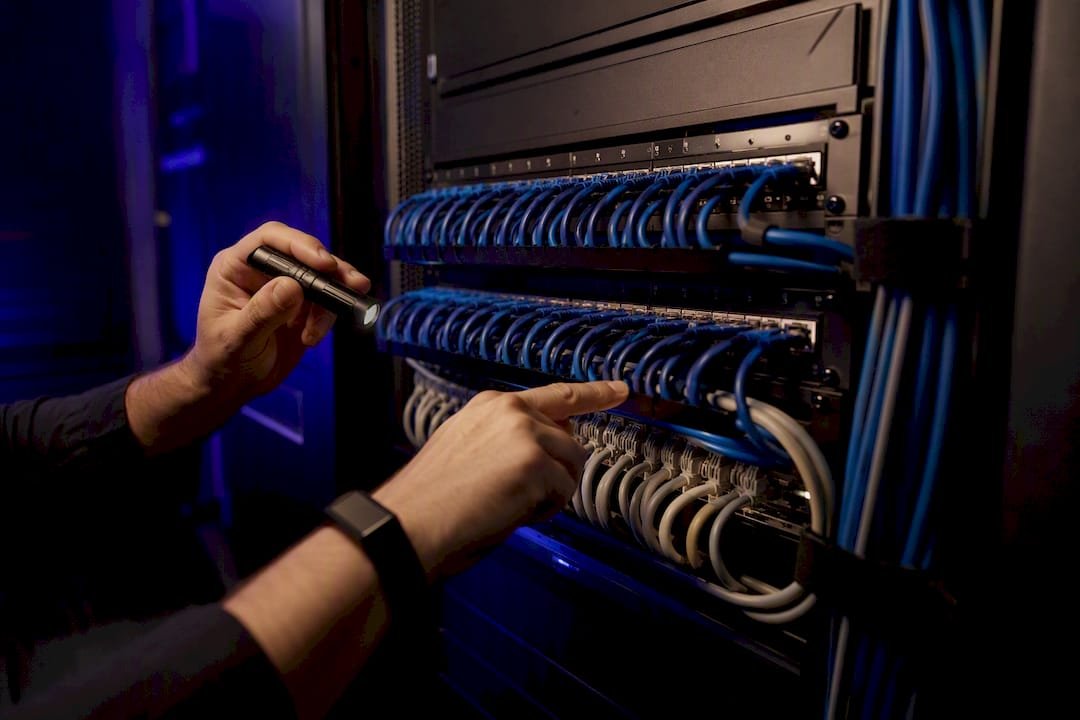
Look at physical security too. Is the server rack locked? Can anyone walking past unplug a switch or plug in an unauthorised device? Dust and heat damage are common in older installations, particularly in retail or hospitality settings where network gear gets installed in whatever space was left over after everything else.
Label everything you find, or relabel it if the existing labels no longer match reality. A cabinet full of unlabelled cables is a problem waiting to surface at the worst possible time, usually during an outage when someone needs to trace a connection fast and can't.
Checking compliance against real standards
Compliance gets treated as a box-ticking exercise, but the frameworks exist because they capture patterns from genuine incidents, and mapping your findings against them turns a checklist into something a regulator, insurer, or client can actually trust.
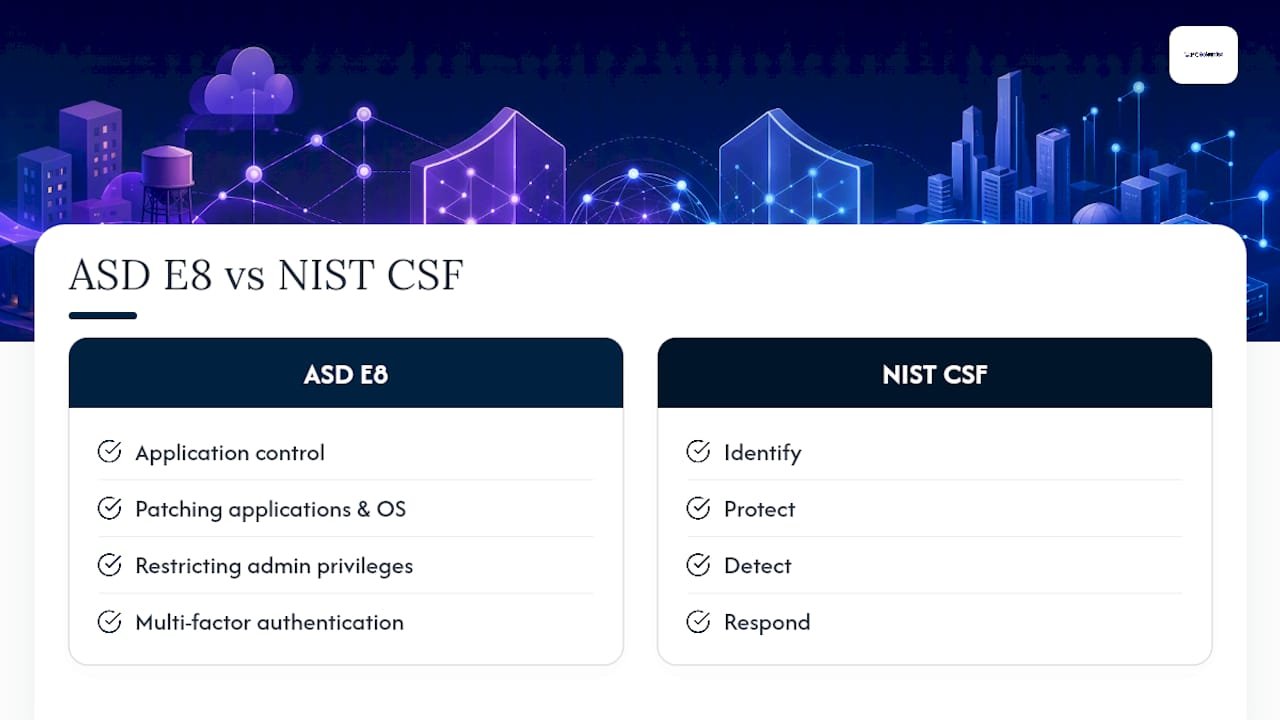
The ASD Essential Eight is the standard most Australian small businesses should measure against first. It covers application control, patching applications and operating systems, restricting admin privileges, and multi factor authentication, among other controls, and it's structured in maturity levels so you can show progress rather than a binary pass or fail. The NIST Cybersecurity Framework offers a broader structure across identification, protection, detection, response, and recovery, useful if you deal with international clients or need a framework recognised outside Australia.
Beyond these, check whether your industry carries specific obligations, health providers, financial services, and businesses handling payment card data all have their own regulatory layers on top of general cyber security practice. If you're not sure which apply, that's a reasonable question to bring to a professional rather than guess at.
Document compliance status the same way you document everything else in this process: dated, evidenced, and specific about what's covered and what isn't yet.
Planning for scalability and future growth
A network assessment that only looks at today's traffic misses the point if you're planning to hire ten people next year or open a second site. Scalability deserves its own honest look, separate from the current performance baseline.
Check whether your current internet connection, switching capacity, and Wi-Fi coverage have headroom, or whether they're already running close to their ceiling. A network handling 20 staff comfortably today might struggle at 35 if the underlying infrastructure was sized for the smaller number. Look at your cabling standard too. Cat5e installed a decade ago will bottleneck gigabit and multi-gigabit switching that's now standard on new hardware.
Consider how your business is actually likely to grow. A business planning a second location needs to think about site-to-site connectivity now, not after the lease is signed. A business moving more operations to cloud services needs internet bandwidth that matches that shift, not the bandwidth sized for on-premises file sharing five years ago.
Build headroom into any upgrade recommendation rather than replacing like-for-like. It's usually far cheaper to install a switch with extra capacity now than to rip out undersized infrastructure again in eighteen months.
Setting objectives and scope before you start
Every assessment needs boundaries decided before the first cable gets traced or the first scan gets run, otherwise scope creep turns a two-day job into a three-week one with no clearer outcome.
Decide upfront what you're actually trying to achieve. Are you assessing for security, for performance, for growth planning, or all three? A business preparing for cyber insurance renewal has a different focus to one that's simply outgrown its Wi-Fi. Define which sites, networks, and device categories are in scope, and be explicit about what's excluded, so nobody assumes personal devices or a remote worker's home network got checked when they weren't.
A practical audit process starts by defining scope and building the asset inventory before any scanning begins, and that sequencing matters. Scanning before you know what you're scanning wastes time chasing findings on devices that turn out to be irrelevant or already scheduled for replacement.
Put the objective in writing, even if it's one paragraph, and share it with whoever's approving budget for any resulting remediation work.
How often should you run this, and what method fits?
Frequency depends on business size and risk exposure, not a fixed calendar rule. Smaller businesses with stable infrastructure may conduct full assessments annually and lighter quarterly check-ins on essential controls, while growing businesses or those handling sensitive data may benefit from more frequent assessments.
Choose a consistent methodology and stick to it, because the value of a baseline comes from comparing like with like over time. A well-scoped audit for SMBs typically focuses on cloud security, internet-facing vulnerability scanning, and an Essential Eight gap analysis rather than attempting a full enterprise-style audit, which usually burns budget on depth a small business doesn't need yet.
Whatever cadence you settle on, calendar it. Assessments that depend on someone remembering to schedule them get skipped the first time things get busy, which is exactly when they're needed most.
Practitioner perspective: the blind spots that matter most
Shadow IT and printers cause more real incidents than businesses expect, precisely because nobody thinks to check them. Evidence beats assumption every time: a backup log means nothing without a tested restore behind it. If you do nothing else this month, enforce MFA on every admin account, test one backup restoration, and check your guest Wi-Fi is genuinely isolated. Those three cost little and close the gaps attackers rely on most.
- PC Scientist
Get your network properly assessed by PC Scientist
Professional IT service providers run the checklist above as a paid service, onsite and remote, often including inventory, security baseline, and remediation planning to save time on discovering network details. Comprehensive assessments typically come with detailed evidence such as network diagrams, scan exports, patch reports, and backup restoration logs, rather than just verbal summaries.

Before booking professional network assessment services, having admin logins, a device list, and contact details for key system administrators can help streamline the process.
If you'd rather have someone else run the full process end to end, the Business Network & Wi-Fi Assessment service covers everything from hardware inventory through to a prioritised remediation report. For businesses that uncover deeper security gaps along the way, our business cybersecurity support picks up where the assessment leaves off. Get in touch to book a time that suits your business.
Sources
This checklist draws on the ACSC Small Business Cyber Security Guide for core security controls, the NIST Cybersecurity Framework for governance mapping, the Small Business Cyber Resilience Service for free expert support, and the CPA Australia and Paessler checklists for evidence standards and audit sequencing.
- ACSC Small Business Cyber Security Guide V6 (2023)
- Nist
- Cyber security checklist - CPA Australia (September 2024)
- Network audit checklist for IT infrastructure security - Paessler blog
Recommended
- NAS data recovery: practical steps and when to call a pro
- Your new PC setup checklist: eight things to do first
- Same-Day IT Support Near Me | Fast Local Help
- IT Support and Services: A Simple Guide for Central Coast Homes & Businesses
Frequently Asked Questions
Straight answers about Audit Ready Network Assessment Checklist for IT Pros and SMBs - without jargon or pressure. Call 0493 563 381 for advice, or get help below.
Want the quickest answer? 0493 563 381 for free advice.
A network assessment is a structured review of a business's hardware, software, security controls, and performance to produce an inventory, a security baseline, and a prioritised list of fixes.
A typical sequence runs: define scope, build an asset inventory, run vulnerability scans, review access and controls, and compile a prioritised remediation plan, as outlined in Paessler's network audit checklist.
An assessment checklist is a structured list of items to verify and evidence during a review, in this case covering network hardware, software, security controls, and performance so nothing gets missed or assumed.
TPRM stands for third-party risk management, and its checklist focuses specifically on evaluating the security practices of vendors and suppliers who connect to or handle data on your network, a narrower scope than a full network assessment.
Pricing depends on network size and scope, so current rates are listed on the PC Scientist website rather than quoted here.
Yes. Small businesses with 19 or fewer full-time equivalent staff can even access the Small Business Cyber Resilience Service for free one-on-one support, and smaller networks are just as vulnerable to unpatched firmware, weak passwords, and untested backups as larger ones.
Network help across NSW
Still stuck on a network assessment?
If the steps above did not get the network behaving, that is okay. Get help in your area and we will take it from here.
Start here
Get network help
Optional Need a Sydney city or region?
Choose a side of Sydney
These are Sydney cities and regions, such as the Northern Beaches or Inner West. First tap a side of Sydney. Then open the city or region that covers you.
C Sydney City / Inner 3 areas
N Northern Sydney 6 areas
NW North-West / Central Sydney 3 areas
W Western Sydney 1 area
SW South-West Sydney 3 areas
S Southern Sydney 2 areas
Optional Find your suburb
Type a suburb from our listed coverage. This opens the matching city or region page for this topic. Listed suburb pages are general technology services, not this specialist page.
If your suburb is not listed, use the city or region list above, or call 0493 563 381.
Disclaimer
The information in this article is provided for general educational and informational purposes only. While PC Scientist strives to keep all content accurate and up to date, technology issues can vary depending on your device, software, network configuration, and individual circumstances. Always back up important data before attempting repairs or system changes. If you are unsure or the issue cannot be resolved safely, contact PC Scientist today for professional onsite or remote IT support. PC Scientist is not liable for any loss of data, damage, or other issues resulting from the use of the information provided in this article.

