

Decide in 4 Questions: Mesh WiFi or Access Points
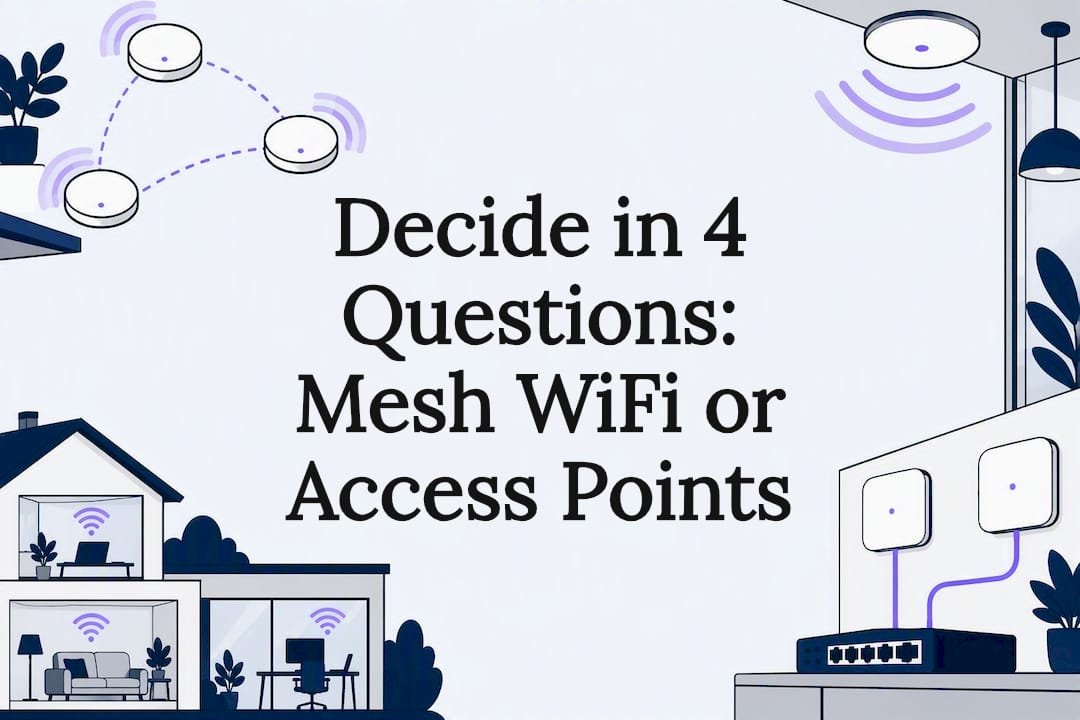
The deciding factor isn't brand, price, or how many antennas a box has. It's backhaul: if you can run Ethernet to where you need coverage, wired access points give you the most reliable result. If you can't, mesh is the sensible, practical default. Everything else in this decision is detail.
Key takeaways
- Wired Ethernet connections significantly improve network performance and reliability, especially for large or multi-story properties with high device counts.
- Mesh WiFi systems excel in ease of setup and are ideal for rental or temporary setups, but wireless backhaul reduces bandwidth and can cause performance issues in thick-walled buildings.
- Access points connected via Ethernet or PoE offer predictable throughput and better scalability for businesses or environments requiring high uptime, but involve higher upfront installation costs.
- Remote placement of nodes behind walls, or in cabinets, can weaken signals and contribute to dead zones, making proper positioning essential for optimal coverage.
- Professional network assessments that include site surveys, interference scans, and coverage mapping help identify whether wiring, placement, or hardware is the actual bottleneck before investing in new hardware.
Table of Contents
- Mesh WiFi vs access points: the basic difference
- Why backhaul, radios, and hop count change what you actually feel
- The trade-offs, honestly stated
- A decision path you can actually follow
- Getting placement and backhaul right the first time
- What a professional network assessment actually covers
- Where most people go wrong before calling anyone
- Get a proper network assessment instead of guessing
- Sources
- FAQ
Mesh WiFi vs access points: the basic difference
A mesh node is a small router-like unit that talks to its neighbours wirelessly (or over a wire, if you set it up that way) and hands your devices off between units without you noticing. An access point, by contrast, is a dedicated radio that plugs into your existing network, usually via Ethernet, and simply broadcasts WiFi from that one spot. The access point doesn't need to relay traffic to another wireless unit because it's already wired into the network.
That difference in how each device connects back to your router is called backhaul, and it's the single biggest factor in how well either system performs. Wireless backhaul means a mesh node splits its radio time between talking to your phone and talking to the next node in the chain. Wired backhaul means an access point (or a mesh node running in wired mode) gets a dedicated Ethernet path back to the router, with no radio time wasted on relaying.
Here's the quick shorthand for where each option tends to make sense:
- Mesh WiFi suits: rental properties, homes without existing cabling, quick fixes for a single dead spot, and anyone who wants app-based setup without touching a network cupboard.
- Access points suit: homes with existing Ethernet runs, small businesses needing guest and staff networks kept apart, multi-storey or brick/concrete buildings, and anywhere uptime actually matters to income.
- Wired mesh (a hybrid) suits: people who like the mesh app experience but happen to have cabling, getting the best of both without buying a separate AP platform.
Consumer mesh kits win on convenience. They're easier to set up and hand off devices seamlessly under one network name, which is exactly why they've become the default recommendation for people who just want WiFi that works without a technician on site. Access points trade some of that plug-and-play simplicity for control and consistency, particularly once you're running more than two or three radios across a property.
Why backhaul, radios, and hop count change what you actually feel
The engineering behind mesh vs access points comes down to airtime. Every wireless mesh node has to use some of its radio time to talk to the next node in the chain, and that time isn't available for your laptop, your smart TV, or your work video call. The further a node sits from the main router, and the more hops a signal has to make to get there, the more airtime gets eaten by backhaul traffic rather than your devices.
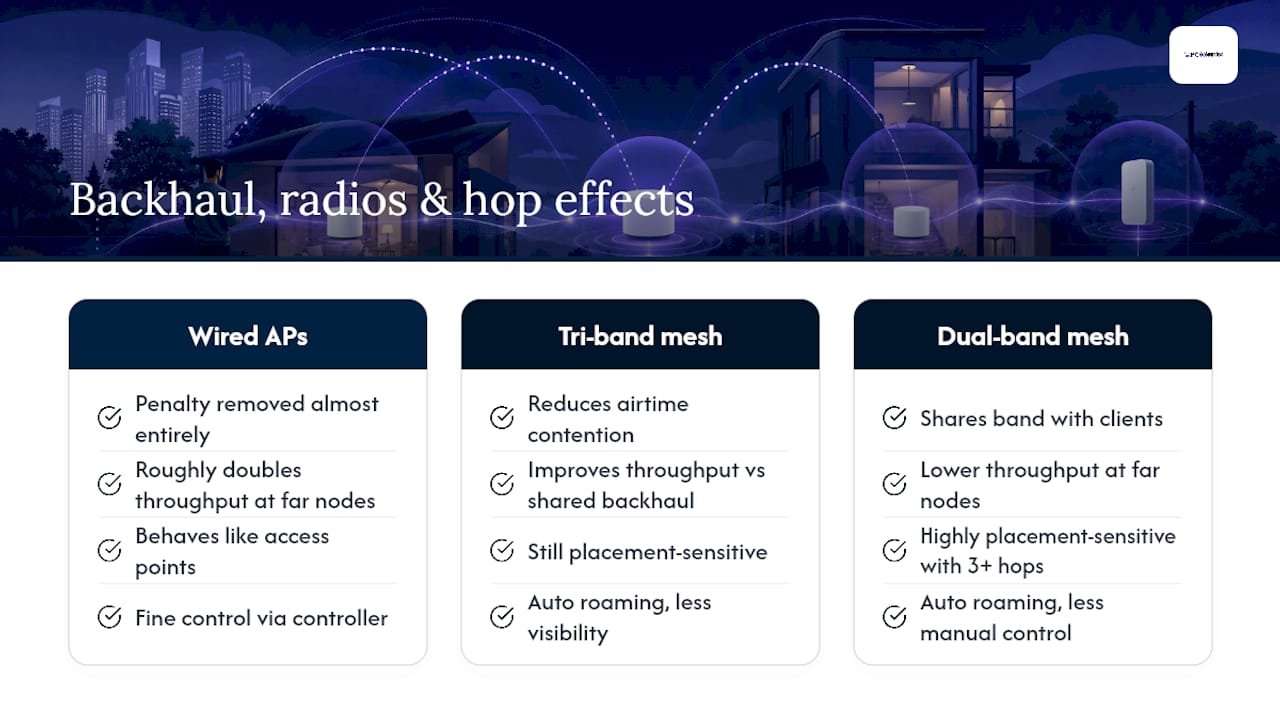
Wired backhaul removes that penalty almost entirely. Testing on newer WiFi 7 hardware found that wired backhaul roughly doubles the throughput available at far nodes compared with wireless backhaul, and it makes mesh nodes behave essentially like access points once they're plugged into Ethernet. That's a substantial gap, and it's the whole reason network designers keep repeating the same advice: wire it if you can, then decide how you want to manage it.
Tri-band mesh systems try to soften the wireless-backhaul penalty by dedicating a separate radio band purely to node-to-node traffic, keeping it off the bands your devices use. This genuinely helps. A dedicated backhaul radio reduces airtime contention, but it doesn't remove placement sensitivity. A tri-band node still needs a decent signal path to its neighbour; put it behind a brick wall or two floors down and the extra radio won't save you. Dual-band mesh systems, which share one band between client devices and backhaul, feel this problem more acutely, especially with three or more nodes in a chain.
Access points connected to a controller platform add another layer of advantage: fine control. A controller can actively manage which access point a device connects to, balance load across radios, and adjust channel plans to avoid interference between units. Consumer mesh apps handle roaming automatically too, but with far less visibility or manual override if something's not working the way you'd expect. For a household, that's rarely a problem. For a business with forty staff logging in each morning, it can be the difference between a network that just works and one that generates a support ticket every Monday.
The trade-offs, honestly stated
Neither option is universally "better." Each solves a different problem, and knowing the downsides upfront saves you money and frustration.
Mesh WiFi strengths:
- App-guided setup that takes minutes, not hours
- One network name across the whole property, with automatic device handoff
- Ideal for rentals or anywhere you can't or won't run cable
Mesh WiFi downsides:
- Wireless backhaul eats into usable bandwidth, worse with more hops
- Performance is sensitive to node placement, wall material, and distance
- Dense environments and thick walls cause mesh to struggle, particularly in brick or concrete buildings with a lot of concurrent users
Access point strengths:
- Wired backhaul gives predictable throughput and lower latency
- Scales cleanly as you add more units or more staff
- Supports VLANs, separate guest networks, and granular channel tuning through a controller
Access point downsides:
- Needs cabling or PoE infrastructure, which costs more upfront
- Installation isn't a weekend DIY job for most households
- Requires a switch with enough PoE ports, or injectors, adding a piece of hardware most homes don't already own
Cost shapes follow the same logic. Mesh is cheaper to buy and free to install yourself. Access points cost more in labour and cabling but need almost no ongoing fiddling once they're mounted and configured properly.
A decision path you can actually follow
Work through these questions in order and you'll land on the right system without guesswork.
- Can you run Ethernet to where coverage is weak? If yes, wired access points (or mesh nodes in wired backhaul mode) are the stronger long-term choice.
- Is low latency genuinely important? Video calls, gaming, VoIP phones, or point-of-sale systems all suffer more from wireless backhaul than casual browsing does. If latency matters, lean wired.
- Is this a temporary or rental situation? If you'll move in a year, or you can't drill or run cable, mesh is the practical answer regardless of the other factors.
- How many devices will connect at once? A household with a dozen devices barely notices backhaul overhead. An office with sixty laptops, phones, and IoT sensors will feel it fast, and that's where wired access points scale more cleanly.
If you answered "no Ethernet, but I still want reliability," don't rule out wired backhaul yet. MoCA over existing coax or a powerline adapter can close much of the gap without a cabling job, though both need a quick check of your existing wiring or coax splitters before you rely on them.
When you're briefing an installer or shopping yourself, look for Ethernet-capable mesh nodes (so you can upgrade to wired backhaul later), PoE-compatible access points, VLAN support if you need guest or IoT separation, and only pay for tri-band if wireless backhaul is genuinely unavoidable.
Getting placement and backhaul right the first time
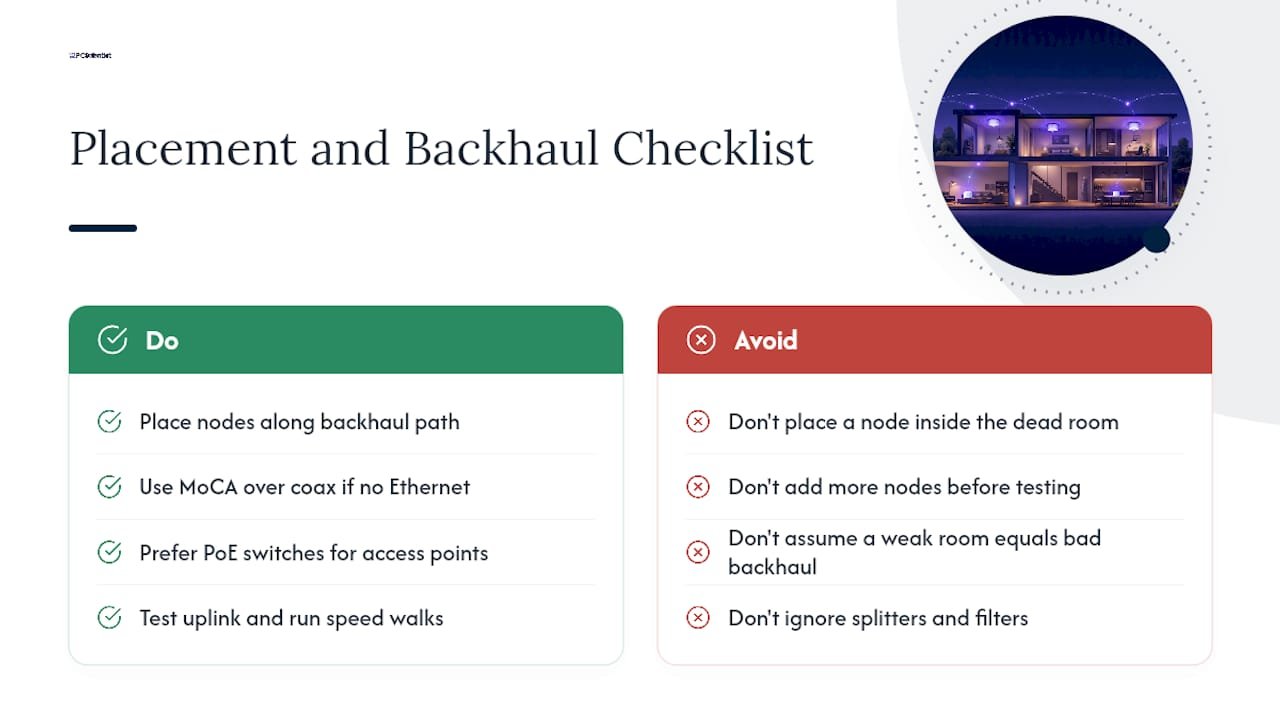
Start with the backhaul path, not the dead zone. A common mistake is placing a mesh node directly in the room with poor signal, which fixes that room but does nothing for the weak link back to the router. Place nodes along a path that keeps signal strong node to node, then let coverage fill outward from there.
If Ethernet isn't an option, MoCA adapters over existing coax often get close to Ethernet-level performance with far less disruption than pulling new cable, though you'll want your splitters and filters checked first. Powerline adapters are a fallback rather than a first choice, since performance swings a lot depending on your home's wiring age and circuit layout. PoE switches are the clean option for access points, letting you run one cable per unit for both power and data.
Before you spend more on extra nodes, test what you've got. Check the uplink rate reported on your existing mesh node or AP, walk the property with a speed test running to spot where roaming actually drops, and note where signal degrades between rooms rather than just where it's weak. If you're constantly fighting drop-outs despite adding hardware, the backhaul path is almost always the real culprit, not the number of nodes.
Pro Tip: Before buying another mesh node, map where your cable and modem/router already sit, count any spare PoE switch ports you have, and only then decide whether you need more hardware or a different backhaul altogether.
What a professional network assessment actually covers
A proper site assessment isn't guesswork with a WiFi app. It typically includes a physical site survey, an interference scan to spot competing networks and non-WiFi noise, cable testing on any existing runs, a coverage heatmap built from real signal readings, and a device-capacity plan based on how many people and gadgets will actually be online at once.
That last point matters more than most homeowners expect. A house with two adults and a smart TV has very different needs to a small office running eight workstations, a point-of-sale terminal, and a guest network for clients. Controller-managed access points give you the VLAN separation and channel tuning that a consumer mesh app simply doesn't expose.
As a rough guide, call a professional when downtime has a real cost (a business losing trading time), when you need guest or IoT traffic kept off your main network, or when you've already tried repositioning nodes and testing backhaul without success. DIY mesh is fine for a straightforward home; anything with compliance, multiple sites, or paying customers deserves a proper network assessment.
Where most people go wrong before calling anyone
The most common mistake is buying a third or fourth mesh node before checking whether the backhaul link is the actual problem. A close second is tucking a node inside a cabinet or behind a TV, which quietly kills its signal to the next node. Mesh often delays the inevitable AP cabling job by a year or two, and that's fine, as long as you go in expecting good, not flawless, roaming.
- PC Scientist
Get a proper network assessment instead of guessing
A proper site assessment tells you whether wiring, placement, or hardware is actually behind your dead zones, before you spend another cent. Our Business Network & Wi-Fi Assessment covers the same ground a professional installer would, cabling checks, interference scans, coverage mapping, and a device-capacity plan, whether you're weighing mesh nodes or access points for a home office or a growing small business.

Booking one is straightforward: a professional will come to your property, run the survey, and give a clear, honest recommendation on whether Ethernet is worth pulling, where nodes or access points should sit, and what hardware actually fits your situation. No pressure to buy more than you need. If you'd rather start with a general chat about your setup, our network support team can talk you through options before you commit to anything. Get in touch to book an assessment and stop guessing where your WiFi is actually failing.
Sources
- WiFi 7 Mesh vs Access Points With Wired Backhaul
- Mesh WiFi vs Access Points
- Mesh WiFi vs Access Point: Which Is Better in 2026?
- Mesh vs Access Points: When Mesh Works (and Fails)
- Mesh vs Wired Access Points: The Home Network Decision Tree - TechGeeks
Recommended
- Wi-Fi keeps dropping? Here's what actually fixes it
- Guest Wi-Fi network setup: secure and simple
- Home Wi-Fi setup: get online in under 30 minutes
Frequently Asked Questions
Straight answers about Decide in 4 Questions: Mesh WiFi or Access Points - without jargon or pressure. Call 0493 563 381 for advice, or get help below.
Want the quickest answer? 0493 563 381 for free advice.
Running your mesh main unit as the router, with satellite nodes as extensions, works well for most homes and is how mesh systems are designed to be used. If you already have a strong router or firewall you want to keep, you can often set mesh nodes to access-point-only mode, letting your existing router handle routing while the nodes just extend WiFi coverage.
Wireless backhaul consumes airtime that would otherwise go to your devices, which reduces usable bandwidth the further you sit from the main router. Mesh also struggles in dense or high-user environments and buildings with brick or concrete walls, where signal between nodes weakens and hop counts climb.
Mesh signal does pass through most standard walls, but thicker materials like brick, concrete, or metal-backed insulation weaken both client signal and node-to-node backhaul. This is one of the main reasons mesh underperforms in certain building types, regardless of how many nodes you add.
Yes, and it's a common hybrid setup: a mesh node connected via Ethernet effectively behaves like a wired access point, giving you mesh's easy app management with wired backhaul's reliability. This wired-mesh combination is one reason wired backhaul makes mesh nodes and dedicated access points perform almost identically.
Wi-Fi help across NSW
Still stuck choosing mesh Wi-Fi or access points?
If the steps above did not get Wi-Fi behaving, that is okay. Get help in your area and we will take it from here.
Start here
Get Wi-Fi help
Optional Need a Sydney city or region?
Choose a side of Sydney
These are Sydney cities and regions, such as the Northern Beaches or Inner West. First tap a side of Sydney. Then open the city or region that covers you.
C Sydney City / Inner 3 areas
N Northern Sydney 6 areas
NW North-West / Central Sydney 3 areas
W Western Sydney 1 area
SW South-West Sydney 3 areas
S Southern Sydney 2 areas
Optional Find your suburb
Type a suburb from our listed coverage. This opens the matching city or region page for this topic. Listed suburb pages are general technology services, not this specialist page.
If your suburb is not listed, use the city or region list above, or call 0493 563 381.
Disclaimer
The information in this article is provided for general educational and informational purposes only. While PC Scientist strives to keep all content accurate and up to date, technology issues can vary depending on your device, software, network configuration, and individual circumstances. Always back up important data before attempting repairs or system changes. If you are unsure or the issue cannot be resolved safely, contact PC Scientist today for professional onsite or remote IT support. PC Scientist is not liable for any loss of data, damage, or other issues resulting from the use of the information provided in this article.

