

Fix Cyber Security in a Week: 3 ACSC Steps for Small Businesses
Turn on multi-factor authentication, switch on automatic software updates, and set up regular tested backups. Those three moves stop the vast majority of everyday attacks, and you can do all three this week. Staff training and a written incident plan come next. Everything below walks you through each step in order, so you can work through it at your own pace or hand it straight to your IT person.
Key takeaways
- Enabling multi-factor authentication on email, banking, and cloud services dramatically reduces the risk of intrusion, especially when app-based codes are used over SMS.
- Implementing tested backups following the 3-2-1 rule and scheduling quarterly restore tests is crucial for reliable recovery after an incident.
- Keeping software updated automatically and changing default router settings keeps devices and networks protected from common vulnerabilities.
- Training staff regularly on phishing recognition and incident reporting significantly lowers human error-related security breaches.
- Starting with basic controls like MFA, backups, and updates offers the most effective protection before advancing to more complex security measures.
Table of Contents
- Cyber security checklist for small business: where to start
- Protect your accounts: MFA, strong passwords and account hygiene
- Protect devices and networks: updates, endpoint security and Wi-Fi
- Back up and recover: the checklist that actually saves your business
- Prepare your people: training, phishing defences and policies
- Incident response: your simple emergency plan
- What comes after the checklist: the Essential Eight and ongoing upkeep
- How PC Scientist fits into this checklist
- Our take: the checklist matters more than the acronym
- Get a hand putting this checklist into practice
- Official resources and quick links
- Sources
- FAQ
Cyber security checklist for small business: where to start
You cannot fix what you cannot see. Before you touch a single setting, spend twenty minutes listing what you actually have: user accounts, laptops and phones, the software you rely on daily, and where your critical data lives, whether that is an accounting platform, a shared drive, or a filing cabinet's digital twin. Most small business owners have never done this, and it shows the moment something goes wrong. You cannot secure a system nobody has mapped.
Once you have that list, prioritise with a simple rule: fix what is both high impact and easy first. That sounds obvious, but it is where most checklists fall apart, because they list forty things with no order. Here is a rough version to start from.
- High impact, easy: turn on MFA for email and banking, enable automatic updates, start a password manager.
- High impact, harder: full backup system with tested restores, staff training program, incident response plan.
- Lower impact, easy: change default router names, tidy up unused accounts.
- Lower impact, harder: full network segmentation, formal security audits.
Start at the top left and work down. This is not about doing everything at once; it is about doing the things that stop the most damage for the least effort, first.
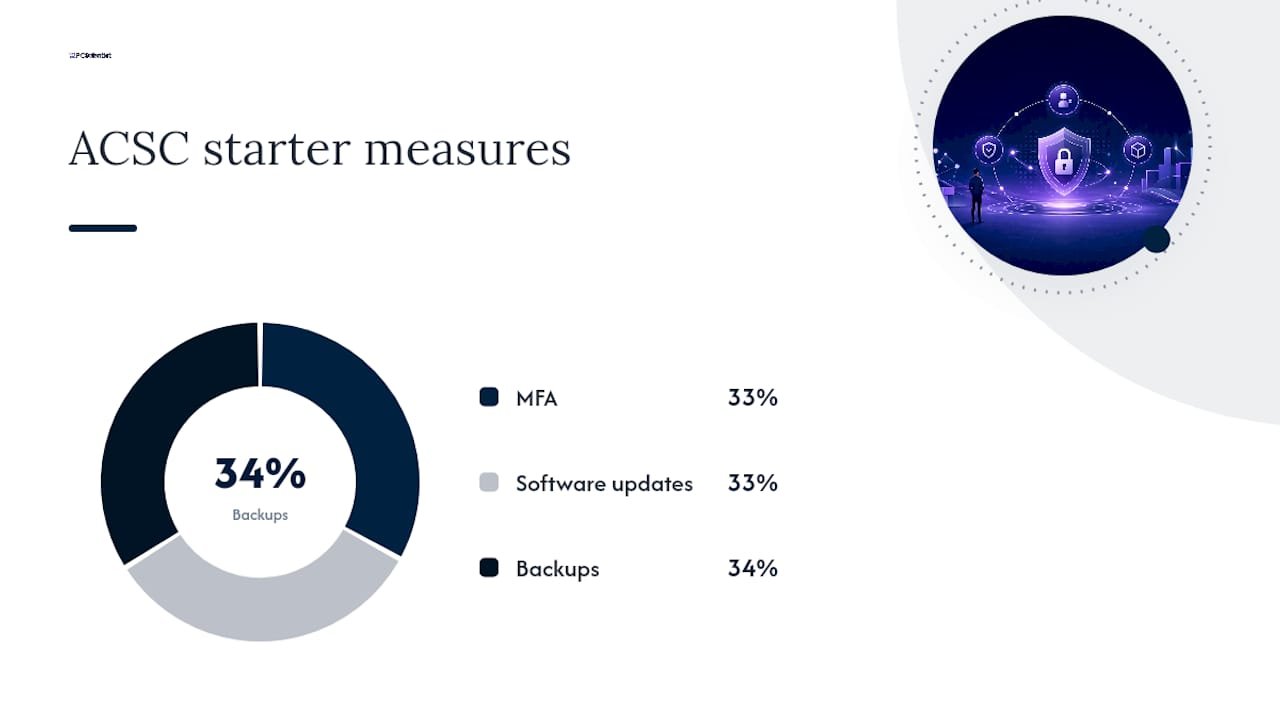
Small businesses have real skin in this game. The Australian Cyber Security Centre's small business guidance points to enabling MFA, keeping software updated, and backing up information as the three starting measures every small business should put in place before anything else. That is not a random suggestion. It reflects where attackers actually get in: stolen or guessed passwords, unpatched software, and businesses with no backup to fall back on when ransomware hits.
Protect your accounts: MFA, strong passwords and account hygiene
Your accounts are the front door, and most break ins happen because that door was left unlocked, not because someone picked the lock. Multi factor authentication is the single most effective control you can add, and the ACSC's small business cyber security checklist names it as a primary control, recommending you start with your most important accounts first.
Here is a practical order to work through:
- Turn on MFA for email first. Email is usually the account attackers want most, because it lets them reset every other password.
- Then banking and accounting software, followed by any cloud storage or customer database.
- Use an authenticator app over SMS where you can. SMS codes can be intercepted through SIM swapping; app based codes generally can't.
- Roll out a password manager so nobody is reusing "Password123" across six different logins, or writing passwords on sticky notes.
- Review shared accounts. If three staff log into the same social media account, give each person their own login instead, and apply least privilege, meaning people only get access to what their job actually needs.
- Schedule a quarterly admin review. Check who still has administrator access and whether they still need it.
Pro Tip: Before you lock down admin access, write down a recovery process and store it somewhere offline. Nothing wastes a Tuesday morning like being locked out of your own email with no backup admin account to fix it.
Protect devices and networks: updates, endpoint security and Wi-Fi
Every laptop, phone and router in your business is a potential entry point, and the fix for most of them is genuinely boring: keep things updated. Turn on automatic updates for Windows, macOS, and your key business applications so patches install without anyone needing to remember. For servers or specialised software where updates might break something, schedule a monthly review instead of full automation, so you can test first.
Windows Security (built into Windows 10 and 11) covers basic antivirus and firewall needs for most small teams without extra cost. If you are handling sensitive customer data or running a larger fleet of devices, a dedicated endpoint protection tool adds centralised visibility your IT provider can monitor remotely.
Your router deserves more attention than it usually gets:
- Change the default admin username and password the day you install it.
- Use WPA3 encryption where your router supports it, or WPA2 at minimum.
- Set up a separate guest Wi-Fi network so visitors never touch your business systems.
- Turn off remote management features you are not actively using.
Remote access is worth a specific check. Unused Remote Desktop Protocol connections are a favourite target for attackers scanning the internet for weak points, so disable anything you are not using, and secure genuine remote access with a proper VPN rather than an open port. If that sentence made your eyes glaze over, that is a sign to get a technician to do a network and Wi-Fi assessment rather than guessing.
Back up and recover: the checklist that actually saves your business
A backup you have never tested is a backup you do not actually have. The ACSC's small business hub is blunt about this: without verified restores, recovery after an incident may not be possible at all, no matter how confident you feel about your backup routine.
Work through this order:
- Identify what needs backing up: business data, full system images for critical machines, and configuration settings for key software.
- Apply the 3-2-1 rule: three copies of your data, on two different types of storage, with one copy kept offsite or offline.
- Automate the schedule. Daily backups for active data, weekly full system backups, and immediate backups before major software changes.
- Test a restore every quarter. Pick a file or folder and actually restore it. If it fails, you want to know now, not during a ransomware attack.
Pro Tip: Keep at least one backup copy disconnected from your main network, and protect the credentials for your backup system with their own MFA. Ransomware increasingly hunts for connected backups specifically, so an offline copy is your last real line of defence.
If a restore ever fails and you are staring down lost files, a data recovery specialist can sometimes retrieve what looks unrecoverable, but that should be your backstop, never your plan.
Prepare your people: training, phishing defences and policies
Your staff either strengthen your defences or become the weakest point in them, and which one depends entirely on whether you have trained them. Business.gov.au's guidance is consistent on this: staff education and simple reporting processes reduce the risk of phishing and invoice fraud more reliably than most technical controls alone.
Cover these topics in a short session, then refresh every six months:
- How to spot a phishing email (mismatched sender addresses, urgent payment requests, unexpected attachments).
- Why they should never approve a payment change over email without a phone call to confirm it.
- What to do the moment they suspect they have clicked something they shouldn't have.
- Basic password and device hygiene, including locking screens when stepping away.
Low cost phishing simulations, sent through most email security tools or even manually crafted test emails, show you who needs extra support without embarrassing anyone. Set up a simple reporting flow: "If you think an email looks suspicious, forward it to [a nominated inbox] before clicking anything, and tell your manager immediately." Write short, plain policies covering device use, data access and incident reporting, and automate account revocation the day someone leaves the business, not weeks later when someone remembers.
Incident response: your simple emergency plan
Panic is the enemy of a good response. Write this down before you need it, not while you are living it.
- Isolate the affected system. Disconnect it from the network immediately, but don't turn it off if you suspect ransomware, since that can complicate recovery.
- Preserve evidence. Take screenshots and note timestamps before you start fixing anything.
- Contact your bank immediately if payment details or accounts may be compromised.
- Call your insurer if you hold cyber insurance, as many require early notification.
- Document everything: what happened, when you noticed, and what you have done so far.
For live incidents, ring the Australian Cyber Security Hotline on 1300CYBER1 (1300292371). Separately, the Small Business Cyber Resilience Service, delivered with IDCARE, offers free person to person support and a tailored recovery plan for businesses with up to 19 employees, reachable on 1800 595 170. If the incident involves personal information about customers or staff, check your obligations under the Notifiable Data Breaches scheme through the Office of the Australian Information Commissioner before deciding whether it needs formal reporting.
What comes after the checklist: the Essential Eight and ongoing upkeep
Finishing this checklist is not the finish line. It is the point where you shift from crisis prevention to routine maintenance, and the recommended next step is the Essential Eight, a set of baseline strategies developed by the Australian Signals Directorate. Maturity Level One is the entry point the ACSC suggests may suit smaller organisations, covering things like application control, restricting admin privileges and patching applications promptly.
Build a simple maintenance rhythm around it:
- Weekly: check backup logs, review any flagged security alerts.
- Monthly: confirm updates installed correctly, review new user accounts and permissions.
- Quarterly: test a full backup restore, run a phishing simulation, review admin access.
- Annually: reassess your Essential Eight maturity level and consider whether it is time for an external security review.
Government guidance frames cyber security this way for a reason: it is an ongoing cycle of assess, implement, test, and maintain, not a box you tick once and forget.
How PC Scientist fits into this checklist
We spend a lot of our week doing exactly what this article describes: running assessments, sorting out patching schedules, configuring backups that actually restore when tested, and helping businesses through the messy aftermath of an incident. Our Cybersecurity Scientist service exists for the moment you decide you'd rather have someone check this properly than keep guessing. If you have worked through this checklist and want a second set of eyes, or you need after-a-scare support, that's a conversation we're happy to have.
Our take: the checklist matters more than the acronym
The cyber security industry loves talking about frameworks before businesses have even locked their front door. That is backwards. The judgement this guidance actually supports is simple: MFA, updates, and backups protect against the overwhelming majority of everyday incidents small businesses face, and everything after that is refinement, not foundation.
Where conventional advice falls short is in treating every business like it needs enterprise grade controls on day one. A five person accounting firm does not need the same maturity roadmap as a fifty person logistics company, and pretending otherwise just leads to overwhelm and inaction. Start with the checklist. Get the basics genuinely working, tested, and habitual. Only then does the Essential Eight or a formal audit start to earn its keep.
If you take one thing from this, take this: perfect security does not exist, but a business with MFA on, backups tested, and staff who know how to spot a scam is dramatically harder to hurt than one without.
- PC Scientist
Get a hand putting this checklist into practice
Working through this alone is doable, but it takes time most small business owners simply don't have between running the actual business. PC Scientist offers something a generic online guide can't: a technician who sits down with your setup, tells you plainly what's already solid and what needs attention, and fixes it without the jargon.

A typical first visit covers a site assessment, a priority list of fixes ranked by impact and ease, and a proper backup setup with a test restore to ensure it works. If your Wi-Fi or router setup needs a look too, that gets covered in the same visit rather than a separate booking. Book a cybersecurity assessment with PC Scientist, or start from our main site if you're not sure exactly what you need yet. We'll figure that part out together.
Official resources and quick links
- ACSC Small Business Cyber Security Guide and checklist PDF
- Small Business Cyber Resilience Service, 1800 595 170
- Australian Cyber Security Hotline: 1300CYBER1 (1300292371)
- OAIC for data breach notification obligations
- A trusted local provider such as NextGen IT for scam protection guidance if you're outside PC Scientist's NSW service areas
Sources
- Small business cyber security checklist (ACSC, June 2023 PDF)
- ACSC Small Business Cyber Security Guide (V6, PDF)
- Business
Recommended
- Business Cybersecurity NSW | After a Scare
- Business IT Support NSW | Onsite & Remote
- Business Network & Wi-Fi Assessment NSW
- Case Studies | Real IT Support, Website and Network Outcomes
Frequently Asked Questions
Straight answers about Fix Cyber Security in a Week: 3 ACSC Steps for Small Businesses - without jargon or pressure. Call 0493 563 381 for advice, or get help below.
Want the quickest answer? 0493 563 381 for free advice.
Definitions vary depending on the source, but a common version covers Change, Compliance, Cost, Continuity, and Coverage, referring to the operational pressures businesses balance when managing security. For a practical small business checklist, the ACSC's starting measures, MFA, updates, and backups, matter far more than remembering an acronym.
Salaries in cyber security vary widely by role, experience, and location, and no figure can be stated as typical without a specific source for your market. If you're weighing a career move, research current job listings and industry salary surveys in your region rather than relying on a single headline number.
Small businesses need the same fundamentals as larger ones, just scaled to their size and budget: MFA, updated software, tested backups, basic endpoint protection, staff awareness, and a written incident plan. The ACSC's small business guide frames these as the non-negotiable starting point before anything more advanced. PC Scientist's Cybersecurity Scientist service is built around implementing exactly this list for businesses that want hands on help.
Applied to small business security, it means roughly 80% of your risk reduction comes from a small set of high impact actions, MFA, patching, and backups, rather than from complex or expensive tools. This mirrors the priority approach this article recommends: fix the high impact, easy wins first before chasing more advanced controls.
Test a full restore at least quarterly, and immediately after any major change to your backup system or software. An untested backup can fail silently for months, and ACSC guidance treats verified restores as essential, not optional.
Cybersecurity across NSW
Still stuck on a small-business cyber security checklist?
If the device still does not feel safe, that is okay. Get help in your area and we will take it from here.
Start here
Get cybersecurity help
Optional Need a Sydney city or region?
Choose a side of Sydney
These are Sydney cities and regions, such as the Northern Beaches or Inner West. First tap a side of Sydney. Then open the city or region that covers you.
C Sydney City / Inner 3 areas
N Northern Sydney 6 areas
NW North-West / Central Sydney 3 areas
W Western Sydney 1 area
SW South-West Sydney 3 areas
S Southern Sydney 2 areas
Optional Find your suburb
Type a suburb from our listed coverage. This opens the matching city or region page for this topic. Listed suburb pages are general technology services, not this specialist page.
If your suburb is not listed, use the city or region list above, or call 0493 563 381.
Disclaimer
The information in this article is provided for general educational and informational purposes only. While PC Scientist strives to keep all content accurate and up to date, technology issues can vary depending on your device, software, network configuration, and individual circumstances. Always back up important data before attempting repairs or system changes. If you are unsure or the issue cannot be resolved safely, contact PC Scientist today for professional onsite or remote IT support. PC Scientist is not liable for any loss of data, damage, or other issues resulting from the use of the information provided in this article.

