

One Session to a One Page Disaster Recovery Plan for Small Businesses
A disaster recovery plan for small business needs to do one job well: get you trading again with minimal downtime while keeping your people safe. Start today with two things, a one-page register of your critical systems, and an emergency contact card sent to every staff member. For the templates and grant links, Business is your official starting point, and Professional IT support can help you turn that first page into a working plan.
Key takeaways
- Small businesses should prioritize verifying backup restores and preparing a one-page critical-systems register for effective disaster recovery.
- A practical plan includes defining RTO and RPO targets with simple questions about survival time and acceptable data loss.
- Conducting regular tests such as tabletop exercises and full recovery rehearsals ensures the plan works when it counts.
- Building the plan involves a quick impact audit, inventorying backups, and creating short communication and recovery protocols.
- Professional IT support can identify weaknesses, verify backups, and assist with practical drills to strengthen disaster readiness.
Table of Contents
- What is a disaster recovery plan and who does it cover?
- What must a small-business disaster recovery plan include?
- How do you actually build a disaster recovery plan, step by step?
- How often should you test and review your recovery plan?
- Templates you can copy right now
- Where small-business plans usually fall short
- Our take: plans fail on execution, not ambition
- Getting your plan tested and working with PC Scientist
- Where to find official templates and disaster support
- Sources
- FAQ
What is a disaster recovery plan and who does it cover?
A disaster recovery plan (DRP) is a document that tells you and your staff exactly how to restore critical operations after something knocks the business offline. It sits inside your broader business continuity plan and usually follows the PPRR model used by Business Queensland: prevention, preparedness, response and recovery. Each phase asks a different question, from "how do we stop this happening" through to "how do we get back to normal trading."
Small businesses tend to plan for a narrow set of recurring threats:
- Power outages that take down point-of-sale systems or refrigeration
- Cyber-attacks, particularly ransomware and phishing that locks staff out of email
- Flood, storm or fire damage to premises and equipment
- Sudden staff absence, whether illness or an inability to reach the site
A DRP doesn't need to cover every conceivable scenario. It needs to cover the ones most likely to stop you trading, and set out who does what when they happen.
What must a small-business disaster recovery plan include?
Every reliable small business disaster recovery plan contains the same core building blocks, regardless of industry. Miss one and the plan tends to fail exactly when you need it most.
- Asset and licence inventory - hardware, software subscriptions, login credentials and where key documents live.
- Business impact analysis (BIA) - which services are critical, who owns each one, and what happens if they stop.
- RTO and RPO targets - your recovery time objective (how fast a system must come back) and recovery point objective (how much data loss is tolerable, measured in time since the last backup).
- Backup strategy - cloud backups, image backups and an offsite copy, verified on a set cadence rather than assumed to be working.
- Communications plan - scripts and contact trees for staff, suppliers, customers and, if needed, media.
- Insurance and financial recovery steps - what evidence you need for a claim, and which grants you may be eligible for.
- Roles and recovery contacts - a named person for each task, with backups in case someone is unavailable.
Pro Tip: Don't let RTO and RPO become abstract numbers. Ask "how many hours could we survive without this system" for RTO, and "how much work could we afford to redo" for RPO. Those two plain-English questions usually get you to the right figure faster than any formula.
Small Business NSW's continuity toolkit walks through this exact structure with hazard-specific checklists for bushfire, flood and cyber incidents, and it's worth working from if you want a ready-made framework rather than building one from scratch.
How do you actually build a disaster recovery plan, step by step?
Building a small business disaster recovery plan doesn't need a consultant or a week off. Here's a sequence that produces something usable by the end of a single session.
- Run a quick impact audit (30 to 60 minutes). List every core function (sales, invoicing, payroll, comms) with an owner's name next to each. Mark which ones would hurt within a day versus a week.
- Set your RTOs and RPOs. Anything customer-facing or revenue-generating gets a tight RTO, measured in hours. Internal admin systems can usually wait a day or two.
- Inventory and back up. Note what's backed up, where (cloud, external drive, offsite), and how often you've actually tested a restore, not just a backup.
- Build your communications plan. Draft a phone tree, a template message for customers, and a rule that only one person is authorised to speak publicly during an incident.
- Sort insurance and immediate financial steps. Photograph damage, log everything, and know who to call first, including whether you're eligible for a government disaster grant of up to $25,000, depending on the disaster and your location.
- Write a short recovery playbook. One to two pages covering temporary premises, backup suppliers and how you'll message customers in the first 48 hours.
By the end, you should have four deliverables sitting in a shared folder:
- A one-page critical-systems register
- A simple BIA with named owners
- An emergency communications card
- A 48-hour checklist for the first days after an incident
That's a working plan. It won't be perfect, but it beats the alternative most small businesses have now, which is nothing written down at all.
How often should you test and review your recovery plan?
A plan that's never been tested is a guess dressed up as a document. Three test types cover most small businesses without eating your whole week.
- Table-top exercise - a 60-minute conversation where you walk through a scenario ("the server's down, it's 9am on a Monday") and check whether everyone knows their role.
- Partial failover - restoring a single system, like your accounting software or email, from backup to confirm it actually works.
- Full recovery rehearsal - a rarer, more involved test where you simulate restoring everything, usually once a year.
Small Business NSW recommends checking backup restores weekly or quarterly and running a full rehearsal annually. Business Queensland goes further, suggesting workplace simulations that include staff directly, rather than leaving testing to the owner or IT contractor alone.
For the table-top, book 60 minutes, pick one scenario, and write down every gap someone raises. Keep those notes, along with photos, logs and test reports, because insurers and grant assessors often want proof you had a working plan before the event, not just after.
Pro Tip: Store your test reports alongside your insurance policy documents. When a claim's being assessed, evidence that you tested backups and had a documented plan can genuinely speed up the process.
Templates you can copy right now
You don't need special software for any of this. A shared spreadsheet and a printed card will get you further than most paid tools.
- Critical-systems register: system name, owner, RTO, RPO, backup location, last test date.
- BIA fields: function, impact if lost for a day/week, dependencies, current workaround.
- Emergency contact card: staff mobile numbers, insurer contact, IT support number, landlord or property manager.
- Customer message template: "We're currently experiencing [issue] and expect to be back online by [time]. Thanks for your patience."
- 48-hour checklist: secure the premises, record all damage with photos, contact your insurer, set up temporary operations if needed.
| Deliverable | Purpose | Where to keep it |
|---|---|---|
| Critical-systems register | Know what to restore first | Cloud drive + printed copy |
| Emergency contact card | Reach the right people fast | Staff phones + noticeboard |
| 48-hour checklist | Guide the first two days | Cloud drive + printed copy |
| Test reports | Support insurance/grant claims | Cloud drive, backed up offsite |
Keep a digital copy in the cloud and a printed copy somewhere that doesn't depend on power or internet, exactly as business.gov.au recommends in its three-part emergency management template.
Where small-business plans usually fall short
The weakest point in most small-business DRPs we see isn't the plan itself, it's the assumption that backups work simply because they exist. Unverified backups and missing or outdated contact lists cause more failed recoveries than the actual disaster does.
Call in a professional when a restore fails, your network setup is complex enough that nobody fully understands it, or you're cleaning up after ransomware. That's when a proper business IT support assessment earns its cost quickly.
Our take: plans fail on execution, not ambition
The research on this is consistent, and it points somewhere most owners don't expect. Small businesses rarely fail their disaster recovery because the plan was too thin. They fail because the plan was too long to read under pressure, or because nobody ever tested whether the backup it relied on actually worked.
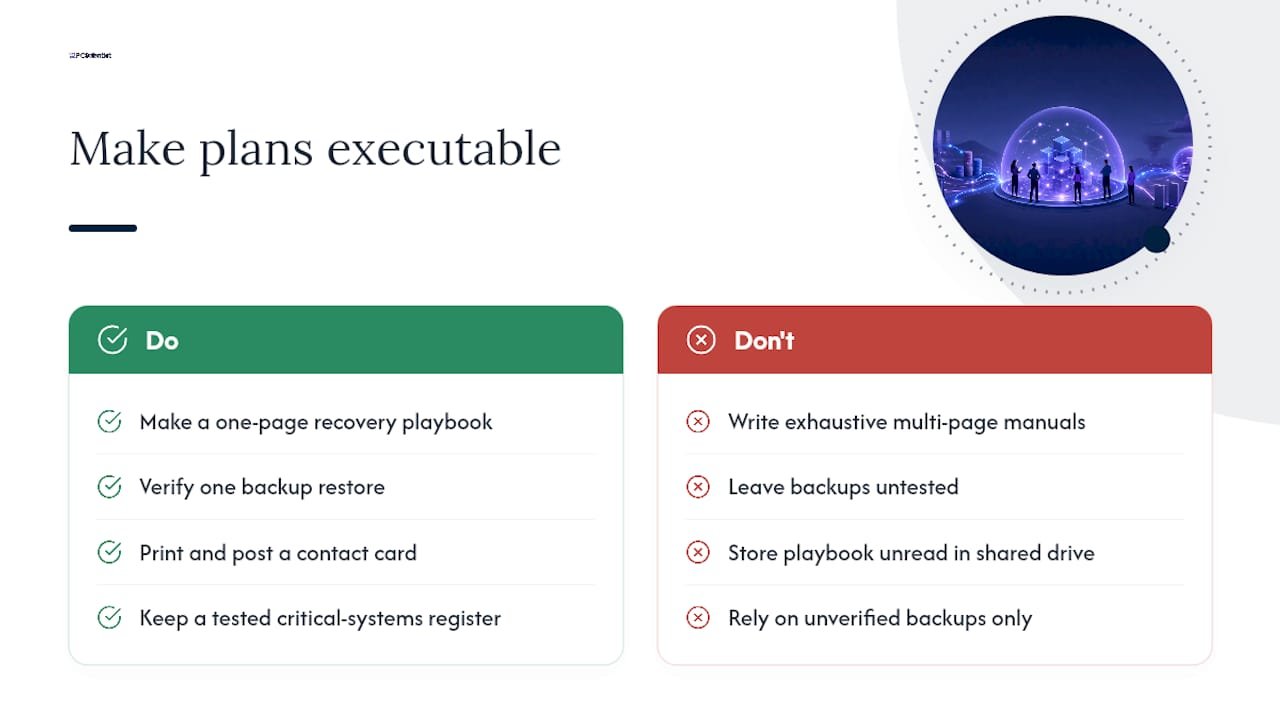
Conventional advice pushes owners toward exhaustive, multi-page continuity documents modelled on enterprise frameworks. That's backwards for a five-person business. A single page that staff can find, read and act on in under two minutes beats a comprehensive plan sitting unread in a shared drive. Small Business NSW's own guidance backs this: the highest-value outputs for a small operation are a tested critical-systems register and a short recovery playbook, not a lengthy manual.
If you do nothing else this month, verify one backup restore and print one contact card. Everything else in a disaster recovery plan for small business builds on those two habits, and almost nothing else matters if they're missing.
- PC Scientist
Getting your plan tested and working with PC Scientist
Writing the plan is half the job. The other half is making sure the backups actually restore, the network holds up under pressure, and someone competent has looked at where the real weak points sit. Professional local IT support can provide practical help for small businesses in NSW that want a team to sanity-check a plan rather than build one from a generic online course.

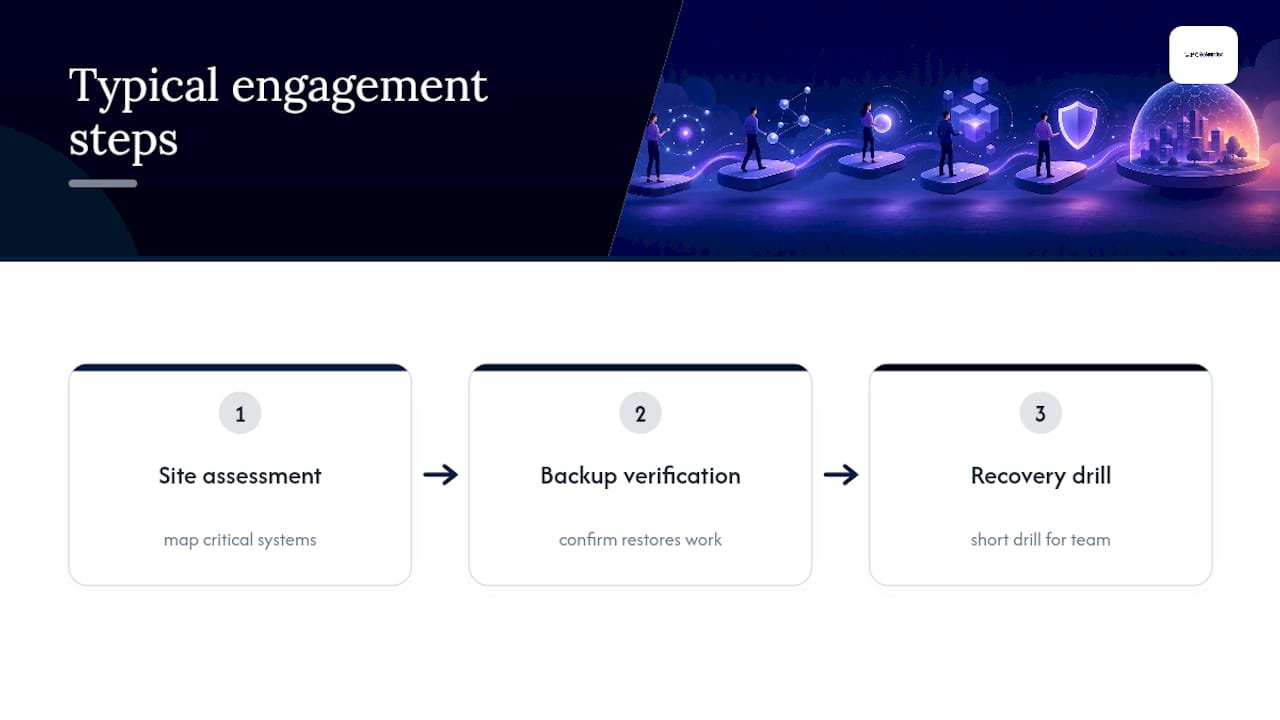
A typical engagement starts small: a site assessment to map your critical systems, a backup verification to confirm your restores actually work, and a short recovery drill so your team knows what to do before an incident forces the question. If your business runs on Microsoft 365, shared drives or a point-of-sale system tied to the internet, our business IT support team can walk through your setup and flag the gaps most owners miss. If your last scare was a phishing email or a lockout, our cybersecurity service focuses specifically on that kind of cleanup and prevention. And if a backup has already failed and you need files back now, Data Recovery Scientist handles urgent restores.
The simplest next step is a network and backup assessment, so book a business IT support visit and get a clear picture of where your plan needs strengthening.
Where to find official templates and disaster support
Start with business.gov.au's emergency management template and its disaster assistance portal. NSW businesses should also check Small Business NSW's continuity toolkit and Business Queensland's continuity guidance for hazard-specific advice and grant eligibility in your state.
Sources
Recommended
- Business Cybersecurity NSW | After a Scare
- Data Recovery Scientist | Files & Backup Help NSW
- Business Network & Wi-Fi Assessment NSW
Frequently Asked Questions
Straight answers about One Session to a One Page Disaster Recovery Plan for Small Businesses - without jargon or pressure. Call 0493 563 381 for advice, or get help below.
Want the quickest answer? 0493 563 381 for free advice.
A solid plan includes an asset inventory, a business impact analysis, RTO and RPO targets, a backup strategy, a communications plan, and named recovery contacts. Business.gov.au's template structures this into three parts: a continuity plan, an emergency action plan and a recovery plan.
There's no fixed cost. Many small businesses build the basics themselves using free government templates, then bring in an IT provider for backup verification and testing. PC Scientist's pricing for a site assessment and review is available on request through business IT support.
Definitions vary across industries and no single standard "four C's" applies universally to small-business disaster recovery. If you've seen this term elsewhere, check the specific framework it's referencing before applying it to your plan.
A practical five-step sequence is: run a quick impact audit, set your RTOs and RPOs, inventory and verify backups, build a communications plan, then document a short recovery playbook for the first 48 hours. This mirrors the structure recommended in Small Business NSW's continuity toolkit.
Data recovery across NSW
Still stuck on a disaster recovery plan?
If files have gone missing, that is okay. Get data recovery help in your area and we will take it from here.
Start here
Get data recovery help
Optional Need a Sydney city or region?
Choose a side of Sydney
These are Sydney cities and regions, such as the Northern Beaches or Inner West. First tap a side of Sydney. Then open the city or region that covers you.
C Sydney City / Inner 3 areas
N Northern Sydney 6 areas
NW North-West / Central Sydney 3 areas
W Western Sydney 1 area
SW South-West Sydney 3 areas
S Southern Sydney 2 areas
Optional Find your suburb
Type a suburb from our listed coverage. This opens the matching city or region page for this topic. Listed suburb pages are general technology services, not this specialist page.
If your suburb is not listed, use the city or region list above, or call 0493 563 381.
Disclaimer
The information in this article is provided for general educational and informational purposes only. While PC Scientist strives to keep all content accurate and up to date, technology issues can vary depending on your device, software, network configuration, and individual circumstances. Always back up important data before attempting repairs or system changes. If you are unsure or the issue cannot be resolved safely, contact PC Scientist today for professional onsite or remote IT support. PC Scientist is not liable for any loss of data, damage, or other issues resulting from the use of the information provided in this article.

