

Laptop Hinge Repair: Fix, Replace or Walk Away
A broken or loose laptop hinge is usually fixable, and the sooner you deal with it, the smaller the job. A hinge that has only worked loose is often a straightforward repair. A hinge that has already cracked the lid or the base can turn into a bigger job, because the hinge is bolted into plastic that tears when it is forced. This guide shows you how to tell which situation you are in, what not to do in the meantime, and when repairing makes sense compared with replacing the laptop.
Key takeaways
- A lid that will not stay up, a grinding or stiff feel, or a gap between the screen and the base are early signs. Stop opening and closing it as normal and get it looked at.
- Never force the lid. Pushing a stiff or broken hinge can crack the case and damage the screen cable that runs through it.
- Light DIY (a loose screw, for example) is one thing. Prising apart a cracked case is another, and it is where small faults become expensive ones.
- Repair usually wins when the laptop is otherwise healthy. If the quote is too high, you can still use the laptop as a desktop with an external monitor, keyboard and mouse.
- We assess laptops across NSW, onsite or remote where it suits, and tell you honestly whether to fix or replace.
Table of Contents
- Signs your laptop hinge is broken, loose or on its way out
- Why a hinge problem gets worse the longer you wait
- What to do the moment a hinge breaks
- Can you fix a laptop hinge yourself?
- Hinge, mount or lid: what actually needs repairing
- When is it a repair, and when is it a replacement part?
- What affects the cost of laptop hinge repair in Sydney
- Is it worth repairing, or should you replace the laptop?
- Perspective: what we see in the workshop and at the door
- How to prevent a laptop hinge from breaking
- Getting a laptop looked at before it gets worse
- What happens to the old hinge and the old laptop
- FAQ
- Sources
Signs your laptop hinge is broken, loose or on its way out
Hinges rarely fail without warning. Watch for these:
- The screen will not stay put. It flops backwards or slowly sinks closed when you let go.
- Stiffness, clicking or a grinding feel as you open the lid. One side may move more easily than the other.
- A gap or lifting where the lid meets the base, usually at one corner.
- Hairline cracks in the plastic around the hinge, or the bezel around the screen starting to separate.
- The screen flickers or goes dark when you move the lid. The display cable passes through the hinge area, so movement can strain it.
- The lid wobbles when you type, or the laptop base seems to bulge near the hinge.
If you spot the first two, you are in the cheap-to-fix zone. If you spot cracks or flickering, stop using the hinge movement as much as you can and book an assessment.
Why a hinge problem gets worse the longer you wait
A hinge is a lever. When one side is loose or seized, every open and close pushes against the screws and plastic mounts holding it in place. Those mounts are often small posts moulded into the laptop's shell. Once they crack, a screw has nothing solid to grip, and the job is no longer about the hinge alone.
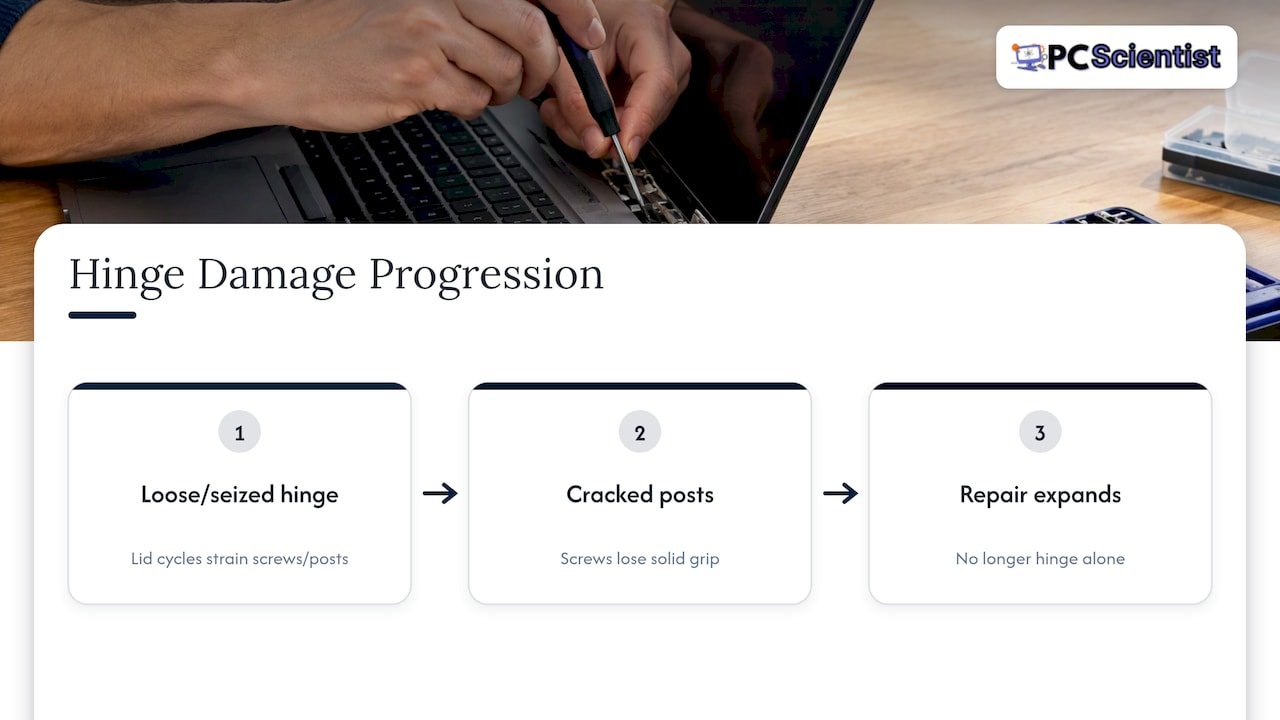
Forcing is the other common cause of damage. Dell Australia notes that opening a lid beyond its physical hinge stop can crack the hinge, palm rest, back cover, bezel or panel. That applies to most brands, not only Dell. If your laptop does not open flat, it was designed that way, so do not push it.
What to do the moment a hinge breaks
Stay calm. A broken hinge is rarely an emergency for your files, and what you do in the first few minutes matters more than speed.
- Stop moving the lid. Do not test it to see how bad it is.
- Save your work and shut down. A screen that flickers while you work is a good reason to back up now.
- Do not pick up the laptop by the screen. Lift it from the base with the lid closed, or supported flat.
- Do not use glue. It looks like a quick fix, but adhesive can run into the case, seal screws in place and make a proper repair harder.
- Keep every loose screw and fragment. Put them in a small container and bring them with the laptop.
If you cannot open the laptop at all, or something else has failed, you can connect a monitor, keyboard and mouse and use it like a desktop PC while you decide what to do. That keeps you working and gives you time to get a sensible quote.
Can you fix a laptop hinge yourself?
Sometimes. It depends on how far the damage has gone.
Reasonable to try at home:
- Tightening a visible hinge screw that has backed out, on a laptop with no cracks.
- Checking whether something (a pen, a cable, a charger) is stopping the lid from closing.
Better left to a technician:
- Any hinge that is cracked, bent or has pulled out of the plastic.
- Anything that needs the screen bezel or back cover removed. These clips snap easily, and the screen cable sits right there.
- Laptops under warranty, where opening the case yourself may affect your cover.
If you do open a laptop, the battery is the hazard. iFixit's hinge replacement guides tell you to shut the laptop down, disconnect all cables and discharge the battery below 25%, because a charged battery can catch fire if it is damaged. If that sentence makes you uneasy, that is a good sign the job is one for a professional.
Online videos show epoxy, coupling nuts and drills. Those fixes can hold for a while on some models, but they tend to be permanent and they are hard to undo. They also do nothing for a screen cable that has been pinched. We would rather see a laptop before the glue goes on.
Hinge, mount or lid: what actually needs repairing
The word "hinge" covers a few different faults, and the answer to "repair or replace" depends on which one you have.
| What has failed | What you notice | Typical outcome |
|---|---|---|
| Hinge has loosened or worn | Screen drifts or flops, lid is stiff on one side | Often repairable or the hinge can be swapped |
| Hinge intact, plastic mount cracked | Hinge moves with the lid, gap at the corner | Needs the mount or case section repaired or replaced |
| Hinge snapped | Lid hangs at an angle or comes away | Replacement hinge, and a check of the screen and cable |
| Cable or screen damaged by the hinge | Flicker, lines, black screen | Hinge job plus display repair, which changes the maths |
The fourth row is why we assess before quoting. A quote for a hinge alone can look cheap until the screen turns out to be damaged too.
When is it a repair, and when is it a replacement part?
In plain terms:
- Repair means reusing the existing hinge or case, such as refastening it, rebuilding a mount, or realigning it.
- Replacement means fitting a new hinge or hinge set. Many laptops need both hinges replaced together, since a new one fitted beside a worn one can fail quickly.
- Neither applies when the case or motherboard area is too damaged, or when parts are no longer available for an older model.
Parts availability is the thing owners do not expect. A popular business laptop from a few years ago is usually easy. A budget model, a rare model or a thin-and-light design may be harder, which affects both cost and timing.
What affects the cost of laptop hinge repair in Sydney
We do not publish a fixed hinge price, because it varies so much between jobs. Here is what moves it, and it is the same list whether you are in the CBD, the Hills, the Northern Beaches or the Central Coast:
- The model. Parts for mainstream business and consumer laptops are easier to find than for gaming laptops or ultra-thin designs.
- One hinge or both. Replacing a pair is normal practice, and it costs more than a single hinge.
- Damage to the case. If the mounts are cracked, the repair involves more than the hinge.
- Screen and cable condition. If the display has been strained, that may need attention too.
- Time to source parts. A part that has to be ordered in takes longer than one on the shelf.
Ask any technician for a written quote that names the parts and says what happens if the job turns out bigger than expected. We give clear upfront pricing and our repairs are no fix, no fee, so you know the terms before we start.
Is it worth repairing, or should you replace the laptop?
Nobody wants to throw good money at an old machine, and nobody wants to buy a new one when a repair would do. Use these checks:
- How old is it, and does it run well otherwise? A three or four year old laptop with a solid processor, enough memory and a healthy battery is usually worth repairing.
- How does the quote compare with a similar replacement? If the repair is a modest fraction of the cost of an equivalent new laptop, repair. If it nears the cost of a new one, think again.
- Is it still under warranty? Check before anyone opens it.
- Is anything else failing? A dying battery, a slow drive or a cracked screen alongside the hinge changes the answer.
- Can it live as a desktop? If the repair is not worth it, the laptop can still serve with an external monitor, keyboard and mouse, which is a sensible option for a home office or a spare study machine.
Our longer guide, repair or replace your laptop in Australia, walks through a 10-minute decision process using these same questions.
If the laptop is quite new
A hinge that fails early may not be your problem to pay for. Under the Australian Consumer Law, CHOICE explains that for a major failure you can choose a replacement or a full refund, and for a minor issue the business must repair it free within a reasonable time. A hinge that cracks under normal use soon after purchase is worth raising with the retailer first. Physical damage from a drop or forced lid is a different matter, so be honest about how it happened.
Perspective: what we see in the workshop and at the door
Most hinge calls start the same way. Someone has noticed the screen drooping for months, kept using it, and then one day the lid comes away or the bezel cracks. The laptop is fine inside. It is the delay that costs money.
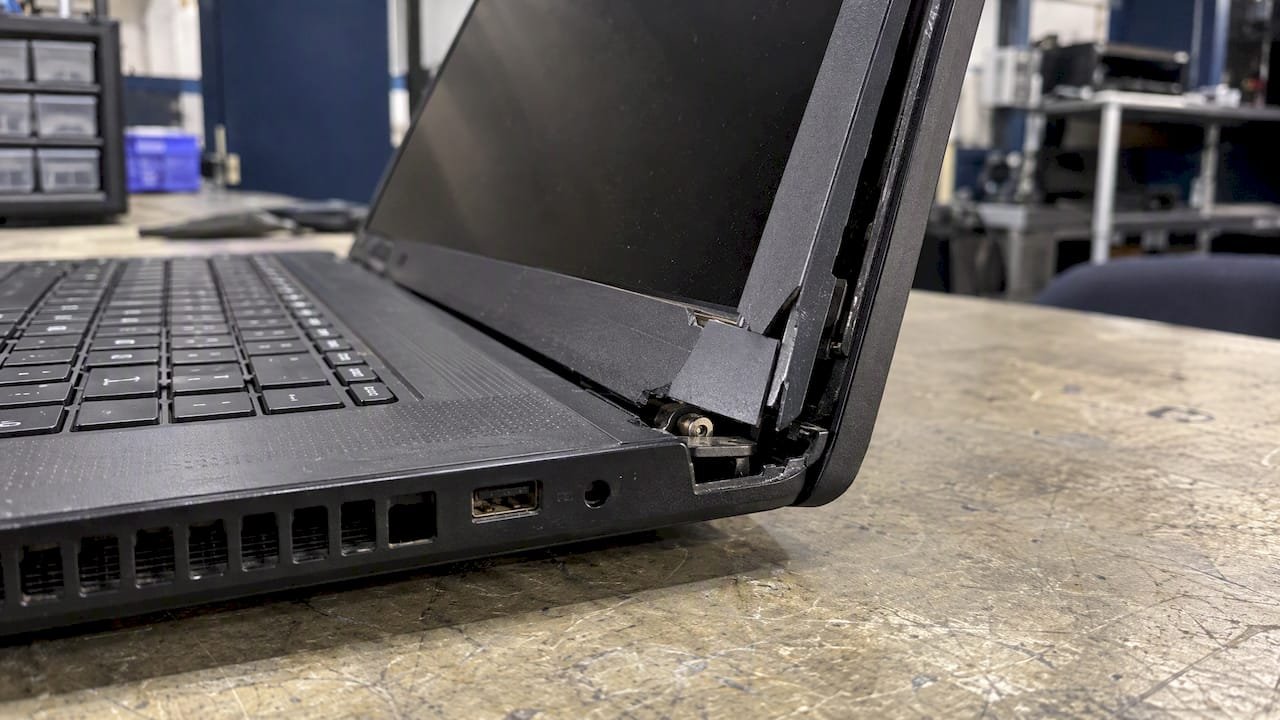
We also see well-meant fixes that make things harder. Glue is the usual one. If the hinge posts have been glued, the repair is no longer a clean part swap, and we have to tell people that honestly.
Our approach is simple. We look at the whole laptop, not only the part you pointed at. We tell you what has failed, what it will take to fix, and whether it is worth doing. If the better answer is to retire the laptop, we say so, and we can help you move your files across or turn it into a desktop setup. You should not need to know technical terms to get a straight answer, and you do not need to decide the exact service before you call.
- PC Scientist
How to prevent a laptop hinge from breaking
Hinges last for years when they are treated gently. Dell Australia's care and use guidance covers the habits that matter, and they apply to any brand:
- Close the lid gently, holding it near the centre rather than a corner.
- Do not force the lid past its limit.
- Keep pressure and objects off the laptop, including in a packed bag.
- Never lift or carry it by the screen.
- Close it before moving it.
- Use a padded sleeve or case.
Three extras from our experience: do not open a laptop with one hand from the corner, keep charger cables clear of the hinge area when you close it, and do not leave a laptop on a sofa arm where it can be knocked.
Getting a laptop looked at before it gets worse
When you are ready to have a hinge checked, we can look at it, tell you which of the faults above you have, and give you the options before any work starts. Our Computer Repair Scientist service covers laptops and desktops across NSW, and we offer onsite visits as well as remote help where it fits. If you want help with more than one device in a single visit, our computer support team can handle those at the same time.
Local pages if you want to see who covers your area: Sydney, Western Sydney, Inner West, Northern Beaches, Central Coast and Maitland.
If your laptop will not start at all, our guide on what to check when a laptop won't turn on is a good first step. And if files are worried you, ask us about data recovery and backup help before anything gets taken apart.
What happens to the old hinge and the old laptop
Hinge parts are often made from mixed metals and plastics, so they do not belong in the household bin. iFixit encourages people to recycle damaged hinge components through certified local e-waste programs. If a repair is not worth it and you are moving to a replacement, you can also consider a verified refurbished device, which is a lower-cost route that keeps electronics in use for longer. Whatever you choose, wipe or back up your files first, and ask us if you would like a hand moving them.
Sources
- Identify the Maximum Possible Lid Opening Angle on a Dell Laptop
- Best Practices for Use, How to Clean and Maintain Your Dell Notebook
- 4 Things to Do if Your Laptop's Hinge Just Broke
- Lenovo ThinkPad T16 Gen 3 Screen Hinges Replacement, iFixit
- Lenovo Flex 11 Chromebook Hinges Replacement, iFixit
- Refunds and returns in Australia: your rights, CHOICE
- Buying Refurbished Electronics Online Without Getting Burned
Recommended
- Decide in 10 minutes: Repair or replace your laptop in Australia
- Laptop won't turn on? Here's what to check first
Frequently Asked Questions
Straight answers about Laptop Hinge Repair: Fix, Replace or Walk Away - without jargon or pressure. Call 0493 563 381 for advice, or get help below.
Want the quickest answer? 0493 563 381 for free advice.
It depends on the model, whether one or both hinges need replacing, and whether the case or screen is also damaged. We do not publish a fixed hinge price. We give you a clear quote after assessing the laptop, and our repairs are no fix, no fee.
Sometimes, if the hinge is still firmly mounted and only a screw has loosened. If the lid still droops after tightening, or the plastic around the hinge is cracked, the mount has likely failed and tightening will not hold. Stop there and have it checked rather than forcing it.
It is safe for your data, but it risks making the damage worse. Avoid moving the lid, and connect an external monitor, keyboard and mouse if you need to keep working. Back up anything important if the screen flickers.
It may hold briefly, but it makes a proper repair harder and does nothing for the screen cable. We would advise against it if you want the laptop repaired professionally later.
Computer repair across NSW
Still stuck with a laptop hinge?
If the steps above did not get the repair sorted, that is okay. Get help in your area and we will take it from here.
Start here
Get computer repair
Optional Need a Sydney city or region?
Choose a side of Sydney
These are Sydney cities and regions, such as the Northern Beaches or Inner West. First tap a side of Sydney. Then open the city or region that covers you.
C Sydney City / Inner 3 areas
N Northern Sydney 5 areas
NW North-West / Central Sydney 3 areas
W Western Sydney 1 area
SW South-West Sydney 3 areas
S Southern Sydney 2 areas
Optional Find your suburb
Type a suburb from our listed coverage. This opens the matching city or region page for this topic. Listed suburb pages are general technology services, not this specialist page.
If your suburb is not listed, use the city or region list above, or call 0493 563 381.
Disclaimer
The information in this article is provided for general educational and informational purposes only. While PC Scientist strives to keep all content accurate and up to date, technology issues can vary depending on your device, software, network configuration, and individual circumstances. Always back up important data before attempting repairs or system changes. If you are unsure or the issue cannot be resolved safely, contact PC Scientist today for professional onsite or remote IT support. PC Scientist is not liable for any loss of data, damage, or other issues resulting from the use of the information provided in this article.