

Australia CCTV Prewire: Conduit, ACMA Rules, $120 Survey

Before plasterboard goes up, run one dedicated Cat6 or Cat6a cable per camera back to a central, ventilated hub, inside conduit with a service loop at each end. Leave spare runs for future cameras, plan PoE power at the hub, and get a registered cabler to terminate and certify the work. Get this sequence right and your CCTV install later becomes a one-visit job instead of a wall-chasing exercise.
Key takeaways
- Use one dedicated Cat6a cable per camera, with a service loop at each end, inside conduit sized at about 1.5 times the cable bundle for easy pulling.
- Plan the entire cabling path and hub location during site walkthrough, including spare runs and conduit capacity, to avoid costly wall chases later.
- Certify all terminations with a registered cabler, perform comprehensive testing, and label each cable end to prevent future faults and simplify maintenance.
- Position the central hub in a well-ventilated, dedicated cupboard with enough patch ports, grounding, surge protection, and a power supply with headroom for expansion.
- Consider running extra cable runs and reserve conduit for future upgrades like higher resolution cameras or additional buildings, at minimal upfront cost.
Table of Contents
- Step-by-step prewire planning checklist for builders and homeowners
- Which cables and conduit you actually need
- Choosing where the NVR, switch and patch panel live
- Getting camera placement and mounting right from the start
- Termination, labelling and testing before handover
- Australian cabling rules and how to hire a compliant installer
- Keeping finishes neat, and what to do if you missed the prewire
- Leaving room to add cameras and resolution later
- How we run CCTV site surveys and handovers
- Power supply options: PoE injectors versus local power
- Grounding and surge protection for CCTV cabling
- Integration points for other security systems
- When DIY prewire is fine, and when to call in the pros
- Our CCTV prewire site assessment, and how to book it
- FAQ
- Sources
Step-by-step prewire planning checklist for builders and homeowners
A good prewire starts with a plan, not a cable reel. Walk the site before any framing closes up and work through these steps in order.
- Map coverage first. Decide how many cameras you need and where, based on sightlines to entries, driveways, side gates and any blind spots around the build.
- Match camera type to location. A doorbell camera needs a different back box to a rooftop turret or an eave-mounted dome, so note the mounting style against each position.
- Plan every run back to one hub. Each camera gets its own home-run cable, with no daisy-chaining, so sketch the path from each camera location to the comms cupboard.
- Size the conduit and cupboard space together. Work out how many cables will share a conduit run or cable tray before anyone drills a hole.
- Add spare runs now. One or two extra Cat6a runs cost very little during construction and save a full wall-chase later.
- Lock in the schedule. Cabling needs to happen before plaster goes up but after framing, so this step has to sit on the build program, not get squeezed in afterwards.
- Coordinate trades early. Builder, electrician and registered cabler all need to agree on cupboard location, power points and access before the first cable is pulled.
Missing any one of these steps usually means cutting into a finished wall later, which costs far more than the extra conduit would have.
Which cables and conduit you actually need
For any IP camera system, Cat6 is the minimum and Cat6a is worth the small extra cost, especially over longer runs or where you expect higher-resolution cameras later. Both carry data and Power over Ethernet on the same cable, so a single run feeds the camera and powers it.
Coaxial cable still has a place, but only for legacy analogue systems. If you are prewiring a new build for anything modern, skip coax entirely and standardise on Cat6/Cat6a.
- Run one home-run cable per camera, in a star topology, rather than looping multiple cameras off one cable.
- Size conduit at roughly 1.5 times the bundled cable diameter so cables pull through without stress on the jacket.
- Use 20 to 25 millimetre conduit for a single Cat6 run, and step up to larger conduit where several runs or a future fibre backbone share the same path.
- Leave a 300 to 500 millimetre service loop at both the camera end and the hub end, coiled loosely behind a back box or in the cupboard.
- Secure cable with cable ties or clips that do not crush the jacket, and avoid sharp bends tighter than the cable's rated bend radius.
Keep the pair twist intact right to the point of termination. Untwisting pairs too early, even by a few centimetres, is one of the more common causes of unreliable camera feeds on an otherwise well-installed system.
For backbone runs between separate buildings, such as a house and a detached garage or granny flat, optical fibre is worth considering alongside copper. It handles distance and electrical interference far better than Cat6a once you are running more than about 90 metres.
Pro Tip: Pull an extra length of Cat6a alongside every planned camera run. A spare cable sitting dormant in conduit costs little now and saves a full retrofit later.
Choosing where the NVR, switch and patch panel live
The central hub is the single point where every camera cable, the network switch, the NVR and often the home network all meet, so its location matters as much as any camera position.
- Pick a dry, ventilated cupboard, ideally a dedicated comms cupboard rather than a cramped shelf in a linen press.
- Provide a dedicated, RCD-protected power outlet at the hub, and consider a small UPS to keep the NVR and switch running through short outages.
- Reserve more patch panel ports than you think you need. Cameras get added, and spare ports cost nothing once the panel is already in.
- Plan the cable entry point into the cupboard so bundled cables enter cleanly, with enough slack to dress and label them without strain.
- Check whether earthing or grounding is required for the cupboard and any surge protection equipment, and build that into the electrical compliance and certification plan rather than retrofitting it.
A cupboard that is too small or poorly ventilated shortens the working life of switches and recorders, particularly in warmer climates where equipment runs hot behind a closed door.
Getting camera placement and mounting right from the start
Placement decisions made during prewire are hard to undo once cable is fixed in a wall, so get them right the first time.
- Aim front-door cameras slightly downward to capture faces at a useful angle, rather than mounting too high and capturing only the tops of heads.
- Position driveway and rear-yard cameras to cover entry points and blind corners, not just open lawn.
- Use a mounting back box or plate at each camera position so the finish is clean and the cable terminates inside the wall rather than dangling.
- Mark each position clearly on the building plans and on the surface itself, including the preferred lens orientation, so the installer does not have to guess later.
- Keep camera coverage on your own property. Angling a camera to capture a neighbour's yard or windows creates privacy problems well beyond the cost of moving it.
Leave enough access around each mounting point for an installer to work comfortably, especially at height or in eaves, so the final fit-off does not need scaffolding that was not budgeted for.
Pro Tip: Photograph each marked camera position before the wall sheet goes up. It is the fastest way to settle a dispute about "that's not where we agreed" months later.
Termination, labelling and testing before handover
Cable that is pulled correctly but terminated poorly will still cause flaky camera feeds, so this stage deserves the same care as the pull itself.
- Terminate every run at the patch panel, using a consistent pinout, either T568A or T568B, at both the camera end and the hub end. Mixing standards on the same run is a common source of intermittent faults.
- Test each run with a proper cable tester for continuity, correct pair mapping and wiremap faults, not just a quick "does the light come on" check.
- Label both ends of every cable with a unique ID that matches a written cable plan, so a camera added years later does not mean tracing wires blind.
- Keep a test log recording the result for each run, and hand it over with the cable plan at completion.
- Never untwist pairs further than necessary to terminate. Even a short stretch of untwisted pair can introduce crosstalk that shows up as dropouts under load.
One registered cabler can complete and certify far more runs correctly the first time than an uncertified job that needs retesting after a failed camera feed.
Skipping the test-and-label step is the single most common reason a CCTV prewire looks fine on install day and then causes call-backs within the first few months.
Australian cabling rules and how to hire a compliant installer
Customer cabling, which includes CCTV and alarm cabling inside a property, is regulated work in Australia, not a job anyone with a drill can legally take on. Under the ACMA cabling provider rules, this kind of work must be performed by a registered cabler, and the current framework sits under the Telecommunications (Cabling Provider) Rules 2025.
Registration comes in different kinds, including open, restricted and lift registration, and specialised work such as structured cabling or coaxial installation can require additional competency units on top of base registration. The ACMA rules set minimum experience hours for these categories, so not every registered cabler is automatically qualified for every cabling type.
Terminated cabling should also meet AS/CA S009, the industry cabling standard referenced throughout ACMA guidance, and where the hub's power supply or RCD protection is involved, the work needs to meet AS/NZS wiring rules with a proper Certificate of Compliance issued for the electrical component.
- Ask any installer for proof of current cabling registration before work starts.
- Confirm the scope in writing, including who terminates, tests and labels each run.
- Check what warranty applies to both the cabling and the installed equipment.
- Get a copy of the test log and cable plan at handover, not just a verbal "it's all done."
| Compliance item | What it covers | Reference |
|---|---|---|
| Cabler registration | Who is legally allowed to perform customer cabling | ACMA cabling provider rules |
| Registration kind | Open, restricted or lift, with specific competency units | Telecommunications (Cabling Provider) Rules 2025 |
| Cabling standard | Structured cabling and termination practice | AS/CA S009 |
| Electrical compliance | Power, RCD protection, Certificate of Compliance | AS/NZS wiring rules |
Keeping finishes neat, and what to do if you missed the prewire
A well-planned prewire should leave almost no visible cable once the walls are finished. Back boxes, recessed plates and conduit routed through eaves or soffits keep every run hidden behind a clean faceplate.
- Use recessed mounting plates at each camera position so cable terminates flush rather than in a surface-mounted gland.
- Route conduit through roof spaces, eaves or soffits wherever possible, rather than through visible wall surfaces.
- Colour-match any visible fittings to the exterior finish, and document every concealed run on the as-built plan for future reference.
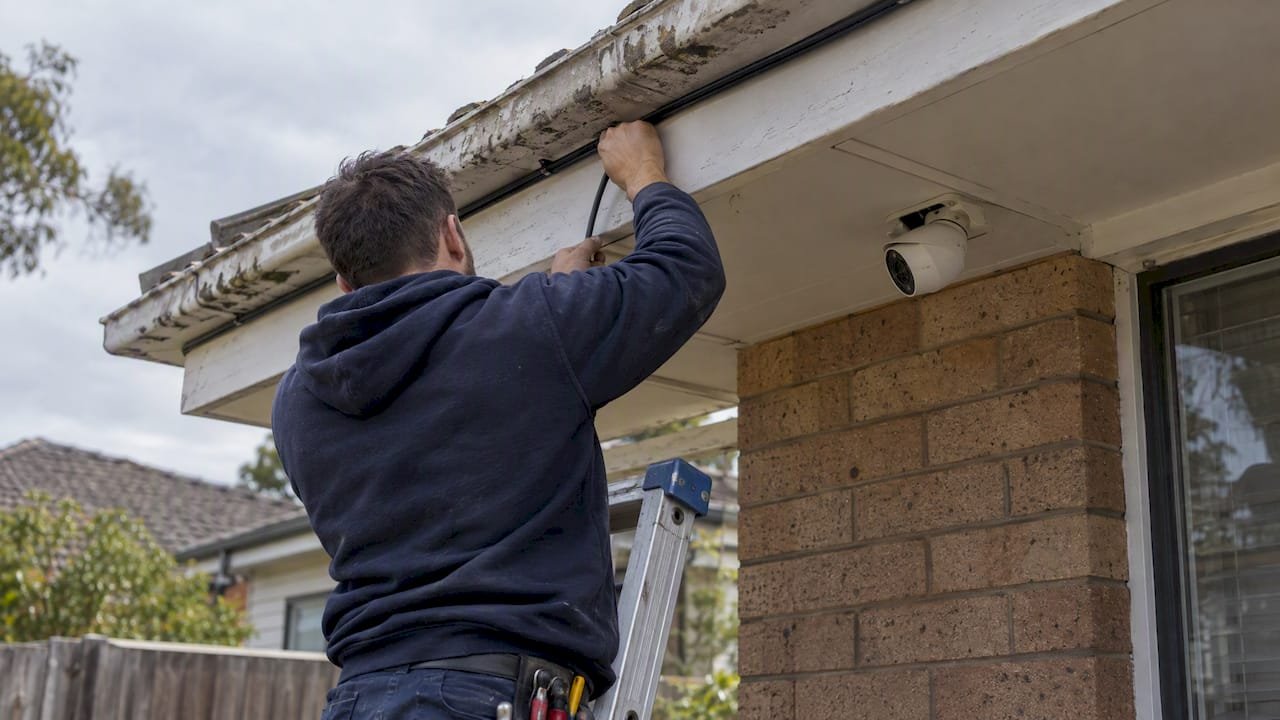
If the house is already built and nobody ran conduit, surface-mounted trunking is a legitimate retrofit option rather than a compromise. It avoids chasing finished walls and, painted to match, is barely noticeable from ground level.
Pro Tip: When retrofitting, route cable along gutters and through soffit spaces rather than across living areas. It is slower to install but leaves no patch-and-paint job behind.
Leaving room to add cameras and resolution later
Camera systems grow. A property that starts with four cameras often ends up with six or eight within a few years, plus a jump to higher resolution that eats more storage and bandwidth.
- Run at least one or two spare Cat6a cables to likely future positions, even if no camera goes there yet.
- Leave a spare conduit path for a future fibre backbone between buildings, particularly on larger blocks.
- Size the PoE switch with headroom. A switch running at its power budget limit cannot accept another camera without an upgrade.
- Reserve extra patch panel ports so adding a camera later means patching in, not re-cabling.
- Oversize NVR storage slightly beyond current needs, and note your expected retention period so storage capacity matches it.
None of this costs much at prewire stage. Retrofitting any of it after the walls are finished almost always costs more than doing it upfront.
How we run CCTV site surveys and handovers
Through Security Camera Scientist, our CCTV division works alongside Network Scientist for hub and PoE planning, and Cybersecurity Scientist where network security review is relevant to the camera system.
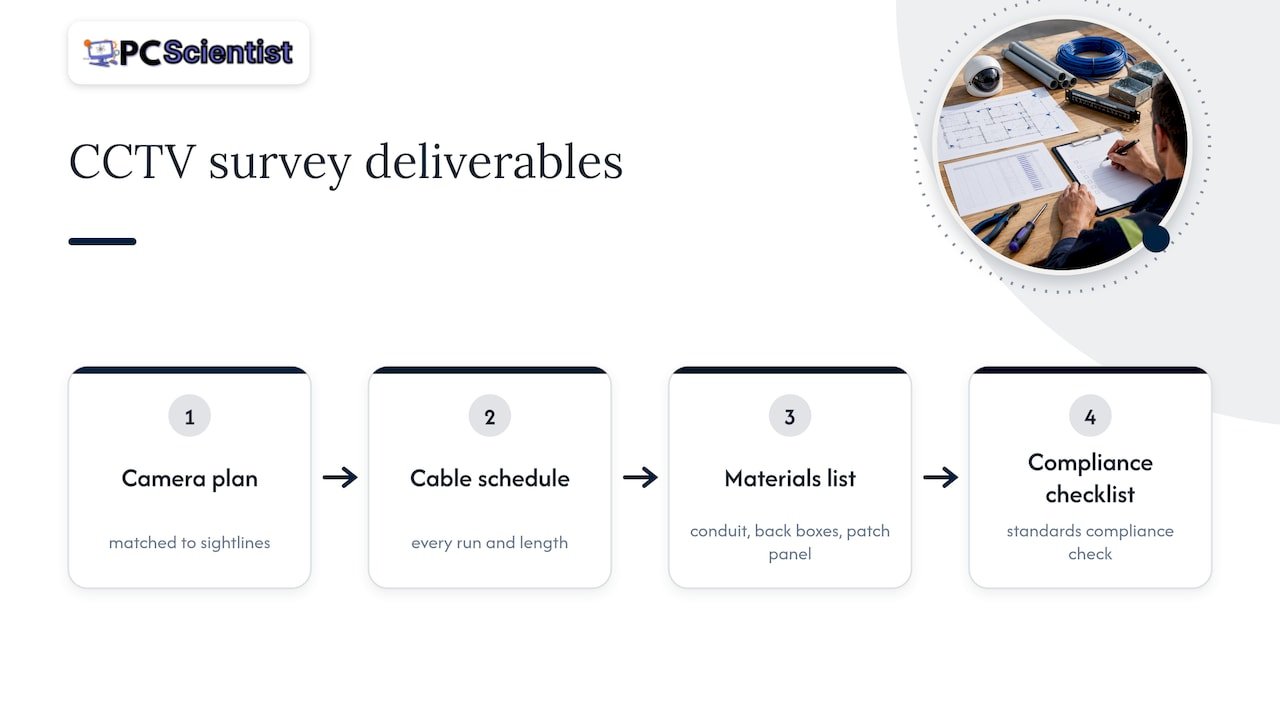
A typical site survey produces a camera placement plan matched to the property's actual sightlines, a cable schedule listing every run and its length, a materials list covering conduit, back boxes and patch panel hardware, and a compliance checklist against the standards above.
A compliant handover includes a labelled patch panel, a written test log for every run, and a cable diagram matching the as-built layout. That paperwork is what lets a future electrician, cabler or our own team pick the system up years later without guessing what sits behind each wall.
Power supply options: PoE injectors versus local power
Most IP cameras draw power over the same Cat6 cable that carries their data, through Power over Ethernet from the switch at the hub. This is the simplest option for a prewired system because it means one cable per camera, with no separate power run needed.
Where a PoE switch port is not available, or a single camera sits far from the hub, a PoE injector lets you add power to an existing Ethernet run without rewiring. It is a practical fix for one or two cameras, less so as a whole-system strategy.
Some cameras, particularly older analogue units or certain specialised fixtures, need a local power source instead, usually a nearby 12-volt supply or mains-powered transformer. If you are planning for any of these, note the power requirement against that camera's position during prewire so the electrician can allow for it alongside the data cabling, rather than discovering the gap after cameras arrive on site.
Budgeting PoE capacity at the switch matters as much as choosing injectors or local power. A switch with headroom for a few extra cameras avoids a forced upgrade the moment you add one more device.
Grounding and surge protection for CCTV cabling
Cameras mounted outdoors, particularly on rooftops or exposed eaves, sit exposed to lightning-induced surges travelling along the cable run. Surge protection at the patch panel end, and sometimes at the camera end for high-risk locations, limits damage to the switch and NVR if a surge does reach the cabling.
Earthing or grounding the comms cupboard and any surge protection equipment is part of the electrical side of the job, not an afterthought. If your hub cupboard sits near other earthed electrical equipment, your electrician can usually tie the grounding together during the same visit that provides the RCD-protected outlet.
This is one area where it pays to ask the question early rather than assume it is covered. Not every installer includes surge protection as standard, and it is far cheaper to specify during prewire than to add after a camera has already failed from a surge event.
Integration points for other security systems
A CCTV prewire rarely happens in isolation. Most new builds also plan for an alarm system, and increasingly an intercom, and all three systems benefit from sharing planning decisions even when they use separate cabling.
If an alarm panel and the CCTV hub sit in the same cupboard, the electrical and network planning becomes simpler: one power circuit, one cable entry point, one place to document everything. Intercom systems that use IP video, rather than older proprietary wiring, can sometimes share the same Cat6 infrastructure and PoE switch as the camera system, which is worth raising with your installer before cabling is finalised.
Even where systems stay physically separate, noting each one's cable paths and hub locations on the same as-built plan avoids conflicts later, such as two trades wanting the same conduit run or cupboard space.
When DIY prewire is fine, and when to call in the pros
Marking camera positions, running conduit and pulling un-terminated cable under a builder's supervision are reasonable DIY tasks, and plenty of homeowners handle this stage themselves to save on labour.
Termination, labelling, earthing and the compliance paperwork are a different matter. This is where registered cabler requirements apply, and non-compliant work here can mean a system that fails intermittently, an insurer that queries a claim, or a full re-termination before the job can be signed off. The labour saved on DIY termination rarely covers the cost of redoing it properly.
- PC Scientist
Our CCTV prewire site assessment, and how to book it
A well-planned prewire removes most of the guesswork from a CCTV install, and that is exactly what our site assessment is built to deliver. We walk the property, map camera positions against real sightlines, and leave you with a cable schedule and materials list before a single cable gets pulled.

- A walk-through of the build with camera positions marked against actual sightlines.
- A written cable plan and materials list covering conduit, back boxes and patch panel hardware.
- Compliance advice covering registered cabling requirements and electrical considerations for the hub.
The site assessment carries a fee from $120, and you leave with a plan a builder, electrician and cabler can all work from without back-and-forth. Book a Security Camera Scientist site assessment to get your prewire plan sorted before the walls close in.
Sources
- How we can help you become a registered cabler - JB Hunter
- Legislation
- ACMA cabling provider rules - April 2025 (ACMA)
- Electrical standards, rules and notes - NSW Government
Recommended
- Wired vs wireless CCTV: which one actually protects your property?
- Business & Venue CCTV NSW
- Security camera placement: where every camera should go
Frequently Asked Questions
Straight answers about Australia CCTV Prewire: Conduit, ACMA Rules, $120 Survey - without jargon or pressure. Call 0493 563 381 for advice, or get help below.
Want the quickest answer? 0493 563 381 for free advice.
No, CCTV installation itself does not require an electrician's licence, but the cabling component does require a registered cabler under Australian rules. An electrician is typically needed only for the power circuit feeding the hub, such as the RCD-protected outlet.
Run one dedicated Cat6 or Cat6a cable per camera back to a central hub in a star topology, inside conduit sized for the cable bundle, with a service loop at each end. Terminate at a patch panel using a consistent pinout, test every run, and label both ends before handover.
Wired systems need cabling planned before or during construction, which is harder to retrofit than wireless once walls are finished. They also depend on a central hub with power and network capacity, so a fault at the hub can affect multiple cameras at once rather than just one.
Route cable through conduit inside walls, eaves or soffits during construction, and terminate behind recessed mounting plates so no cable is visible at the finished camera position. If the prewire was missed, surface-mounted trunking painted to match the exterior is a practical retrofit that avoids chasing finished walls.
CCTV help across NSW
Need a hand prewiring a house for CCTV?
If you would rather not plan cameras on your own, get help in your area. We will talk it through first.
Start here
Get CCTV help
Optional Need a Sydney city or region?
Choose a side of Sydney
These are Sydney cities and regions, such as the Northern Beaches or Inner West. First tap a side of Sydney. Then open the city or region that covers you.
C Sydney City / Inner 3 areas
N Northern Sydney 6 areas
NW North-West / Central Sydney 3 areas
W Western Sydney 1 area
SW South-West Sydney 3 areas
S Southern Sydney 2 areas
Optional Find your suburb
Type a suburb from our listed coverage. This opens the matching city or region page for this topic. Listed suburb pages are general technology services, not this specialist page.
If your suburb is not listed, use the city or region list above, or call 0493 563 381.
Disclaimer
The information in this article is provided for general educational and informational purposes only. While PC Scientist strives to keep all content accurate and up to date, technology issues can vary depending on your device, software, network configuration, and individual circumstances. Always back up important data before attempting repairs or system changes. If you are unsure or the issue cannot be resolved safely, contact PC Scientist today for professional onsite or remote IT support. PC Scientist is not liable for any loss of data, damage, or other issues resulting from the use of the information provided in this article.
