

CCTV Signage Requirements in NSW: What You Need to Display

There is no single NSW rule that says every home with a camera must put up a sign. But the rules change quickly once a camera watches staff, a shopfront, a shared area or a place where people expect privacy. For a workplace, signs at every entrance to the surveyed area are a legal requirement. For a home, a sign is the sensible, low-cost thing to do, and it can matter a lot if a neighbour ever complains.
This guide walks through what applies to your situation, what a good sign says, where it goes, and the mistake we see most: assuming a sign makes any camera position lawful. It doesn't.
Key takeaways
- Workplaces in NSW: cameras must be clearly visible, and signs must be clearly visible at every entrance to the area under surveillance. Employees also need written notice at least 14 days beforehand.
- Homes: NSW has no blanket sign rule for a private house, but a clear sign is good practice, and your council, strata by-laws and the Surveillance Devices Act can all apply.
- A sign is not a licence: it never makes it lawful to film private activities, bathrooms, neighbours' private spaces or to record conversations.
- Larger businesses: if the federal Privacy Act covers you, people must be told their image may be captured before recording starts.
- Not sure? Get the camera positions checked before the cameras go up, not after a complaint.
Table of Contents
- Are CCTV signs legally required in NSW?
- What the Workplace Surveillance Act asks of you
- What a CCTV sign should say
- Where to put the signs
- A sign doesn't make every camera position lawful
- Before you install: a five-minute checklist
- Our perspective: signage is part of the design
- Getting it set up properly
- FAQ
- Sources
Are CCTV signs legally required in NSW?
The honest answer depends on who the camera is watching.
At a workplace, yes. The Workplace Surveillance Act 2005 (NSW) requires camera surveillance of employees to be overt. Cameras, or equipment that makes it obvious cameras are in use, must be clearly visible, and a sign telling people they may be under camera surveillance must be clearly visible at each entrance to the area where it happens.
At a private home, the picture is less tidy. The NSW Information and Privacy Commission says private-property CCTV is outside its jurisdiction and points owners towards the Surveillance Devices Act 2007 (NSW). It also suggests checking local council rules and, in a strata scheme, your by-laws. If your home is also a workplace (a home office with an employee, a nanny or a tradie on site daily), the Workplace Surveillance Act may apply as well.
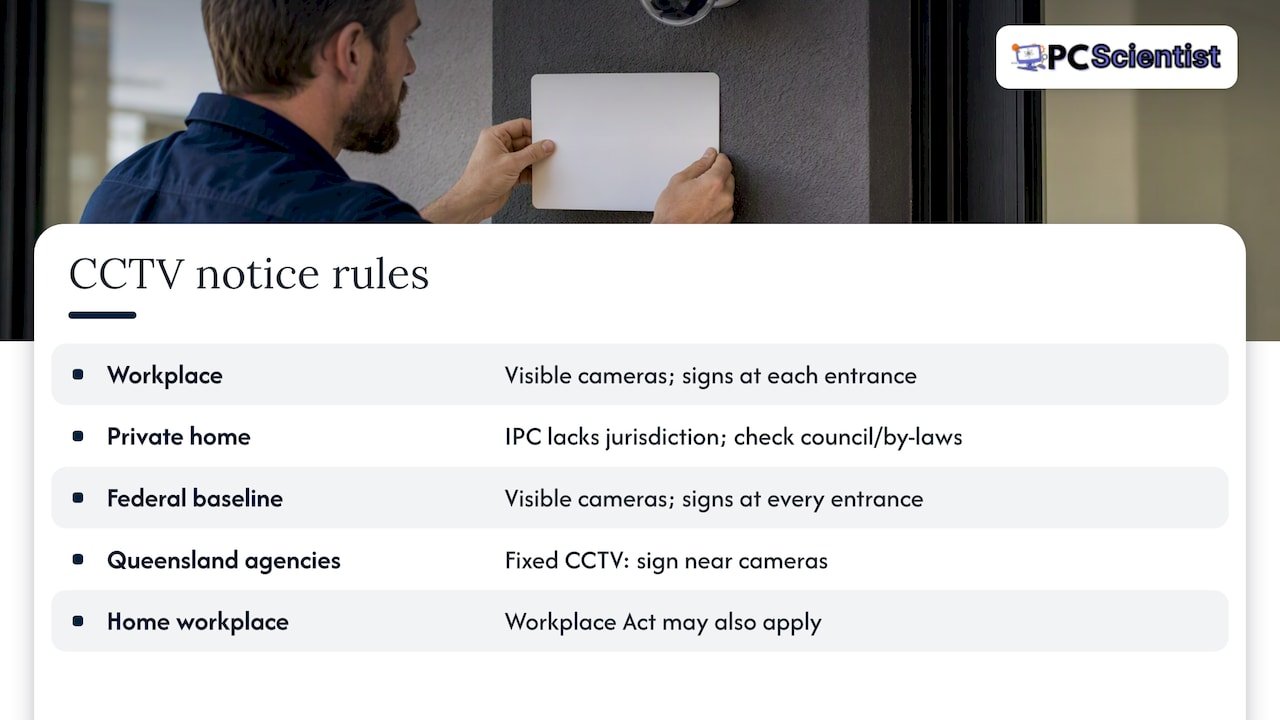
Elsewhere in Australia, the rules differ by state and territory. The federal government's business portal gives a simple baseline for businesses anywhere: keep cameras visible and place signs at every entrance so staff and customers know about the surveillance. Queensland's information commissioner, for example, says that for fixed CCTV run by Queensland government agencies a sign near the cameras is the recommended way to meet notice duties. That is a Queensland public-sector rule, not an NSW one, but it shows how consistently regulators treat signage as the standard approach.
Quick guide by situation
| Situation | Sign needed? | What else to check |
|---|---|---|
| Private house, cameras on your own property | Not set by a general NSW rule, strongly recommended | Surveillance Devices Act, council rules |
| Strata or apartment | Check by-laws first | Owners corporation approval; common property rules |
| Shop, café, office, warehouse with staff | Yes, at every entrance to the surveyed area | 14 days' written notice to employees |
| Home with a paid worker on site | Likely, if the camera watches them at work | Workplace Surveillance Act |
| Business covered by the federal Privacy Act | Yes, tell people before recording | OAIC guidance |
| Rental, motel or short-stay common areas | Yes, as good practice and where staff are watched | Never in bedrooms or bathrooms |
What the Workplace Surveillance Act asks of you
If you employ anyone in NSW and a camera can see them at work, three things matter.
- Visible cameras. The camera, or equipment indicating a camera is present, must be clearly visible where the surveillance takes place.
- Signs at every entrance. Not one sign somewhere near reception. One at each entrance to the area covered.
- Written notice to staff. Generally at least 14 days before surveillance starts, stating the type of surveillance, how it will be carried out, when it starts, whether it is continuous or intermittent, and whether it is limited or ongoing. Email counts as written notice. New employees must be told before they start work.
All of that is set out in the current Act on the NSW legislation site. The same page notes that notice is not required for camera surveillance at a workplace that is not the employee's usual workplace, and that covert surveillance generally needs a covert-surveillance authority. Covert filming of staff is not something to improvise.
The NSW Department of Education's legal bulletin on schools says the same thing in plain language: cameras visible, signs displayed at entrances, and 14 days' written notice. It adds extra written-notice and audio-signage steps where cameras also record sound, which is a good reminder that audio is a separate legal question altogether.
We've covered the 14-day notice process in more detail in our guide to CCTV laws in NSW.
What a CCTV sign should say
No NSW statute gives you a template, so the aim is simple: anyone reading the sign understands, in two seconds, that cameras are operating here.
A good sign includes:
- A clear camera symbol and the words "CCTV in operation" or "Camera surveillance in use". Plain wording beats clever wording.
- Who is operating it, so people know who to ask. For a business, that is your trading name.
- A contact point, such as a phone number or email, or a line pointing to a privacy notice if you have one.
- A note about audio, if you record it. Only do this after you've confirmed it's lawful. In most cases, the better answer is to turn audio recording off.
- Readable size and contrast. If someone has to stop and squint, it isn't doing its job.
The Australian Government's own advice is that signs go at every entrance, and that cameras themselves should be clearly visible. Hiding a camera behind a sign that nobody can see defeats the purpose of both.
For federally covered organisations, the Office of the Australian Information Commissioner says that those under the Privacy Act 1988 (generally those with annual turnover above $3 million) must tell people their image may be captured before recording begins. A sign at the door is the usual way to do that.
Where to put the signs
Think about the path a person takes, then put the sign before they enter the camera's view.
- Shops and cafés: on the front door or window at eye level, plus any side or rear entrance customers or staff use.
- Offices and clinics: at the entrance to the suite or floor, and at any separate door into the surveilled area.
- Warehouses and yards: at the gate and at each pedestrian door, and near loading areas and tills where cameras focus.
- Car parks: at each vehicle and pedestrian entry point, not just at the building.
- Homes: at the front gate or door and wherever a visitor, delivery driver or tradie first walks into coverage, for example a driveway or side access.
The point is that someone should see the sign before they're recorded, not after. If you have more than one entrance, you need more than one sign.
Some councils run their own public-space systems under their own policies. Blacktown City Council's policy, for example, gives the public at least 14 days' notice before cameras go into a new public-space location and requires signs at each camera location. That's a council obligation for council cameras, but it shows the standard that local government expects.
A sign doesn't make every camera position lawful
This is the part people get wrong. A sign informs. It doesn't grant permission.
A law firm's workplace-surveillance note makes the point directly: employers should audit camera locations to make sure none captures a prohibited area, even incidentally, because signage does not make surveillance there lawful. The same article stresses that complying with the Workplace Surveillance Act is no defence if you breach the Surveillance Devices Act, which deals with listening devices and private conversations.
In practice, that means:
- Don't point a camera into a neighbour's windows, yard or private space. Aim at your own driveway, doors and boundaries.
- Keep cameras out of toilets, change rooms and bathrooms. Workplace surveillance is prohibited in those places, sign or no sign.
- Be cautious with audio. Recording private conversations is a separate legal issue from video. If you don't need sound, turn it off.
- Be careful sharing footage. Posting clips online can create its own problems, particularly if people can be identified.
The NSW Public Health Act also contains a specific rule for safe access zones around clinics, where capturing and publishing a person's image without consent is prohibited, with an exception for security cameras operated for security reasons only. If your premises are near one of those zones, get advice before you place cameras.
If you're worried about a neighbour's camera pointed at you, the IPC says private-property surveillance concerns are outside its jurisdiction, and that safety concerns or footage used for indecent purposes can be reported to NSW Police. A Community Justice Centre is a sensible first stop for a calm conversation before things escalate.
Before you install: a five-minute checklist
- Who will the camera see? Family only, visitors, customers, staff, the street?
- Is it a workplace? If a camera covers an employee's usual workplace, plan for the 14-day written notice and the entrance signs.
- Is it strata? Look at your by-laws and talk to the owners corporation. Lot owners don't automatically have the right to fix cameras to common property. Our guide to apartment CCTV rules explains the usual sticking points.
- Does council care? The IPC notes some councils have their own planning rules, so a quick call before work starts is cheap insurance.
- Audio on or off? Decide deliberately. Off is the safer default.
- Where will signs go? Decide at the same time as camera positions, so the two match.
- Where will footage be stored, and who can see it? Write down who has access, and keep it limited.
Our perspective: signage is part of the design
Most sign problems start long before the sign. They start when cameras are positioned for "maximum coverage" without asking who is being covered.
When we plan a CCTV job, we begin with a site visit, because the right sign, the right camera angle and the right notice process all depend on what the property is actually like: where people walk in, where the neighbour's fence sits, whether staff work in the view, and whether the network and storage will still be reliable in a year. A camera that points at a driveway and a front door is easy to justify and easy to sign. A camera that sweeps across half the street is hard to defend whatever the sign says.
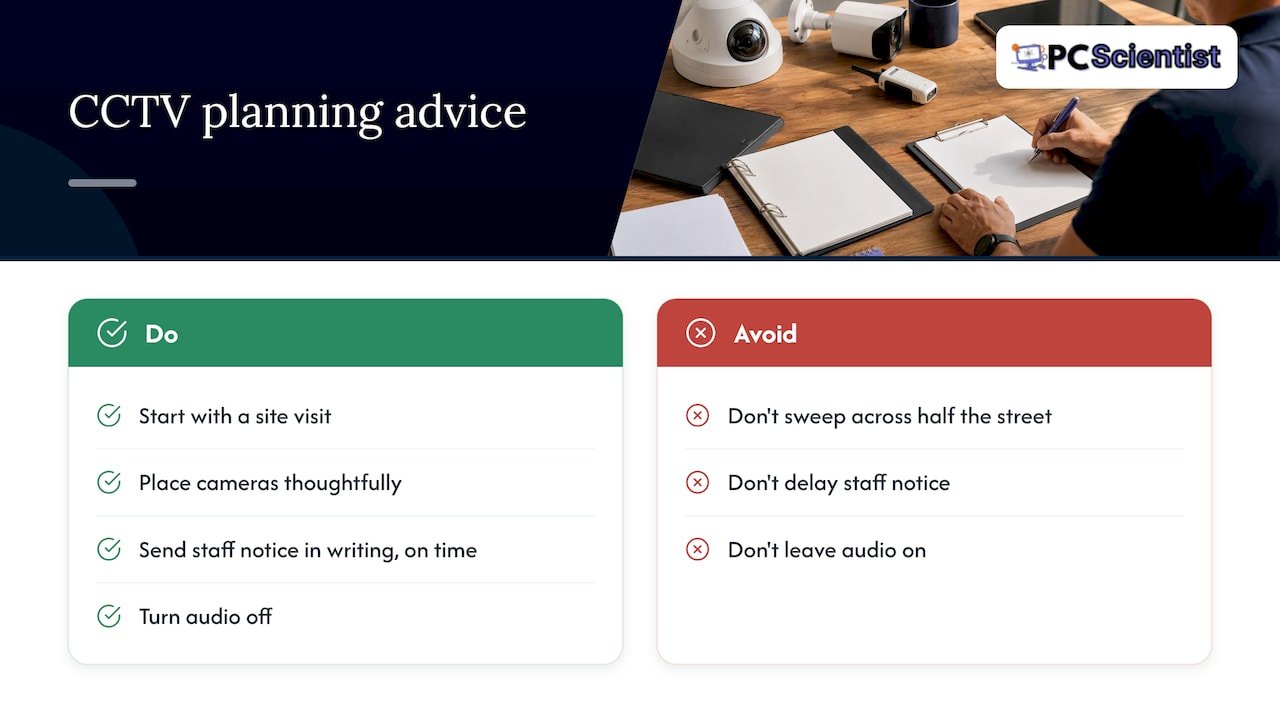
For homes, we'd rather you have two well-placed cameras and a clear sign than eight cameras and an argument with next door. For businesses, we'd rather the staff notice goes out properly, in writing, on time, than have a dispute after the fact. It's a small piece of admin that protects you.
We're an IT support business, not a law firm, so for anything contested, such as a staff dispute, a strata disagreement or footage you've been asked to hand over, talk to a solicitor. What we can do is make sure the technical side is right: camera positions, recording settings (including turning audio off), secure storage and a sensible retention approach.
- PC Scientist
Getting it set up properly
If you'd like cameras installed with the signage and positions thought through from the start, our Security Camera Scientist service covers CCTV for homes and businesses across NSW, starting with a site assessment so the plan fits your property, not a generic package. We also work locally in places like Newcastle, the Central Coast and Sydney's Eastern Suburbs.

If you're planning ahead, our guide to CCTV installation costs in Sydney explains what a licensed installation involves, and the prewire guide helps if you're building or renovating.
Sources
- CCTV on private property, NSW Information and Privacy Commission
- Workplace Surveillance Act 2005 No 47, NSW Legislation
- Install video surveillance, business.gov.au
- Privacy and technology, Queensland Office of the Information Commissioner
- CCTV: use of closed circuit cameras, NSW Department of Education
- Security cameras, OAIC
- Public space safety cameras policy, Blacktown City Council
- Workplace surveillance and the law, Keypoint Law
- Public Health Act 2010 section 98E, AustLII
- IPC fact sheet: what the IPC can and cannot do
Recommended
- Avoid fines: CCTV laws in NSW, 14 days' notice and $120 site survey
- Sydney CCTV installation costs: NSW licence rules and $120 site survey example
- Apartment CCTV Rules in Australia: What You Can Install
- CCTV Storage Options for Australian Homes and SMEs: Retention First
Frequently Asked Questions
Straight answers about CCTV Signage Requirements in NSW: What You Need to Display - without jargon or pressure. Call 0493 563 381 for advice, or get help below.
Driveway Front door Shop till Phone app Whole NSW
Want the quickest answer? 0493 563 381 for free advice.
No general NSW rule requires one for a private home with cameras on your own property. A visible sign is still the sensible choice: it deters, it shows you aren't hiding anything, and it supports your case if someone complains. If anyone works at your home, the Workplace Surveillance Act may apply, and then signs are required.
Generally at least 14 days' written notice before surveillance starts, covering the type, method, start time, whether it is continuous or intermittent, and whether it is limited or ongoing. Email counts. New employees must be told before they begin work.
Be very careful. Recording private conversations falls under the Surveillance Devices Act 2007 (NSW), and complying with workplace surveillance rules doesn't protect you from it. Unless you have clear legal advice, switch audio recording off.
Not automatically. Check your by-laws and ask the owners corporation first, because lot owners generally can't fix cameras to common property on their own say-so. Cameras inside your own lot that only see your own space are a different question, but get the by-laws checked.
No. A sign tells people cameras are in use; it doesn't make filming a private space lawful. Reposition or mask the camera view so it covers only your own property.
CCTV help across NSW
Still stuck with CCTV signage?
If you would rather not plan cameras on your own, get help in your area. We will talk it through first.
Start here
Get CCTV help
Optional Need a Sydney city or region?
Choose a side of Sydney
These are Sydney cities and regions, such as the Northern Beaches or Inner West. First tap a side of Sydney. Then open the city or region that covers you.
C Sydney City / Inner 3 areas
N Northern Sydney 5 areas
NW North-West / Central Sydney 3 areas
W Western Sydney 1 area
SW South-West Sydney 3 areas
S Southern Sydney 2 areas
Optional Find your suburb
Type a suburb from our listed coverage. This opens the matching city or region page for this topic. Listed suburb pages are general technology services, not this specialist page.
If your suburb is not listed, use the city or region list above, or call 0493 563 381.
Disclaimer
The information in this article is provided for general educational and informational purposes only. While PC Scientist strives to keep all content accurate and up to date, technology issues can vary depending on your device, software, network configuration, and individual circumstances. Always back up important data before attempting repairs or system changes. If you are unsure or the issue cannot be resolved safely, contact PC Scientist today for professional onsite or remote IT support. PC Scientist is not liable for any loss of data, damage, or other issues resulting from the use of the information provided in this article.