

Small Business Website Maintenance: What to Do and How Often
Small business website maintenance comes down to a short, repeatable routine: keep the software updated, keep tested backups, watch security and uptime, check that forms and links still work, and review your content and renewals a few times a year. Most of it takes an hour or two a month. Skipping it is what turns a quiet website into a slow, hacked or broken one, usually at the worst moment.
If you run a trade, a clinic, a café or a small office, your website is probably working harder than you think. It is where people check your hours, send an enquiry or decide whether to trust you. This guide gives you the routine, the reasons behind it, and a clear way to decide whether to do it yourself or hand it over.
Key takeaways
- Maintenance is a schedule, not a project: weekly checks, monthly updates and tests, quarterly reviews, annual renewals.
- The tasks that matter most are software updates, off-site backups you have actually tested, and security basics such as strong passwords and multi-factor authentication.
- A neglected site can lose leads, slow down, drop in search results and, if it holds customer details, trigger Australian breach-notification duties.
- Cost depends on how many tasks you hand over, how complex the site is (a simple brochure site or a shop), and how fast you need fixes.
- If you would rather not carry this, a local IT team can look after the security, backup and email side while your web designer handles content.
Table of Contents
- Why a quiet website still needs looking after
- The small business website maintenance checklist
- WordPress maintenance tasks, specifically
- Maintenance and your search visibility
- What website maintenance costs in Australia
- Do it yourself or hand it over?
- Our perspective
- Where we can help
- What to do if your website has been compromised
- FAQ
- Sources
Why a quiet website still needs looking after
A website that has not broken yet is not a safe website. Most sites run on software (a content management system, a theme, plugins) that is updated regularly because weaknesses are found regularly. When updates pile up, those weaknesses stay open to automated attacks that scan the internet for exactly that.
Australian guidance lines up on this. Dynamic Business points Australian small and medium businesses to regular patching, strong passwords and multi-factor authentication as the basics, and the Australian Cyber Security Centre has warned about large-scale campaigns exploiting CMS vulnerabilities. It says compromised servers can be used for defacement, credential capture, data theft or malware delivery, and recommends patching, checking for webshells and restoring from a recent known-good backup.
That last point is why backups sit at the centre of any routine. A clean copy from last week turns a disaster into an annoying afternoon.
What it costs when maintenance lapses
The damage is not only technical. Shopify's guide to website maintenance lists slower performance, broken links, lost leads, security vulnerabilities, poorer rankings, reputational damage and declining sales as the results of neglect. For a small business, the lost lead is the one that hurts: a contact form that has quietly stopped sending emails can cost you jobs for weeks before anyone notices.
There is a legal side too. If your business is covered by the Privacy Act and a website breach involves personal information, the Notifiable Data Breaches scheme may apply when the breach is likely to result in serious harm. Dynamic Business explains that affected people and the OAIC must then be told. We walk through how that decision works in our guide to the OAIC 30 day test for notifiable data breaches.
The small business website maintenance checklist
Here is the routine in one place. The frequencies follow the cadence used in Elementor's maintenance plan guide, which suggests continuous uptime monitoring, weekly scans and backups, monthly updates and checks, quarterly reviews and annual renewals checks. Scale it to your site: a five-page brochure site needs less than an online shop.
| How often | Task | What you are looking for |
|---|---|---|
| Continuous | Uptime monitoring | An alert if the site goes offline, so you hear before customers do |
| Weekly | Full backup, stored off the server | Backup log shows a recent date and the file is not empty |
| Weekly | Malware and security scan | No warnings, no unknown files or users |
| Weekly | Contact form and phone link test | You receive the test enquiry within minutes |
| Monthly | Software, theme and plugin updates | Applied on a test copy first if the site is important |
| Monthly | Restore test | You can actually bring a backup back |
| Monthly | Speed and broken link check | Pages load promptly, no dead links |
| Monthly | Remove unused plugins and user accounts | Fewer doors left open |
| Quarterly | Content and layout review | Hours, services, staff, photos and prices are current |
| Quarterly | Security review | Passwords, admin access, multi-factor authentication |
| Yearly | Domain, hosting and SSL certificate renewals | Nothing expires by surprise |
Weekly: the five-minute habits
Backups and a test enquiry are the two weekly jobs that earn their keep. Send yourself a message through the contact form, then check that it arrives and is not sitting in spam. If your business email is part of the problem, our Email Systems Scientist page explains how we sort out email that is not sending, receiving or syncing.
Store backups somewhere other than the web server itself. If the server is compromised, a backup sitting next to the site goes down with it. Our 3-2-1 backup rule guide shows how to keep an extra copy that cannot be quietly overwritten or encrypted.
Monthly: updates and a restore test
Updates are the heart of it. Apply them in a sensible order: take a backup, update, then click through your key pages (home, services, contact, checkout if you have one). If the site earns real money, test the updates on a copy first so a faulty plugin does not take the live site down.
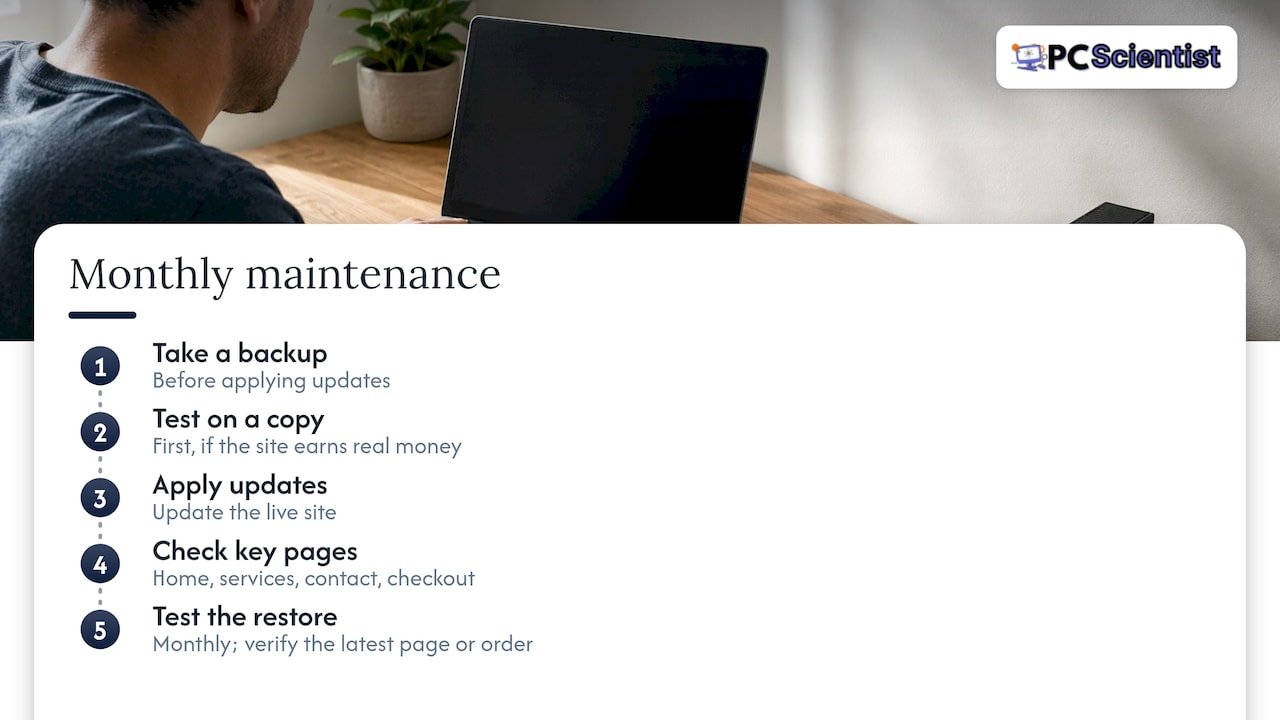
The restore test is the step most people skip. A backup you have never restored is a hope, not a plan. Once a month, confirm that you can bring the site back, and that the latest page or order is in it.
Quarterly and yearly: the review
Every three months, read your own site like a stranger would. Are the opening hours right? Does the price or service list match what you do today? Is that team photo still the team? Check who has admin access, and remove anyone who has left or finished a project.
Once a year, check the renewals: domain registration, hosting and the SSL certificate that gives you the padlock in the browser. An expired domain can take down your website and your email at the same time. Put the dates in your calendar, and make sure the renewal notices go to an inbox someone actually reads.
WordPress maintenance tasks, specifically
Many small business sites run on WordPress, which is flexible but has more moving parts. On top of the checklist above, a routine for WordPress usually covers:
- Core, theme and plugin updates. Plugins are the most common weak point, so each one you do not use is a risk with no benefit. Delete, do not just deactivate.
- Database and file backups. A restorable WordPress backup needs both the database and the files.
- User roles. Give people the lowest access that lets them do their job, and use multi-factor authentication on admin accounts.
- PHP version. Your hosting should run a supported version. Ask your host or web developer when it was last checked.
- Login protection. Use a unique long password for each admin and limit login attempts.
- Image and speed housekeeping. Large uncompressed photos are the most common reason a small business site feels slow.
If your site is on a hosted builder rather than WordPress, much of the technical work is done for you, but the content, access, renewal and form checks still fall to you.
Maintenance and your search visibility
Slow pages, broken links and outdated content do not only annoy visitors. They also chip away at how easily people find you. If you want to understand how those signals fit together, this explainer on what drives search engine ranking is a good place to start. The practical takeaway for you is simple: a site that loads quickly, works properly and is kept current gives search engines and customers fewer reasons to look elsewhere.
Structure matters as well. If you are rethinking how many pages your site needs, see why one page versus multipage can change how many enquiries a service business gets.
What website maintenance costs in Australia
Prices vary widely, and that is normal, because the word "maintenance" covers anything from automatic updates to a person who edits your pages every week. What moves the price is predictable:
- How many tasks are included. Updates and backups only, or also content edits, speed work and reports.
- How complex the site is. A simple five-page site is cheaper to look after than an online shop with payments and stock.
- Response time. Same-day fixes cost more than "we will get to it this week".
- Hosting and renewals. Domain, hosting and SSL are often separate costs, so check whether a plan includes them.
- Contract terms. Month-to-month is more flexible than a long lock-in.
When you compare quotes, ask each provider to list exactly what is included, how often backups run, where they are stored, and what happens if the site is hacked. Two quotes with the same price can cover very different work. Always check whether the price includes GST.
Do it yourself or hand it over?
Doing it yourself works when your site is small, you are comfortable logging in to an admin area, and you will actually keep to the schedule. The honest risk is not skill, it is time. Maintenance is the first thing to slip when the week fills up with jobs.
Handing it over makes sense when any of these are true:
- Your site takes bookings, payments or customer details.
- You have been caught out before by an expired domain, a hacked page or a form that stopped working.
- You do not have anyone on staff whose job is technology.
- You would rather spend the hour on customers.
If you do hand it over, make sure you keep ownership of your domain, hosting and admin logins in your own name. That keeps you in control whoever looks after the site.
Our perspective
Most website problems we see in small businesses are not dramatic. They are an email form that stopped delivering, an old login nobody removed, a backup that was never tested, a domain renewal sent to someone who left. None of them needs a genius to prevent. They need someone to check, regularly.
That is why we think of a website as part of your wider business technology, not a separate thing. The same questions apply across your network, email, devices and website: who has access, what is backed up, where does the copy live, and what happens on the day something goes wrong. When we look at a small business, we start with those answers, in plain language, with no jargon.
We are built around practical, step-by-step help, clear upfront pricing and no fix, no fee repairs. If your website sits on top of email, files and devices that need care as well, doing it all in one visit is simpler than coordinating three different providers.
PC Scientist
Where we can help
A website is only as safe as the accounts, email and backups behind it. At PC Scientist we support homes and businesses across NSW, onsite and remotely, with business IT support, business cybersecurity and data recovery and backup help. If your site has been hit by a scam, a suspicious login or a scare, we can help you tidy up calmly and put protection in place.

Not sure where to start? You do not need to know the technical terms or the exact service. Tell us what is going wrong and we will work out the rest. Contact PC Scientist to book an onsite or remote visit.
Two guides are worth reading alongside this one. Fix cyber security in a week covers three practical ACSC steps, and our one page disaster recovery plan helps you decide in advance what you will do if the site, or anything else, goes down.
What to do if your website has been compromised
If you suspect a problem, act in this order:
- Change the passwords for your website admin, hosting and email, from a device you trust.
- Take the site offline or put up a maintenance page if it is serving anything suspicious.
- Do not delete everything. Keep the evidence and note what you saw and when.
- Restore from a recent known-good backup and apply all updates, as the ACSC recommends in its CMS campaign warning.
- If customer information may have been exposed, work out whether the notification rules apply to you.
If you need a hand with any step, Cybersecurity Scientist is where we handle cleanup and hardening for NSW homes and businesses.
Sources
- Why 'nothing's gone wrong yet' isn't website security, Dynamic Business
- Website Maintenance: What It Is and Key Tasks, Shopify
- ACSC warns of large-scale campaign exploiting CMS vulnerabilities in Australia
- What Is a Website Maintenance Plan?, Elementor
- Search Engine Ranking: What Drives Online Visibility
Recommended
- Fix Cyber Security in a Week: 3 ACSC Steps for Small Businesses
- What does a website really cost in Australia in 2026?
- One Session to a One Page Disaster Recovery Plan for Small Businesses
- Web Design Scientist | Clear Website Quotes Australia
Frequently Asked Questions
Straight answers about Small Business Website Maintenance: What to Do and How Often - without jargon or pressure. Call 0493 563 381 for advice, or get help below.
Clear pages Phone-friendly Enquire button Quoted build Whole NSW
Want the quickest answer? 0493 563 381 for free advice.
Some checks are weekly (backups, a test of your contact form, security scans), updates and restore tests are monthly, content and security reviews are quarterly, and domain, hosting and SSL renewals are yearly. Uptime monitoring should run all the time. A very simple site can get by with less, but the monthly update and backup routine should not slip.
At minimum: regular software updates, off-site backups with restore testing, malware scanning, uptime monitoring and a clear way to report problems. Ask whether content edits, speed checks, and domain and SSL renewal reminders are included, and who is responsible when something breaks.
Yes, if the site is small and you will stick to the schedule. Take a backup before every update, remove plugins you do not use, use multi-factor authentication on admin accounts, and test your forms. If the site takes payments or customer details, consider having a professional look after it.
Outdated software can leave known weaknesses open to automated attacks, and the site can slow down, break or lose rankings. If personal information is exposed, you may also have breach notification duties under Australian law, so keeping updates current is far cheaper than cleaning up afterwards.
Website quotes
Still stuck with small business website maintenance?
Website work starts with Get a clear website quote. Local pages help you find Web Design Scientist in your area. It is a different path from the IT booking flow, on purpose.
Start here
Get a website quote
Optional Need a Sydney city or region?
Choose a side of Sydney
These are Sydney cities and regions, such as the Northern Beaches or Inner West. First tap a side of Sydney. Then open the city or region that covers you.
C Sydney City / Inner 3 areas
N Northern Sydney 5 areas
NW North-West / Central Sydney 3 areas
W Western Sydney 1 area
SW South-West Sydney 3 areas
S Southern Sydney 2 areas
Optional Find your suburb
Type a suburb from our listed coverage. This opens the matching city or region page for this topic. Listed suburb pages are general technology services, not this specialist page.
If your suburb is not listed, use the city or region list above, or call 0493 563 381.
Disclaimer
The information in this article is provided for general educational and informational purposes only. While PC Scientist strives to keep all content accurate and up to date, technology issues can vary depending on your device, software, network configuration, and individual circumstances. Always back up important data before attempting repairs or system changes. If you are unsure or the issue cannot be resolved safely, contact PC Scientist today for professional onsite or remote IT support. PC Scientist is not liable for any loss of data, damage, or other issues resulting from the use of the information provided in this article.