

One page or multi-page: what suits a service business
Most businesses grow faster with a multipage website because it gives search engines more pages to rank and visitors more ways to find exactly what they need. A one-page site works well for a single offer, a portfolio, or a fast launch, but it's harder to expand later. The rest of this guide walks through the SEO, performance, and user experience trade-offs so you can choose with confidence.
Key takeaways
- Businesses with 30 or more landing pages generate roughly seven times more leads than those with fewer than 10, reflecting broader search intent coverage.
- A single page remains defensible when the offer is narrow, backlinks are strong, and traffic comes mainly from branded searches rather than broad discovery.
- Single page applications need prerendering or server side rendering for reliable indexing, while code splitting and lazy loading can reduce their heavier initial download.
- Track scroll depth and section views on a single page; use page level metrics on multiple page sites to identify which pages earn traffic and enquiries.
- During expansion, map single page sections to new URLs, redirect old anchors, update the sitemap, and monitor rankings for 30 to 90 days.
Table of Contents
- What is a one-page website and when it works
- What is a multipage website and when it works
- SEO implications: indexing, topical authority and discovery
- Performance, accessibility and technical trade-offs
- Conversion and user experience: scannability, funnels and analytics
- Decision checklist: how to choose between one-page and multipage
- Migration and hybrid approaches (convert, expand, or combine)
- How we approach this decision
- Practical trade-offs we see in real projects
- Thinking about a new site or a migration?
- FAQ
- Sources
What is a one-page website and when it works
A one-page website lives on a single URL. Everything, your story, services, and contact details, sits on one long-scrolling page, sometimes built as a pageless layout or a single-page application (SPA) that loads once and updates content without a full page reload.
This structure suits a narrow set of situations well. A product launch, a portfolio, a single event, or a lean minimum viable product often doesn't need more than one page to make its case.
- Streamlined narrative: visitors scroll through one story with no decision about where to click next.
- Focused conversion goal: every section points toward the same action, whether that's a booking or an enquiry.
- Lower upfront build scope: fewer pages generally means a faster, simpler build.
- Limited topical breadth: one URL can only target a handful of search queries.
- Harder page-level analytics: without separate pages, you lose some of the clarity that comes from per-page metrics.
What is a multipage website and when it works
A multipage website spreads content across multiple URLs in a hierarchical structure, usually with pages rendered server-side so each one loads as its own document. A homepage links out to service pages, location pages, blog posts, and a contact page, each built around its own intent.
This is the structure that fits most service businesses, online stores, and any site covering more than one audience or location.
- Better search footprint: each page can target its own set of keywords, which widens the net for search traffic.
- Clearer conversion funnels: a dedicated page per service lets you match the call to action to what the visitor actually searched for.
- Flexible analytics: page-level data makes it straightforward to see which content earns traffic and which converts.
- More content to maintain: every page needs writing, updating, and occasional refreshing.
- Higher planning and build costs: mapping out a full site structure takes more upfront work than a single scrolling page.
SEO implications: indexing, topical authority and discovery
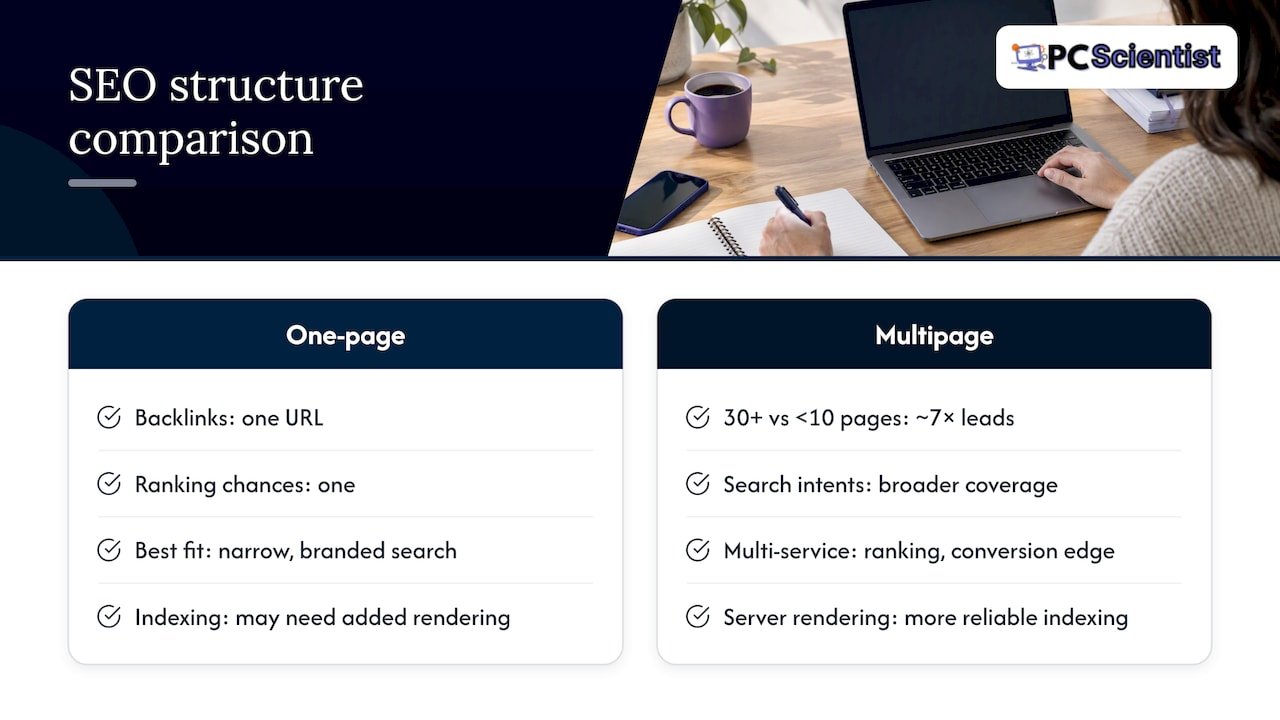
Search visibility is where the two structures diverge the most. Companies with 30 or more landing pages generate roughly seven times more leads than those with fewer than 10, because more pages let you cover more search intents and build depth around a topic rather than skimming the surface of one.
One-page sites and SPAs can still rank, but comparative research on SPAs and MPAs shows that multi-page applications benefit from server-side rendering, which search engines index more reliably than client-side-only content. An SPA or single-page site usually needs prerendering or server-side rendering added on top to match that reliability.
A one-page site does concentrate all its backlinks on a single URL, which strengthens that one page's authority, but it still only creates one ranking opportunity rather than dozens. Service-business guidance backs this up directly: once you're ranking for more than one service or location, multipage structures tend to outperform a single page on both rankings and conversions.
A one-page approach stays defensible when your scope is genuinely narrow, your backlinks are strong, and most of your traffic arrives through branded search rather than broad discovery.
Performance, accessibility and technical trade-offs
Loading speed and accessibility both shift depending on structure. SPAs and single-page sites often carry larger JavaScript bundles upfront, which can slow the first paint even though interactions feel fast once everything has loaded. Comparative analysis of SPAs and MPAs confirms this pattern: fast interactivity after load, but heavier initial payloads and accessibility gaps unless the site is prerendered or server-rendered.
- Lazy loading and code splitting reduce how much a visitor downloads before they see content.
- Smaller, focused pages are often easier to make accessible, since each one has a clear landmark structure.
- Long-scrolling pages need careful ARIA and heading use so screen readers can navigate sections properly.
- Multi-page sites tend to have a simpler security surface for content-heavy sites, while SPAs need more deliberate client-side security planning.
Pro Tip: If you're set on a one-page layout, ask whoever builds it to prerender the page so search engines see fully formed content on first crawl.
Conversion and user experience: scannability, funnels and analytics
Structure shapes how visitors move toward a decision. A one-page layout gives you a linear narrative: fewer clicks between someone landing and reaching your call to action, which suits a single, clear goal. A multipage layout lets you match a dedicated page and CTA to each distinct search intent, which helps you segment visitors by what they actually came for.
- Set up event tracking on one-page sites, since scroll depth and section views replace the page views you'd normally rely on.
- Use page-level metrics on multipage sites to see which service or location pages drive enquiries, something multi-page architecture simplifies compared with single-page tracking setups.
- Test at the section level on a one-page site, and at the full-page level on a multipage site, since that's the natural unit of change in each structure.
Decision checklist: how to choose between one-page and multipage
Before committing to either structure, run through a short checklist:
- How many distinct services or offers do you need to represent?
- How broad is the range of keywords you want to rank for?
- Do you plan to grow the site's content over the next year or two?
- Do you serve multiple locations or distinct audiences?
- What's your budget, and how much analytics detail do you need?
A quick way to apply this: if you have one core offer, a one-page site is reasonable. If you have multiple services, intents, or locations, go multipage from the start. If you're genuinely unsure, a hybrid, a concise homepage with a one-page feel, linking out to deeper pages, gives you both a strong first impression and room to grow. If there's any chance you'll expand within the next year, it's worth planning the migration path before you launch rather than after.
Migration and hybrid approaches (convert, expand, or combine)
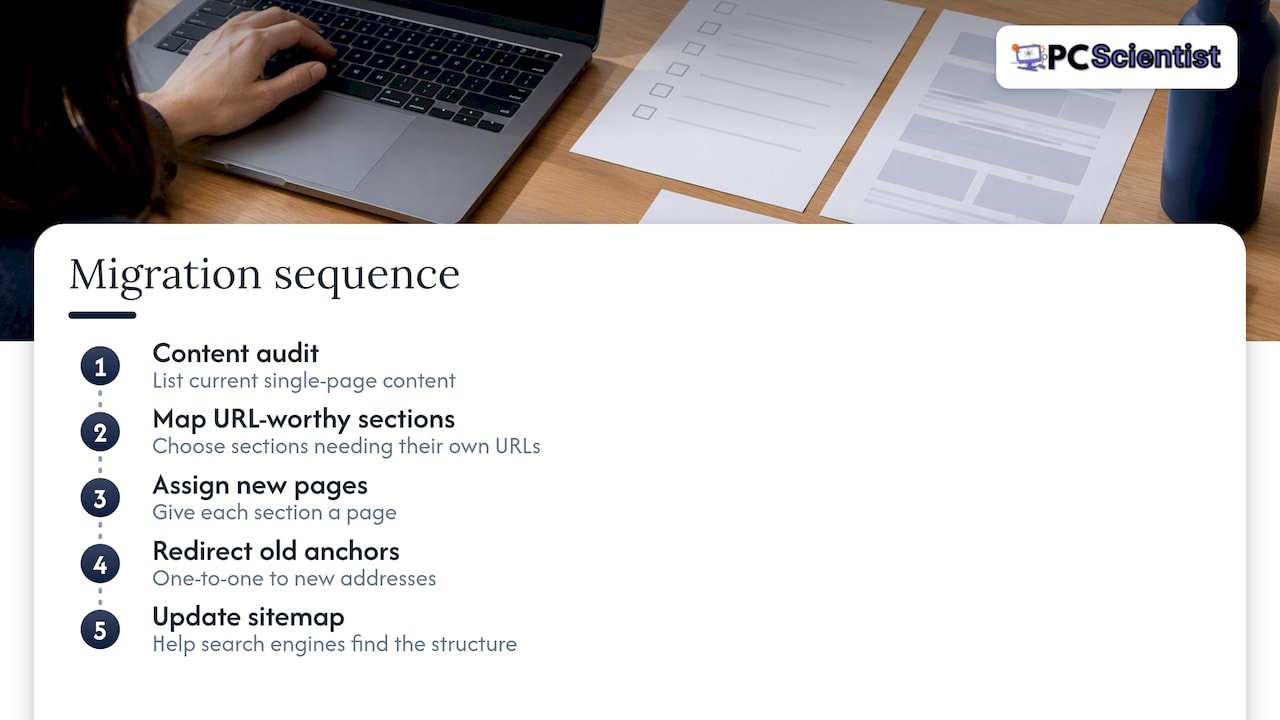
Moving from one page to many, or blending the two, follows a fairly consistent pattern. Start with a content audit: list everything currently living on the single page, then map which sections deserve their own URL. From there, assign each section a new page, redirect the old anchor links to the new addresses on a one-to-one basis, and update your sitemap so search engines can find the new structure quickly.
A hybrid pattern works well here too: keep a short, high-converting homepage but link it out to focused service or content pages underneath. Canonical tags prevent duplicate-content confusion during the transition, and a 30 to 90 day monitoring window after launch lets you catch ranking drops early enough to roll back if something's gone wrong. The main cost driver is usually content: writing and structuring new pages takes longer than the technical redirect work itself.
How we approach this decision
We've built and migrated enough business websites to know the pattern that shows up again and again: service businesses with more than one offer almost always do better long-term with a multipage foundation, while single-offer launches and portfolios are well served by a one-page build. Our Web Design Scientist team starts every project by mapping out your services, locations, and growth plans before recommending a structure.
When reviewing a site, priority pages are flagged first, a realistic timeline is provided, and a scoped quote is offered so there are no surprises once work begins.
Practical trade-offs we see in real projects
We've seen one-page sites work brilliantly for a single product launch, and we've seen other one-page sites hit a wall the moment a business added a second or third service with nowhere clean to put it. The businesses that avoid painful migrations later are usually the ones that think about growth before they build, not after.
Match your site's structure to where your business is heading, not to whichever layout looks sharpest in a portfolio.
- PC Scientist
Thinking about a new site or a migration?
We handle exactly this kind of decision through our Web Design Scientist service, mapping your current content, recommending the structure that fits your growth plans, and scoping the migration so nothing breaks along the way.

If you're weighing up a rebuild or a restructure, get in touch for a site review and a scoped quote through Web Design Scientist.
Sources
- SEO single page vs. multiple pages: Which ranks better?
- Comparative analysis of SPAs and MPAs
- A comparative analysis of SPAs and MPAs
Recommended
Frequently Asked Questions
Straight answers about One Page vs Multipage for Service Firms: Why 30+ Pages Can Win Leads - without jargon or pressure. Call 0493 563 381 for advice, or get help below.
Want the quickest answer? 0493 563 381 for free advice.
A multi-page website is a site built across several separate URLs, typically organised by section such as home, services, about, and contact. Each page targets its own content and search intent, which gives it more opportunities to rank than a single scrolling page.
A landing page is a standalone page built for one specific goal, usually tied to a campaign or offer, with a single call to action. A web page is a broader term covering any page on a site, including pages built for browsing, information, or navigation rather than conversion alone.
A single-page application loads once and updates content dynamically without full page reloads, which feels fast once loaded but can carry larger initial JavaScript bundles. A multi-page application loads a fresh page from the server for each section, which tends to be more reliably indexed by search engines without extra configuration.
Pricing for a one-page site depends on design complexity, copywriting, and whether it needs custom features, so there's no single standard figure across the industry. Our own pricing for web design work is available on request through Web Design Scientist once we understand your goals.
Website quotes
Want help choosing one page or multipage?
Website work starts with Get a clear website quote. Local pages help you find Web Design Scientist in your area. It is a different path from the IT booking flow, on purpose.
Start here
Get a website quote
Optional Need a Sydney city or region?
Choose a side of Sydney
These are Sydney cities and regions, such as the Northern Beaches or Inner West. First tap a side of Sydney. Then open the city or region that covers you.
C Sydney City / Inner 3 areas
N Northern Sydney 6 areas
NW North-West / Central Sydney 3 areas
W Western Sydney 1 area
SW South-West Sydney 3 areas
S Southern Sydney 2 areas
Optional Find your suburb
Type a suburb from our listed coverage. This opens the matching city or region page for this topic. Listed suburb pages are general technology services, not this specialist page.
If your suburb is not listed, use the city or region list above, or call 0493 563 381.
Disclaimer
The information in this article is provided for general educational and informational purposes only. While PC Scientist strives to keep all content accurate and up to date, technology issues can vary depending on your device, software, network configuration, and individual circumstances. Always back up important data before attempting repairs or system changes. If you are unsure or the issue cannot be resolved safely, contact PC Scientist today for professional onsite or remote IT support. PC Scientist is not liable for any loss of data, damage, or other issues resulting from the use of the information provided in this article.
